
Repairing the PowerBook 5300
With flaming batteries, chipping paint, and pathetic performance, the PowerBook 5300 is not a computer many remember fondly. Worst of all was the power connector was poorly designed, such that every time an AC adapter was plugged in, pressure was placed directly against the solder joints. In time, the joints failed, resulting in an unreliable connection that made it impossible to charge the battery or run off AC without forcefully holding the power connector at just the right angle to reestablish the connection.
Despite its shortcomings — actually, because of its shortcomings — old 5300's are very affordable. The two PCMCIA slots make it possible to add modems, 802.11b cards, and various other devices. The infrared port, lacking on modern Macs, makes it possible to communicate with devices that newer machines cannot. Any paint that's going to chip has long since done so, the exploding batteries have been replaced, and the system become stable (if not particularly speedy) when upgraded to Mac OS 8. The only serious problem that remains is the solder joints.
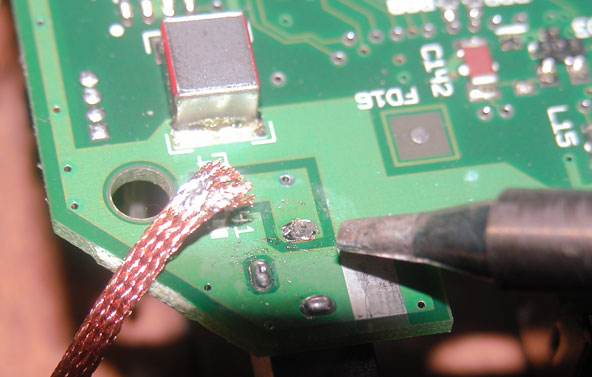
A few weeks ago I picked up a $15 PowerBook 5300c that was advertised as having just this issue. To repair the problem, first remove the motherboard by following the directions in Apple's Service Source for the 5300. Once you have the motherboard out, wiggle the power connector. It should be loose. Using a soldering iron and some desoldering braid, remove as much solder from each joint of the connector as is easily possible (see figure below).
The desoldering braid should be placed directly on top of the joint and the iron tip on top of the braid. The iron should be at about 800°F. The solder will melt and be pulled up into the braid. If it doesn't you're probably using a cheap 15-watt soldering iron. A 40-watt iron is ideal.
Once you have most of the solder out, heat the component and board with the iron directly and solder each pin back in. You should now have a firm joint without movement. Reassemble the machine.
Note that this process only fixes the immediate problem — it doesn't eliminate the cause. If you use the machine heavily, the joints will break again, so be prepared to repeat this process in the future.
| Attachment | Size |
|---|---|
 5300_thumb.jpg 5300_thumb.jpg | 4.43 KB |
| 5300.jpg | 48.06 KB |
Comments
powerbook 5300
I owned a 5300c for a few years and liked it very much. The only lasting solution I know of for the problem referenced here is the expansion-bay AC (and DC) adapter that VST (and others?) produced. Very useful device, which works also in the 3400 and the Kanga.
i had a 5300 given to me a fe
i had a 5300 given to me a few years back and i just soldered wire directly to the board and made my own power connector externaly. worked fine for a long time. i eventually gave up on the machine because i couldnt get an OS on it even with the SCSI adapter. then slowly the HD went and batteries wouldnt hold a charge.. so i sold it on ebay last summer.. was a great little laptop for free, my first ever and i certainly learned alot about it. the one time i had a good copy of OS8 on it was by installing it on another machine, then splitting the system folder up into 1.2 mb pieces and then one by one copied over to the hd on the 5300 with a copy of Disk tools on the internal HD. took forever but it worked
or, an alternative . . .
Replace the POS original power socket with the later style.
dan k
5300 Repair
Great Info !!
I did basically the same procedure on a 5300 many years ago...
I also applied quite a bit of silicone caulk around the repair to
keep the power input port in place.
Worked great but would be a pain if you ever needed to repete
the procedure.
I heartfully encourage posts like these in the future.
Dave
power connector of the PowerBook 190
Is the power connector of the PowerBook 190 the same as the PowerBook 5300 with the problems with the connector?
re: power connector of the PowerBook 190
yep, same connector, same problem.
dan k
DItto
Ditto on that. I must've ripped my PB 190 apart about 7x when I had it, just to replace that damn connector. It was a PITA everytime I needed to do that. And I am not that good with a soldering iron either. But then again, I could use a better soldering iron, as the one I had was from a $14.99 wonder toolkit.
1400cs had the same problem.
I had an old 1400cs that eventually had the same problem, but the final result was fatal. After it broke the connector could be pushed back into place for it to work for about 2 minutes, then the tab would bend. Also during that 2 minutes, you couldnt move that connector at all or it would grind around and a few sparks would fly. That soon burned the whole thing and something got zapped.
John
apple service source
you didnt post a link to the info on how to remve the board just told us that u got the info from apple service source which i have tried to locate and had no luck and all but i should have luck doing this myself and hope it will work out
The very first link in a Goog
The very first link in a Google search for "apple service manuals" brings up this link:
http://www.applerepairmanuals.com/
...and you'll find a link there to some good diagrams of a 5300 disassembly.