
BeOS: A Retrospective
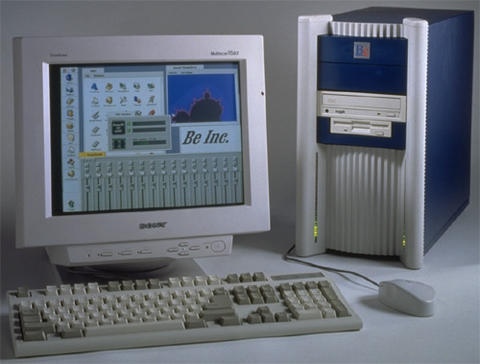
BeOS was the brainchild of former Apple executive, Jean Louis Gasse, who founded Be Inc. in late 1990. BeOS was originally intended to be a continuation of Jaguar (an early RISC prototype) at Apple. It was to run on the BeBox, a machine with four AT&T Hobbit processors. The Hobbit was discontinued, and left Be in shambles. The engineers scrambled to create a new platform for the OS to run on, and eventually they found the PowerPC.
BeOS and the new BeBox debuted at the Agenda 95 conference in the fall of 1995 to critical acclaim. The demo was so successful that Be got the biggest investment it ever received, a check for $4 million from David Marquadt.
Nonetheless, Be was mounting serious debt, and was forced to discontinue its hardware line. Yet again without a platform, the Be engineers ported BeOS to the PowerMac. BeOS continued investing a large portion of their talents and energies into BeOS for the PowerMac, hoping to be acquired by Apple, but in December 1996 Apple announced it would acquire NeXT and make OpenStep the basis of its next generation operating system.
Be then set about porting their operating system for the third time to the Pentium. Despite these efforts, Be was never successful and eventually sold its assets to Palm, where Gasse is now a board member).
Interface Basics
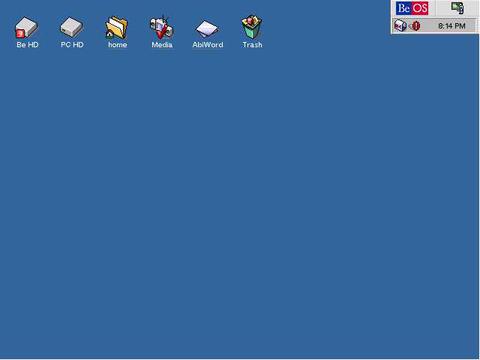
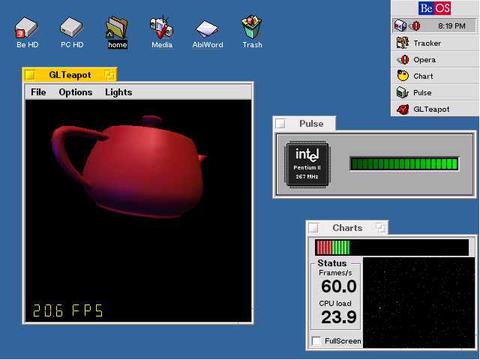
BeOS has an intuitive and elegant interface. Located in the top right corner, the Deskbar is the equivalent of the Dock in Mac OS X. It displays all of the running apps, and allows users to change their settings. Across the top of the display, there are icons for all of the drives mounted on the system (note the Mac OS inspired look), shortcuts and the trash can.
Much like GNU Linux, and other platforms, BeOS uses workspaces. Workspaces are like virtual screens running on the system. For example, I am surfing the net on Screen 1, writing this document on Screen 2, reading the forums on Screen 3, and browsing my email on Screen 4.
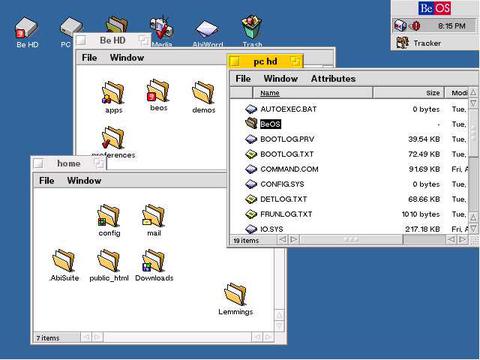
Be is unusual in the way it draws its windows. Instead of having title bars that span the entire width of the window, the title bars in BeOS are only large enough for the tile of the window, the close button, and resize button. To hide these window, you double click them with your middle mouse button.
Apps
BeOS comes bundled with a handful of applications. The most useful of these are the mail client and web browser. The web browser, NetPositive, is remarkable, but aging. It does just about everything, except for JavaScript, and Flash, and it renders sites almost instantly. It loads AppleFritter forums in slightly less than 2 seconds on my cable connection. One of the interesting features of NetPostive is its error messages. The 404 Error messages are written in haiku.
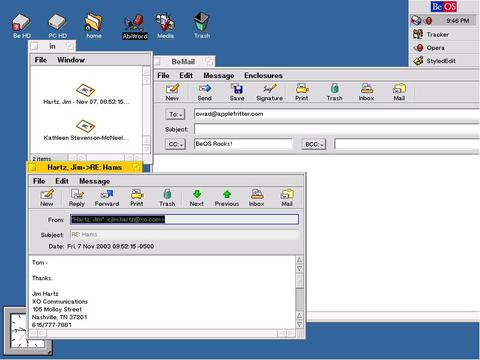
The mail app is much like Nisus Email in the way it stores emails. Instead of a custom application, it treats the inbox as a special folder on the hard drive. Otherwise the app is not that remarkable.
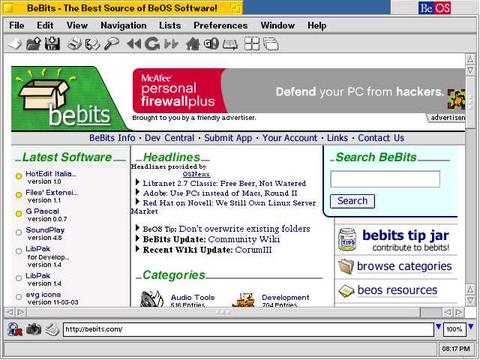
Despite its small user base, BeOS has many third party applications written for it, many of them free. Likely, the most popular third party software is Bezilla and Opera, two web browsers ported to BeOS. I personally prefer Opera, but for those of you who need to view complex sites, try Mozilla.
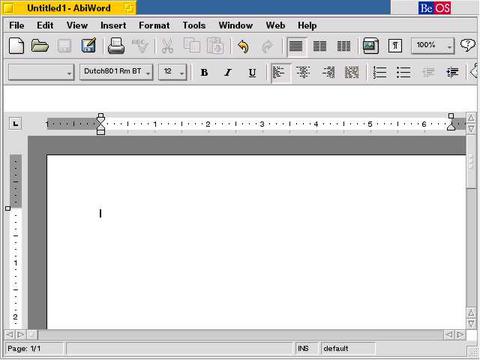
My favorite free word processor is AbiWord, a port of the famous KDE word processor. It supports older Microsoft Office files, is capable of reading and writing HTML, and can export to PDF. If you need a serious word processor, try GoBE's BeProductive Suite. It was designed by the same engineers who worked on ClarisWorks.
Weird Stuff
Here are some screen shots of BeOS being weird.
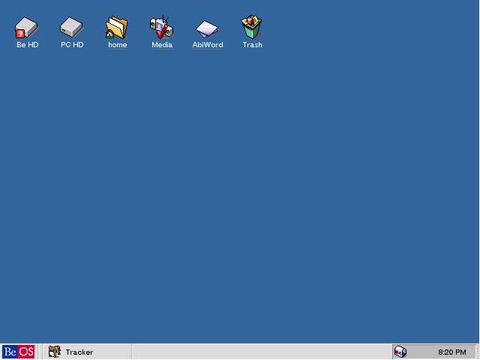
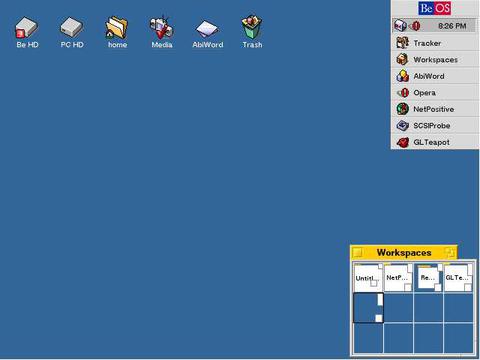
BeOS has Workspaces, just like Linux. Though I only have twelve, you can use up to 32.
Where can I get Be OS?
BeOS personal edition is offered as a free download for Windows and Linux x86. If you are using a PCI PowerMac, try to find a copy on eBay. BeOS does not support NuBus, 52xx, or anything G3 and up.
Comments
Be Inc. was pushing the PPC v
Be Inc. was pushing the PPC version pretty hard in 1997 when I bought my Power Tower Pro. The PTP came with an OS 8.0 install CD as well as a PPC version of BeOS on a CD. I have it running on my Umax C500 now but haven't been able to get it configured correctly to get on-line yet. I did install it on my PTP at one time also. It's a really smooth and quick GUI and the OS has a lot of emphasis on muti-media capabilities. Too bad it didn't last, but it's still fun to play with and pretty easy to install as a dual boot OS. It Runs well with OS 8 on clones or PPC's of that era.
Krow
I used it on a Pentium 233 an
I used it on a Pentium 233 and PII, and it outperformed anything I've used before. I love it.
It's not quite dead, a company is still making updates. It's called Zeta.
In 1999 to mid 2000 I was loo
In 1999 to mid 2000 I was looking for a replacement for Windows. That's when I discovered there were alternatives.
After countless failed Linux installs, I decided to give BeOS a try. It looked promising. And beautiful. It looked like the Mac OS which I was interested in, but the price turned me away. So I looked into BeOS and spent a long time downloading the 41MB Personal Edition installer (Which I still have today. Archived to a CD.) and installed it on my Windows box.
It was fun, but I could NOT get it online. So I had to let that go as a choice.
Let's say I'm thankful I shelled out the money to convert to the Mac OS. Look where I could be right now. In Fisher Price land..
Exparrot's OS of choice
Wow. Finally a writeup on my favourite OS
I'm proud to say that I used BeOS and nothing else for almost a year straight, and it still remains my favourite OS.
Some websites to take a look at:
http://www.bebits.com/
http://www.beunited.com/
http://www.yellowtab.com/
http://www.openbeos.org/
Re: Exparrot's OS of choice
Hey Ex-parrot,
Are you running the PPC version or the x86 ?
About a year ago I gave up on BeOS for my PPC when I realized almost all of the software is being developed for the x86 side. I don't like it enough to buy a pentium box.
If you search Ebay there's still some interest in BeOS and the PPC CD's sell pretty well, but that ws developed a few years ago and updates have been dropped as far as I can tell.
Krow
I was running the x86 version
I was running the x86 version. I do have the PPC version on CD, but my only PPC machine (PB1400CS) won't run it.
http://www.osnews.com/story.php?news_id=7265
BeOS turns 10!
i managed to get R5 for PPC a
i managed to get R5 for PPC and installed it onto my old 4400, it's sooo fast! i am now very much a BeOS fan, it also has a mush faster interface then OSX (i was suprised) and also the OS chooser a startup is useful, so i don't have to wait for a full boot of mac os before booting beos, it's very cool!!!
I used it on a PII,and the di
I used it on a PII,and the difference between Windows 2000 and BeOS is incredible. BeOS takes about 15 seconds to start up, Windows takes about 5. BeOS has never needed a restart, Windows crashes itself regurally.
FireFox and Mozilla are actively being ported to BeOS.
One reason that I believe man
One reason that I believe many apps still comeout is that BeOS included a nice graphical C++ IDE. I used it for a while in college to code for CS 201 and the Discrete Structures courses. AFAIK it produced clean enough code that I didn't need much, if any, mods to compile under MS VC++ 6.0, which the college required us to use.
wut version
what version do u reccomend for me to use on my asus system with an amd athlon processor? im a mac addict and plan to use this system once its done. if theres a download link, please post it with your reply.
BeOS Personal Edition. If yo
BeOS Personal Edition. If you like, check out Zeta YellowTab. BeOS is as exciting as ever, especially with new developers.
wonderful
thats great. thats what i saw in bebits so i should be fine once i get the computer built. now can beos run things like the older versions of imovie and itunes? it just looks like mac os 9 and whatnot were designed after it and may use the same programming language. just wondered...
os x dp3
i just found about os x developer preview. looks like a cross of 9 and X. i know this has nothing to do with beos but would it run well on a wallstreet and where would i download it for free without having to become a user of a website?
It is not a free download.
It is not a free download.
darn
waa. i hate downloading stuff when its not free. i did recently discover that a version of os x server looks like os 9. its kind of a cross of the classic and a unix os. i have no idea what version of x server it is but im assuming its the original. if someone could give me the version (its x but looks like 9!) then ill look it up and come back with some info.
guess what, its me again!!!
hey i am going to build that pc that i was talking about and i want to run os x on it. i need a good powerpc emulator that i can use without a hitch. i just want to use x and be able to play my music on itunes and whatnot. something that makes it run like a mac with nothing stopping me, like no sound support or cd support in pearpc. so help me! name a new emulator that i can use to run panther on a pc without anything being taken away from the experience!
I will be shaken this system :)
I try to install this OS and will be shaken functionality and OS size.
You can also find info and drivers for BeOS at:
http://www.bebits.com
http://www.driverstock.com
It's greatest system!)
My housemate back in 95 had o
My housemate back in 95 had one of the first (possibly only) BeBoxes in Australia. He used it to write stuff for his computer music degree at Latrobe University. I last saw him using it onstage about three or four years ago. His software tracks what he plays (on saxophone) and improvises around him. Kind of awesome.
He even has his own entry in the music section of the BeOS Bible for the 303/drums/sequencer thingy (ReBirth clone) he wrote.
BeOS in the rearview mirror
Back in 2002, I bought a commercial BeOS 5 Pro Edition box set from a friend, and after a few half hearted attempts to get it running on a PPC, tossed it on the shelf... until last September.
Looking back, it's amusing that I got into BeOS just as it was imploding, as PALM had just announced that it was shelving the OS and moving in other directions. The BeOS newsgroup was abuzz with activity, wailing, and solemn vows to keep the dream alive... and then the fun started. I and a few other likeminded folk urged the legion of code monkey to begin writing apps and drivers to bring BeOS up to speed and keep it viable. Afterall, what good is a elegant operating system if it can't actually DO anything. Device drivers for the latest hardware, a decent set of graphics & multimedia tools, desktop utilities and the like. Afterall, BeOS 5 Personal edition had been released into the wild, so we were already half way there, right? Eh... no.
Everyone one of the biggest voices amongst the "doers" on the group wanted to reinvent the wheel, opining that an OS written in fresh code would avoid legal entanglements down the road if BeOS really managed to get a foothold. Fair enough, but some of the rest of us reasoned that if you didn't keep an interested core group of users as a base, you would face the spectre of being a "New Product" in the marketplace of OS's. I also wouldn't be out of line to suggest that there was a certain amount of ego at work amonst the code writers, but I guess that sort of thing just comes with the territory. Unfortunately, these guys weren't even united in that regard as they proceeded to bolt off in several directions at once and work on several different flavors of BeOS independently (Zeta and Yellow being two of the better known zersions), rather than collectively working as a group. Turns out it was all for naught as legal challenges sprang forth as these thing were offered for sale, ultimately dooming them.
So then, last September I fished out my old box set of BeOS 5 Pro, put together a PowerMac 6500, loaded it up and hit power. Set up was straight forward and fast, even giving the option of setting up a duel boot system. Booted up fine and with a minimum of fiddling I had it on the cable modem and on the intraweb. Emboldened, I then set out (on my OSX tower) to hunt down BeWarez of every stripe, which turned out to be trickier than I thought. Lots of dead links and lost interest, but using what I could get and more using the WayBack Machine (Internet Archive) I filled 2 CD's with apps, including a BePort of Firefox!
Final analysis, still an interesting hobby computing project, not nearly as limited as I thought it might be. I'd fool with this more, but I'm kind of waiting to see where the HAIKU OS project goes, but you never know... ^___^