
The SILENT 3rd generation eMac
A modification by Juerg Messer
My trusty old iMac DV (G3/400) had become just too slow for iMovie and MPEG-2 conversion, so it was time to buy a faster Mac. My budget was limited however. I purchased a 1.25 GHz eMac Combo. The LG-Hitachi Combo-drive and the original HD with meagre 40 GB were replaced by a Pioneer DVR-105 (100% Apple supported) and a 120 GB Maxtor HD. Both drives were previously mounted in an external FW housing and connected to the iMac, i.e., no additional costs.
The eMac is not so easy to take apart, I found this web page by Paul Wilkinson very helpful. Note that Paul was disassembling a first or second generation eMac, the design of the 3rd generation is a bit different (e.g. the Harman Kardon sound system is gone!).
Now I had a great Mac for the buck, but I found it to be far to noisy! The old iMac was almost completely silent, because it had no fans at all. The difference to the new eMac was very unpleasant. Something had to be done about it.
I found an interesting remark on Leo Bodnar's web page about eMac overclocking: Leo had installed a variable fan speed regulator in order to reduce the fan noise to a minimum.
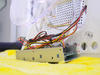
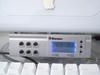
The idea was striking but I wanted to have some temperature control, too. After some search in the internet I discovered an Enermax UC-A5FATR2 fan controller in the web shop of a PC dealer and ordered it for CHF 39.- (approx. 25 Euro) + shipping. It is a speed regulator for six fans (2 with speed feed back) and has a display for 2 temperatures (sensor 1 + 2) and fan speeds (fan 1 & 2). It has the size of a 5.25" PC drive bay and is a 3.5" HD mounting rack at the same time. The Enermax has a beautiful silver finish. There exists even a white version that would match the eMac, but it was not available from that dealer.
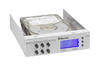
The HD mounting rack could be easily removed. It was fixed with several screws. The PC board with the 6 knobs for fan speed control was removed, and the cables 1b, 1c, 2a, 2b and 2c were soldered out. Some of the cables were used for the customised wiring. The PC board was put back in place. All cables must be detachable connections, because the Enermax would be fixed on the eMac cover. If it becomes necessary to open the eMac again, I can simply unplug the Enermax connections with the sensor, power supply and fan cable in order to be able to take off the cover.
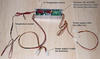
The fan in the eMac is one of the types with speed feed back (yellow cable). I made sure, that this connection to the eMac would remain intact, whereas the fan will be powered by the Enermax controller. The additional connectors were purchased at a local store for electronic parts. I couldn't find connectors of the type used for the eMac fan, but standard 3-pin Molex connectors could be modified to fit them.
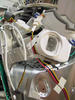
The Enermax comes with a Molex 4-pin y-cable. I used the power supply of the optical drive and fixed the y-cable neatly on the DVD-RW drive with a piece of double sided adhesive tape.
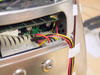
The temperature sensor 1 was fixed on the copper heat pipe coming from the CPU, using 2 cable binders. It was necessary to partly remove the fan to get access. The cable was fixed with another binder and some isolation tape.
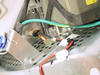
The cables were lead to the area at the bottom of the eMac with the many small ventilation holes. Again, note that none of the cables is soldered directly with the Enermax.
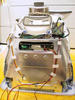
The cover of the eMac was put back in place and the memory access hatch was closed. The eMac stand was attached, all cables are hanging out of the right ventilation opening of the stand. Two layers of thick double sided adhesive tape are fixed in stripes between the ventilation holes in the eMac cover. When the Enermax is fixed, air can still stream in through the gap between the Enermax and the housing. The Enermax was then fixed, but better do that when the eMac is back on your desk, to be able to fix it accurately aligned with the housing.
Now I can adjust the Fan Speed 1A knob to regulate the fan to a pleasant noise level, while I see the impact on CPU temperature on the display (Temp. F1). The fan speed is not displayed although it is supposed to be. I don't know the reason, but I don't care. It doesn't matter. I have no Apple Hardware Test CD for the eMac, so I don't know if the internal fan speed feed back is still working or not. Note that the speaker grills have been removed to further improve the sound quality. The grills were pulled out using a modified paper clip. Make sure nobody sticks its fingers into the speaker membranes, e.g. little children 
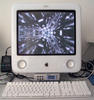
Another note about the sound quality: The eMac is now silent enough to actually be able to enjoy music. The quality of the internal speakers in the 3rd generation eMac is inferior to the iMac DV's Harman Kardon speakers. The new eMac speakers sound dull. If I can spend the money, I will buy JBL sound creatures, but without the fan modification it would be waste of money.
Have more fun with your eMac!
Addendum 1: After 2 years and 3 months of operation, the 120GB Maxtor DiamondMax Plus harddisk has died. Fortunately it didn't do that immediatley but within a week, so I was warned and made a backup in time. I have now replaced the harddisk with a 160GB Samsung. Since I am wondering if the reduced ventilation in my eMac has shortened the life span of the Maxtor HD, I have made the following modification when I replaced the HD. The second temperature sensor was fixed on the new HD with adhesive tape. I do not reduce the fan voltage below 50% now (instead of 33% to 40% before). Now I will observe, how the HD temperature behaves under different operating conditions.
Addendum 2: After another 2 years and 2 months of operation, the 160GB Samsung harddisk had errors that the harddisk utility could not fix. Formating and overwriting with zeros didn't fix the problem, so I had to replace the HD again. This time it is a 160 GB Western-Digital. Since I had to disassemble the eMac for the HD exchange anyway, I thought it is a good opportunity to overclock the CPU at the same time. By the way, the memory was increased to 1.5 GB before (2 GB are possible), when the clock battery had to be replaced. Overclocking is a bit of work: With the 3gen eMac, the five PLL encoding resistors are located on the front side (under the optical drive) as well as on the back side of the mother board, so that you must disassemble the eMac as far as it is necessary to access the HD. Fortunately the resistor combinations have been published here and here. I have expanded the table for the useless 1.17 GHz combination (I have spontaneously found out that setting by forgetting to remove R270 when I wanted to set 1.42 GHz). Note: According to some forum postings higher CPU clock speeds than 1.42 GHz are incorrectly displayed in "About this Mac"!
As usual, "+" means either resistor or solder bridge is present and "-" is an open contact or removed resistor
Comments
Thanks for a clear and intere
Thanks for a clear and interesting article. The only thing missing from your post is some results - what happens to the temperature when you alter fan speed?
Thanks, Dave
Sounds like a good addition t
Sounds like a good addition to a machine that appears to be a thermal nightmare. Have you bothered to try overclocking it yet?
Fan speed and CPU temperature
Hi Dave
When I reduce the fan speed to about 1/3 of full speed, the temperature rises to 55°C and the Enermax starts an alarm sound. I set the fan speed to about 40% and the temperature is between 45 and 53°C, depending on CPU load. After more than 3 months of operation, I am still very content with this modification
Overclocking
I haven't tried to overclock my eMac yet. It is fast enough for me. Before purchasing the eMac, I had worked on a 400 iMac DV G3/400 for 3 years...
thermal speed control
hello,
i´ve bought a thermal speed controller from powercooler (www.powercooler.com.tw). its size seems to be the same as the fan mate used by leo.
it can regulate the speed of the fan from 50% to 98% manually and automatically checks the temperature and adapts the actual fan speed accordingly.
seems to do principally the same as the enermax but with a better form factor.
does anybody knows of problems when installing this controller?
(saw your article AFTER bying the controller :-/)
greetings martin
is it possible to overclock an eMac g4 1,25 Ghz ?
hello !
like you i have owned an iMac DV SE 400 Mhz, and like you now i have an eMac g4 1,25 Ghz !!
and i'd like to overclock it, but i'd prefer using an overclocking software rather than a "resistor-damaging" procedure. could you try to help me please ?
thanks.
bruno doutriaux (france, europe).
you can contact me @: brunodx@cegetel.net
Overclocking Software!?
Dear Bruno,
I have never heard of any software that is able to alter the clock speed of an eMac (or any other Mac for that matter).
Usually, the clock speed is encoded by several SMD (surface mounted) resistors. I don't know any other way to overclock an eMac than relocating these resistors. I had tried such a procedure once with a 400 MHz iMac, but the CPU could not take more than 400 MHz and I had to undo my soldering work. This nearly messed up the motherboard, since I had only normal soldering equipment and the copper lines on the motherboard are very thin and can easily be ripped away.
3-pin molex connectors
hi, i've the same problem with you. the 3-pin molex of my fan regulator can't be connected to the eMac's fan... how did u modify it? tks.
someone help me? :(
someone help me?
In the past, I have overclock
In the past, I have overclocked Mac processors (iMac, Powermac G4, etc) by removing the surface-mount resistors with a grounded iron and then using a conductive paint pen commonly sold at electronics stores to create a new "resistor". As I understand, the surface-mount resistors are zero ohm, so effectively they are only jumping the connection which is why the paint pens work fine. I dab some "paint" on a clean sheet of paper then apply it to the board with a pin or x-acto knife. To remove I carefully scrape with an x-acto (as not to damage the PCB) and clean up with alcohol.
pantoo
pantoo, you asked no question !!!
Modification of Molex connectors
Hello Pantoo
It's a long time ago now and I can't remember exactly. I purchased some similar connectors from the local electronics shop. The space between the pins was the same as the original apple connectors. I probably had to remove two plastic stripes or even a side of the connector with a sharp knife in order to be able to fit the Apple fan connector. Hope this helps.
Connector modification using Zalman Fan Mate 2
I just recently overclocked my eMac 700. Its now running at 900mhz. I attached a Zalman Fan Mate 2 by shaving a little plastic off the eMacs connectors. It's not the prettiest connection but it is connected. The trouble is the Fan Mate doesn't seem to throttle down the fan. As I turn the dial the fan stays the same until I turn the knob to the lowest setting and then the fan turns off completely. I was pretty bummed about it. I'm no electrician so I don't know what to do next. Any ideas out there?
It sounds like your fan may b
It sounds like your fan may be connected backwards.
Connected backwards?
I tried to changing wiring combinations with no success but I didn't try reversing the direction of the device. I assumed that the female connector of the regulator would connect to the male connector of the Apple fan. Perhaps I should give it a try. Hmmm. Any other thoughts? I might need to buy some connectors at Radio Shack and solder up something.
Darin
I would suggest reversing the
I would suggest reversing the power connector and seeing if there is a difference. It sounds to me like the control pot is not working correctly probably because of a very simple reason like that.
Thanks and...
Do you happen to know which wire is which? There are black, yellow and red (maybe white) wires going into the fan and like green, yellow and red on the coming from the computer. I don't have a schematic or a working volt meter. If I need to get a volt meter I will.
I have no idea. A multimeter
I have no idea. A multimeter would probably be your best bet.
I totally understand. Thanks again "themike"
So many machines. So many wires. How could anyone man know these things? I think I've got a mulimeter, just needs a battery.