
Experiments with the Apple Motion Sensor
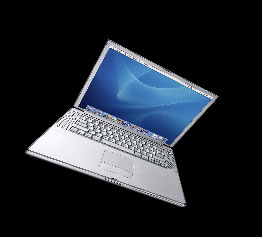
Throw your PowerBook off a cliff. As it tumbles, sensors will detect changes in orientation and gravitational force. With this data, your PowerBook will wisely ascertain that all is not well. Faster than you can knock a laptop off a desk, it will swing the hard drive's head away from the platter and park it, preventing a deadly collision with your data.
The "Sudden Motion Sensor" in Apple's latest PowerBooks implements this technology. The sensors are not built into the hard drive - they're an integral part of the system, compatible with any drive you install. It's even possible to read the sensor output yourself. Amit Singh has written several programs that do just that.
This is where the fun starts. amstracker is a simple command-line utility that returns the values for the sensors' x, y, and z axes. X is left/right tilt, y is forward/back, and z is the change in G force. Amit's utility can output these values and then exit or can be configured to provide a continuous stream of data.
The trick with a cool utility like this is coming up with a practical application. One possibility is to keep a motion log. Here's a sample in which data was collected every tenth of a second. To produce these values, I let my PowerBook drop about eight inches and then gently caught it.
[pre] X Y Z
3 27 49
1 26 51
2 24 53
4 28 49
2 31 49
2 27 53
9 8 16
-6 8 16
9 47 82
11 28 46
5 18 67
-1 22 55
-2 24 51
1 23 49
-1 23 51[/pre]
The first indication that something has gone wrong is a major the change in G force from 53 to 16. At the same time, the Y axis shifts from 27 to 8, indicating a sudden backwards tilt, caused by the weight of the display. A tenth of a second later, the logs indicate a rightward tilt as the X axis changes from 9 to -6. Another tenth of a second - and impact. The G force leaps from 16 to 82 as the PowerBook collides with my hands.
If you often lend your computer out, this data could make for some very interesting conversations. "Larry, why did my PowerBook experience a sudden spike in gravitational force at 6:43 PM?"
The numbers are fun, but a visual makes for a more interesting demo. Amit has done just this with AMSVisualizer, which displays a PowerBook on-screen and tilts it in sync with the computer's actual movements. This is great for demoing the PowerBook to potential customers.
Amit has written one more entertaining demo: StableWindow. You can tilt your PowerBook any way you like, but this window refuses to tilt with it. Those interested in reading more about these programs and the technology behind them should visit Amit Singh's website.
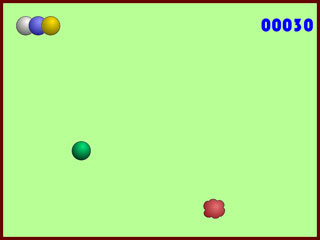
Of course, we haven't even addressed one of the most obvious uses for motion sensors: games. It took Peter Berglund just four days after reading Amit's article to have a simple game working based on the motion sensors. Berglund's BubbleGym gives the player a marble on a board. Tilting the computer tilts the board and causes the marble to roll. The objective is to roll the ball into the cloud. With each success, a new cloud appears and the allotted time grows shorter. The player has four balls (i.e. lives) and each one exhibits different physical characteristics. Graphics and gameplay are rudimentary, but as a technology demonstration, the game is excellent. BubbleGym is mildly fun to play and a lot of fun to share with others.
Where will Apple's motion-sensing technology go from here? A more convenient tool for logging data might also be useful and hopefully an adaptation of the arcade game Neverball will soon be in the works. Post your ideas below.
| Attachment | Size |
|---|---|
 pb_small.jpg pb_small.jpg | 2.03 KB |
| pb.jpg | 8.86 KB |
| bubblegym.jpg | 6.68 KB |
Comments
Inertial navigation system
You could also use this to create a crude inertial navigation system. Integrating the force measurements (with gravity mathematically subtracted) would give you the velocity of the powerbook. Integrating the velocity would give the position. Getting the correction factors might be tricky (one might even need to reference a temperature sensor to correct for thermal effects), but it would be cool to use a powerbook for navigation.
Docked?
I use a stand to elevate my PowerBook when I'm working at my desk. In the stand, the computer is almost vertical, so it's easy to distinguish between "at the desk" and "on the lap" with the Y axis. Now if I could just think of some cron task that should only run when I'm at my desk...
Mobile Dyno
G-force and distance traveled are all that is needed to make the calculations for a Dyno run. A simple stopwatch (automatic) and an input to mark 10ths of a mile (or xths of a mile) would give fairly accurate results.
Mass
Thermal effects? What thermal effects?
All you should need for a VERY crude inertial nav system is the PowerBook's mass properties (center of mass, actual mass, distance of sensor from center of mass, etc) and orientation of the sensor to figure out some rough navigation data.
All the hard work is done - Apple gives you acceleration values in three axes!
I'd be curious to see how the sensor reacts to angular acceleration. If the laptop is spun around on a table, what does the sensor say?
As I'm sure we all know:
X(t) = Xi + Vx*t + Ax*t*t
Y(t) = Yi + Vy*t + Ay*t*t
Z(t) = Zi + Vz*t + Az*t*t
Peace,
Drew
What Model?
What model first had this technology in it? Just curious as ti if this is a recent thing or if it has been around for a while. Also, This could have some real fun uses for applications. A game like the old "Marble Madness" for NES would be real cool. And I could easily see other uses for this...
labyrinth
Another great gaming application for motion sensor input would be a laptop-based Labyrinth game... although it might be more intuitive on a machine with a tablet form factor.
Re: Mobile Dyno
You only need g-force, weight of vehicle, and time calculation to do a dyno.
Technically you use g-force and weight of the vehicle to measure torque and as a function of time figure out how much work got done in a given amount of time, and you get horsepower.
Motion Sensor + Camera
There are games for mobile phones where you need to balance a ball through a (virtual) maze (e.g. http://people.freenet.de/hskopp/wabbellab.html). While these games use the built-in camera of mobile phones, the PowerBooks could use the motion sensor.
Or, even better: Why not develop games that use both, the motion sensor and the built-in iSight (in the new G4 PB models)? A whole new dimension of gaming coming to a PowerBooks.
I agree that a tablet form factor would be even more intriguing...
Security
Wouldn't it be great if the Apple Motion Sensor would be used for security?
When you leave your laptop, you could activate a program, which detects laptop-movement and trigger an alarm-sound. Great if working in busy places such as school and you need to walk to the other side of the room or something like that.
[url=http://digg.com/apple/Ca
digg.com has an article on a bubble level widget that use this sensor. Maybe more programmers will take notice.
The obvious...
The new MacBook MUST be able to do THIS:
http://www-structure.bio.purdue.edu/~bhebert/Cartoons/cartoons.htm
In Dilbert We Trust
security
Check out iAlertU. Wehen the machine is armed and the motion sensor (adjustable) is triggered a loud alarm begins to sound and if your machine is equipped with iSight, it will take a snapshot of the perp. With newer versions you can have the snapshot sent to an e-mail. also check out Lojakmac or MacLojak.
VRHMD
Voila. World's geekiest virtual reality headset.
Serious use for the Sudden Motion Sensor
Hi,
see http://cinderella.de/tiki-index.php?page=Gravity+Sensor for a serious use of the motion sensor!
Ulli