
Review: ColdHeat Soldering Iron
The ColdHeat soldering iron has been touted in stores and advertisements as an end-all solution to one's soldering iron needs. And indeed, when one reads the features list, the ColdHeat is appealing: it only uses a few AA batteries, has a built-in white LED work light, and the tip heats up and cools down in only a few seconds. On paper, the ColdHeat beats not only other, portable soldering irons (most of which are butane-powered), but also traditional corded irons.
However, that's just on paper. As they say, looks can be deceiving. And in the case of the ColdHeat, unfortunately, they are deceiving indeed.
I picked up a ColdHeat at Radio Shack; I was looking for something that would heat up faster than the plain $8.19 25-Watt iron I'd been using. The ColdHeat, which was sold under the Radio Shack brand, cost $19.99 and included the iron, plastic carrying case, and chisel tip. Supply a few AA batteries, and you're good to go. I don't like working with chisel tips on soldering irons, as a lot of times they end up being too large when working with small components. So for $9.99, I picked up the conical tip for the ColdHeat.
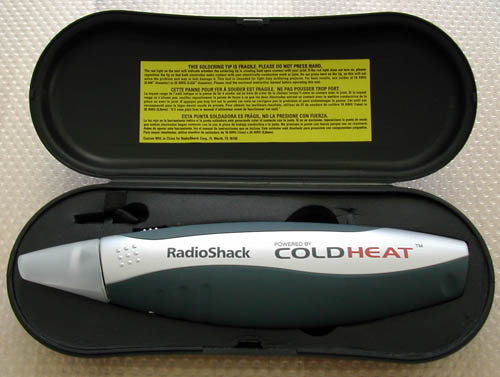
Fig. 1. The ColdHeat in its carrying case.
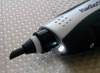
An immediate problem I saw with the ColdHeat is the placement of the white LED light, meant to illuminate what you're working on. The problem with it is that they put it underneath the tip, instead of on top of it. This, therefore, pretty much makes the light useless, unless you use the iron upside-down.
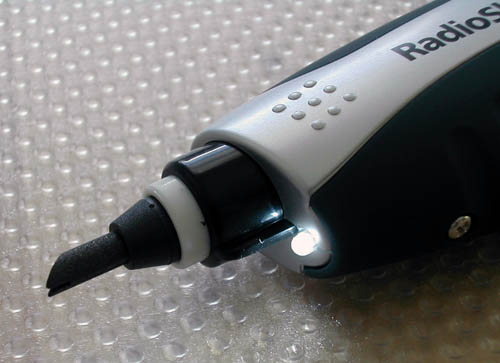
Fig. 2. The ColdHeat's white LED light.
When I first opened the case, something didn't look quite right to me. First, the ColdHeat comes with a cap for the tip -- I had never seen an iron come with one. Also, the yellow sticker on the inside top of the case offered a warning: "The soldering tip is fragile. Please do not press hard."
The warning is very true. After I installed the batteries in the ColdHeat, I pulled out the chisel tip that it came with and swapped in the conical one. As a test, I tried soldering two wires together. With some work, I got them together. I then tried adding more solder to the joint, and in pressing down on it, part of the tip snapped off. It was no more pressure than I'd exert on a normal iron with a small pencil tip. Herein lies one of the fundamental flaws of the ColdHeat's "instant heat" technology -- the tips are not made of metal, but rather a soft ceramic.
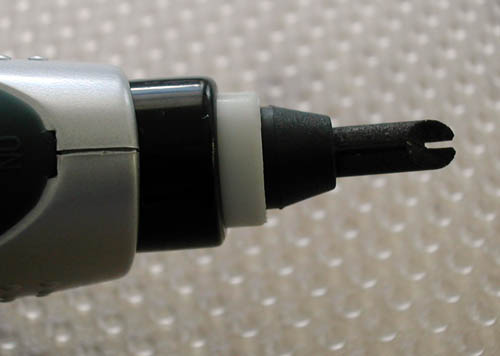
Fig. 3. The ColdHeat tips are split down the middle and are made of a soft ceramic material.
The second flaw with the tip, that exacerbates the first flaw and also poses another problem altogether, is that the tips are split down the middle. The way the ColdHeat works is by passing an electrical current through the tip. When you press both halves of the tip to a conductive surface -- the solder or wire or whatever you're soldering -- it completes the circuit and causes the tip to heat up rapidly. However, because the tip is split, it reduces its strength. You need to use a very gentle touch when soldering with the ColdHeat, or else you'll be out $9.99 as I now am.
The other problem that the split tip causes is a nasty sparking when the circuit is completed. And it's not a single spark that's emitted when the circuit is completed; no, it's more of a continuous arcing.
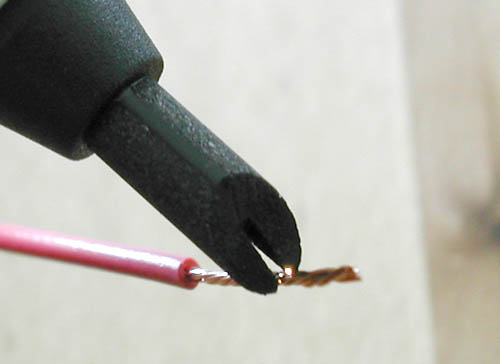
Fig. 4. The ColdHeat's tip sparks and arcs when it completes the circuit to heat the tip.
It's hard to take a picture of the sparking/arcing, but the little bright spot next to one of the prongs of the tip above is one of the sparks. I don't know how much voltage and amperage the ColdHeat uses to heat the tip, but I'm seriously concerned about using it with anything ESD-sensitive. In fact, I'd go so far as to recommend that anyone who uses a ColdHeat use it for use on wires and connectors only. Do not use the ColdHeat on any kind of PCB.
Overall, the ColdHeat has a good concept -- a soldering iron that's completely portable, heats up and cools down fast, and uses standard batteries. Its execution is horrible, however. While the tip does heat up and cool down in about 5 seconds, the longer you use the ColdHeat the longer it takes for the tip to cool down. The tips wear quickly, and prone to breaking, are large (making detail work hard if not impossible), and expensive, and the overall technology behind how the ColdHeat works could potentially kill any ICs you work on.
Here are my pros, cons and overall rating for the ColdHeat:
Pros:
Iron is relatively inexpensive ($20)
Uses standard AA batteries
Compact
Comes with carrying case
Cons:
It solders, but not well (normal irons create joints smoothly)
White LED light misplaced
Tips are large, expensive ($10 each) and prone to breaking
Iron is potentially dangerous to ICs
Overall rating:
Two out of five stars.
Additional note:
ColdHeat has struck a licensing deal with Weller, a well-known and respected soldering iron manufacturer. Weller will begin selling the ColdHeat under the Weller brand name. Keep in mind that Weller does not manufacture this version of the ColdHeat; as sold by Weller, it's just a normal ColdHeat that's been rebadged. So, don't buy the Weller version thinking it'll be better -- it's not.
The Weller iron is actually ColdHeat's new "Pro" model, not the model reviewed here. Please see Weller's post in the comments below. - Tom
| Attachment | Size |
|---|---|
 coldheat1.jpg coldheat1.jpg | 68.45 KB |
| coldheat2.jpg | 63.39 KB |
| coldheat3.jpg | 51.92 KB |
| coldheat4.jpg | 48.6 KB |
| coldheat_t.jpg | 2.68 KB |
Comments
Thanks
For reviewing this honestly. I was going to buy one, but now I won't.
Additional Information
Readers interested in this iron will also want to read:
ColdHeat soldering iron - user experience
Thanks!
Wow thanks! I've always found it a really cool concept but thought it was a scam.
Thanks for proving it.
???
He did not prove it was a scam, just that it has some flaws that make it not suitable for certain precision work. It works as advertised and was never advertised as a replacement for the high dollar Weller type irons with the fine point tips for doing work on .005" components and such.
Check the related thread for more discussion on this tool (see TO's post above).
Cold Heat is junk
I bought one because I thought it would be useful for "in a pinch" situations. But the Cold Heat requires much more time and patience to complete a simple project than a basic soldering iron. The tip is fragile and imprecise. If you break it, you can use some finer grit sand paper to reshape it.
Cold Heat Classic Product Review
Thank you for the positive comments about the Weller brand. I would like to point out that The Cold Heat tool in your review is the "Classic" model. The Weller model is the new "Pro" model.
The Pro model is larger and more powerful than the Classic model, although it still employs the same basic technology including the Split Tip.
I would like to make some comments on your review, and point out the differences between the original model and the new Pro model:
1. The Pro model is larger and more robust than the original Classic tool.
2. The Pro version has an LED work light located above the tip, which addresses one of your concerns.
3. The instructions included with the Pro tool go to great lengths to stress the delicacy of the tip. There is no need to apply pressure like you do with conventional soldering.
4. Regarding arcing, we do not represent the tool as ESD safe. In fact, our instructions warn against using it on circuit boards.
5. As with most product choices, there are trade-offs to be considered. The Cold Heat Pro offers the ultimate in convenience and portability, and will give reliable performance if used as instructed.
Thank you again for your comments.
Glenn Schindo
Brand Manager - Weller
Cooper Hand Tools
glenn.schindo@coopertools.com
oh no!
I had no idea this thing works by passing current through what you're trying to solder! That scares me. I bought one not knowing that. I want to fix my zen micro, my dvd player, and my eventually ... my laptop.
I hope radio shack will take it back. What a POS!!!
Looks fit and nice. Hope it w
Looks fit and nice. Hope it works as effectively as looks.
-------------------
Best homes
worthless
I have one as well and can't take it back to the store. I have tried it on 3 different projects, yesterday being the latest.
I haven't even gotten it to melt the solder yet. I have tried two different sets of batteries and at least a half hour of playing with it for each time with no success at all.
I also think it is a scam.
Re: Cold Heat Classic Product Review
Somehow I don't think you'll be getting your money back.
not really
As the one who first posted a thread about this tool, I still think that it is like most any purpose built tool. I would absolutley buy and use one for large jobs, like soldering larger guage wire or automotive type work.
I originally tried to use it for mobo-type work and found it inadequate.
I think if you are not using it for electronics, you are fine. For soldering power cords and fixing PSU's and such, I think it is fine.
I am not endorsing or condeming the tool. I just think that your choice of project is not the best in the world for this tool. I do subscribe to the mantra that a poor craftsman blames his tools, but a nuerosurgeon would never use a table saw when a hand saw would do. It does need to be the right tool for the job.
And it must be used properly.
And it must be used properly. You can't go at it like you are using a true heated soldering iron. The split tip must be used much like a miniature arc welder. If one tip is against the wire and the other is against the mobo trace and there is no solder to bridge them already then there is no circuit path to short and thus - no "cold" heat. It is definitely a different knack to solder with the Cold Heat than with a heated iron.
This is TOTAL Junk
I spent 100's of hours soldering up chassis for slot cars as a teen, and used an old Weller gun that worked on wiring, brass strip, piano wire, tubing, etc. I was proud of the near-jewelry-grade (low temp) silver solder joints I created, sturdy enough to slam into walls at 25 mph without damage.
The keys to soldering require:
MATCHING heat/wattage to the area of metal to be heated, so adequate heat to melt the solder is transferred to the area/mass - otherwise, the solder will solidify as it reaches the limit of the heated zone.
TOO hot OR too COLD an iron can cause similar damage; too hot may overheat and cause oxidation, while a low-power or poor heat transfer takes so long to spread the critical heat level that surrounding material may be melted or deformed, even if the solder never becomes molten.
The ColdHeat apparently started as an engineering class project, but they took it WAY too soon to market. I valiantly attempted to solder the easiest thing- a simple wire-to-post connection- and gave up after 15 min, with a glob of grey under-melted solder that never reached a liquid flow temperature sitting on the wire.
There is no good area of heat transfer from the ceramic tip, especially since it is not "tinned" - meaning, coated with a nice, clean, shiny protective thin layer of solder.
There are actually a couple decent battery powered cordless irons that utilize standard tip technology; try the Hakka and you may get all the power you every need for small misc. uses. NOT going to work on mammoth 6 guage subwoofer leads, or plumbing.