
| Attachment | Size |
|---|---|
 B&W_Leopard.png B&W_Leopard.png | 424.04 KB |
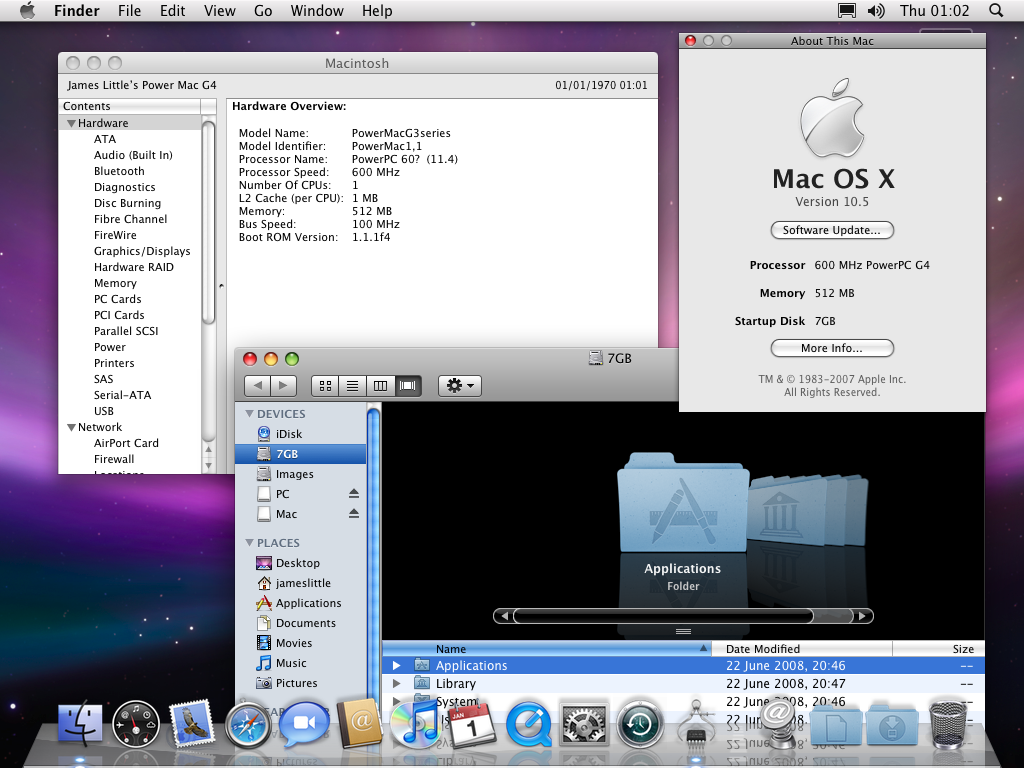
After my previous couple of posts (on Lowendmac) about nearly getting Leopard to load on a Beige G3 / Blue & White G3 I can confirm that I have had success with it booting fully to the graphical user interface, after quite a few tries of different techniques.
There are some functions which currently need attention, like Firewire and power management, but this is related to the way I've got it working:
1. G3 B&W upgraded to run a 600Mhz G4 CPU
2. Used the B&W to installed 10.4 and upgrade to 10.4.11.
3. Used a Digital Audio G4 to install Leopard as an upgrade over existing Tiger installation
4. Tried to boot this on B&W G4. Got previous error or crash with IOGraphicsFamily
5. Noted that AppleCuda and AppleLynx (firewire) kexts didn't load corrctly during boot either/
6. Extracted all kernel extensions from 10.5 WWDC 2006 edition, using Digital Audio - as this booted on G3 and G4 systems, and has all the missing kernel extensions not included in the Lopeard final release.
7. Deleted 'newer versions' of the kexts 'IOGraphicsFamily.kext', 'AppleCuda.kext', 'IOFirewireFamily.kext' and installed the relevant ones from WWDC 2006.
8. Boot was then successful.
I attach a screenshot of the about this Mac and an Apple System Profiler report as proof. Currently, AppleCuda.kext doesn't load and this results in a shutdown powering down everything, but not turning off the fans. IOFirewiewFamily.kext doesn't load so firewire port don't yet work.
I've also flashed a Nvidia Geforce PCI 5200 card which support CoreImage as hardware accelerated, not too slowly,
Next I'll try on my Beige G3 to see what happens!
Hope someone else finds this information useful.
********
Just an update: have now also managed to get it to boot on a G4
upgraded Beige G3 with Radeon 9200. 1. Booted into Mac OS 9, which was
installed on same partition as 10.5
2. Used Xpostfacto to install startup item and bootx, to enable booting on oldworld macs.
3. Disabled onboard video using setenv pci-probe-list fffbffff in Open Firmware (Apple-Alt-O-F at startup)
4. Restarted, and bootup occured as per the B&W G3 ()G4 Upgraded) to full GUI.
Now going to experiment with updates!
James.
Hi,
Another update regarding Leopard on Beige G3 (G4 upgraded) - it's now running 10.5.4 with sound and power management functions working properly.
There seemed to be a problem that whenever I updated the Beige from 10.5.0 to a newer version it would always restart with a kernel panic, stating "unable to find driver for platform "APPL,PowerMacG3". The only way I could get 10.5.0 working on it was to install 10.5.0 over a working Tiger 10.4.11 installation. Using a 'fresh install' of 10.5.0, adding back relevant kernel extensions always result in the same error as above.
However, thinking that the solution must lie in the kernel extensions I managed to get a fresh copy of 10.5.0 working by figuring out the differences between an installation of 10.5.0 over 10.4.11 and a fresh 10.5.0 install.
The kexts (apart from the ones Xpostfacto installs) that were missing from 10.5.0 were:
* AppleCuda.kext (handles ADB mouse and power management function and sound)
* AppIeGossamer.kext (Platfrom expert for Beige G3, B&W and Yikes! G4 - i.e. the platform driver)edit to fix forum filtering - that's Apple, not AppIe
* AppleHeathrow.kext (driver for the Heathrow chip which handles IDE/ATA)
* AppleGracklePCI.kext (driver for the Grakle chip which handles memoery management and IDE/ATA and PCI slots)
* HeathrowATA.kext (driver for the ATA controller section of Heathrow chip)
By experimenting with the working installation of 10.5.0 over 10.4.11 I determined that out of the available kexts versions I have (Tiger versions, WWDC 2006 versions and 10.5 beta-build a527 versions) that the following combination worked. Where possible I used the latest a527 versions as these were the most recent, with the exception of AppleGracklePCI.kext, which was only available in the WWDC 2006. IOGraphicsFamily.kext from a527 exhibited the same crash as the one included in 10.5.0, so the one from WWDC 2006 was used.
To get 10.5.0 working:
1. Installed 10.5.0 from DVD using a Digital Audio G4 to a 7.7GB partition.
2. Copied (from a527): AppleCuda.kext, AppIeGossamer.kext, AppleHeathrow.kext, HeathrowATA.kext into System/Library/Extensions/
3. Copied (from WWDC 2006): AppleGracklePCI.kext, IOGraphicsFamily.kext (deleted existing 10.5.0 one)
4. *Important* used BatChmod (http://macchampion.com/arbysoft/Welcome.html) programme to set permissions on all kexts to owner: system, group: wheel, read and execute only. Doing a permissions repair on the kexts with DiskUtility does not set the permissions properly.
5. *Important* deleted files in System/Library/Caches/ and file: System/Library/extensions.mkext and System/Library/Extensions/Caches/
6. Booted into OS 9 and used Xpostfacto to install all missing kenerel extensions for the Beige and to enable booting into Mac OS X on an oldworld system.
7. Restarted and boot went well.
Trying to update this to 10.5.4 resulted in the same error, so instead I used the Digital Audio to install a fresh 10.5.0 onto a partition and then ran the 10.5.4 combo updater, repeated the steps above and had success!
In 10.5.4 even the internal RagePro works, without causing a kenerl panic on startup - they key to this is to make sure that the RagePro.kext isn't in the extensions folder. Installing 10.5.0 over 10.4.11 meant that this was there.
The B&W and the Yikes! G4 should all work the same, except you will need the additional kexts installed, which are missing, or do not work from 10.5.0:
* AppleFireWireFamily.kext (10.5.0 version doesn't load properly)
* CMD646ATA.kext (missing from 10.5.0 - ATA driver)
Sorry it's a bit long-winded, but hope it's of interest to all those G4 upgraded beige G3s.
Regards,
James.
nice work you have done!!! I love hacks like this. I would try it, but alas, i have no G4 Zif for my G3, so it won't work
edit: I digg'd ya. sorry, just had to do it
Pretty cool. I had a friend get 10.4.11 on his iMac 266MHz trey loading. Installed the OS on one Mac, then swapped out the hard drive. Just that simple.
James,
I just had the HD fail in my FrankenMac Beige G4 1.12GHz Radeon 9200 that was running 10.4.11. So, I think I'd like to try this. Where can I download the kernel extensions that need to be replaced?
Thanks for this excellent bit of work!
TR
Hi TR,
If you could PM me your e-mail address I'll send them to you as a zip file.
Regards,
James.
Someone seems to have inserted Evil Block Company into the forum - what's going on, as I can't edit the previous posts to re-correct.
That's an unfortunate side-effect of word filtering. And a long story. The block company whose name rhymes with eggo called down its lawyers when a computer case made from the aforementioned block was posted.
I've edited your post to make it clearer.
Hi,
Quick update to say that I've now successfully got Leopard booting on a PowerMac 8500 and PowerMac 9600. Will post details in the next few days.
n.b. These computers all have G4 upgrades in.
James.
Hi,
I've now got Leopard running on a G4-upgraded PowerMac 8500 and 9600.
See link for more information:
http://www.macmod.com/content/view/1571
James.
My PM 9600 is still running 10.3.9 on a MaxPowr G4 400mhz. I picked up a Sonnet G4 1ghz a few months ago but have yet to upgrade the PM. This post has given me some motivation to upgrade... Where can I get these kernel extensions?
Hi,
You can now get the kernel extensions from the MacMod site, listed under the parts section of the mod:
http://www.macmod.com/software-mods/mac-os/1571-leopard-on-pre-pci
Regards,
James.
Hi,
You can now get the kernel extensions from the MacMod site, listed under the parts section of the mod:
http://www.macmod.com/software-mods/mac-os/1571-leopard-on-pre-pci
Regards,
James.
Looking at the current state of the Snow Leopard build things are not good for PPC.
Much like G3 support was stripped out of both the Applications and Kernel Extensions support in 10.5 there is mounting evidenence that kernel extensions alone would not re-enable PPC support.
In the latest builds many of the kernel extensions are now listed as Intel only, the Finder.app (along with many others) is also listed as only supporting 386 and x64 architectures, no ppc. This means that it would not run on PPC at all - much like people found that iTunes, etc wouldn't run on later beta builds of Leopard when installed on a G3.
I'll keep monitoring the builds and of course the final release of Snow Leopard - but expect the complete removal of PPC support, except where it props up Rosetta to run some PPC code on Intel machines.
Thats really too bad. I'd love to sell my MacBook Pro and get a quad G5 to replace it. I'd love to have a tower, but alas the Mac Pro is way out of my price range used or new.