
| Attachment | Size |
|---|---|
 IMG_2764.jpeg IMG_2764.jpeg | 6.88 MB |
Hi all,
I'm restoring an Apple IIe PAL/Euro.
Six month ago, I replaced all RAM IC and the computer works well.
Last week I powered it and it's gone bad.
I'm stuck on a display fault after a fairly thorough round of testing. Sharing the full detail in case anyone can offer input, or with some luck has a spare IOU to test.
**Symptom**
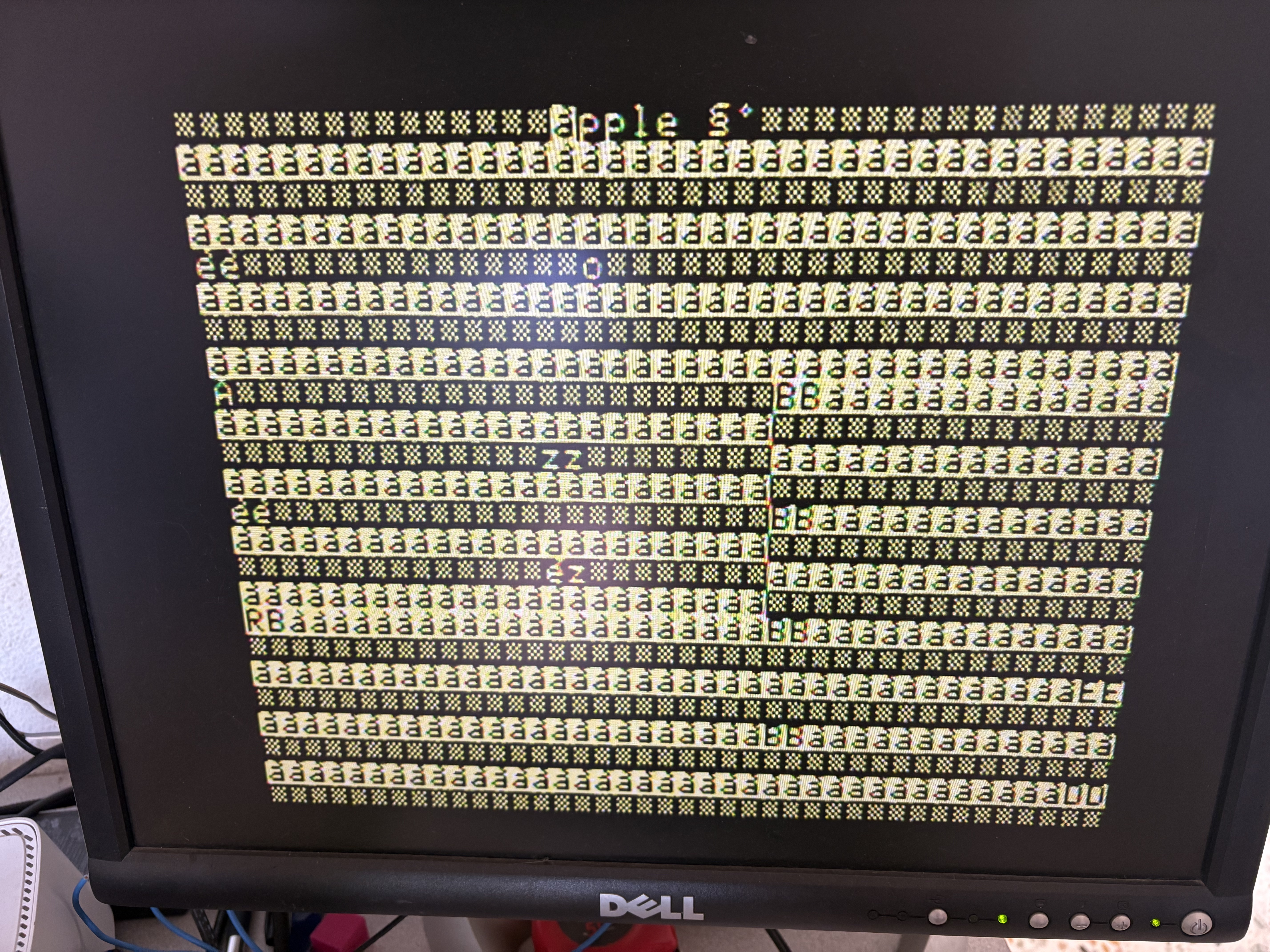
The machine boots normally and gives the usual beep, but the screen shows a frozen pattern (see attached photo): some times I got a "Apple '" banner at the top of the screen (correctly written by the boot ROM), followed by a repetitive pattern alternating between two states on almost every line below, with a few fragments of coherent text poking through here and there.
This pattern is identical on every power-up, and Ctrl-Reset does not change it at all.
**Components identified and tested off-board (all good)**
- - CD ROM: 342-0135-B - Tested with RCT PRO CRC OK
- - EF ROM: 342-0134-A - Tested with RCT PRO CRC OK
- - Keyboard ROM: 342-0153-A - Tested with RCT PRO CRC OK
- - Video ROM (French character set): 341-0163-A - Tested with RCT PRO CRC OK
- - 6502 CPU: confirmed good by substitution (same fault with the original CPU and with a known-good CPU)
- - RAM: confirmed good - Tested with RCT PRO with March test
**Oscilloscope measurements (4-channel, 200 MHz, no logic analyzer)**
On the IOU's RA0-RA7 outputs (UC8 on the schematic, pins 17-24 per my reading of sheet 3 "Timing/Video"): correct amplitude, 5V peak-to-peak on all 8 bits. No output stuck at a fixed level.
**What still looks healthy**
- Clean, sharp character rendering (the "Apple" banner is legible, some times)- Stable screen sync (no rolling, no erratic flicker)
**My question**
Without a donor board or a logic analyzer, I can't push the diagnosis further on the "video address generation inside the IOU" theory. Does anyone have:- a working 344-0022-A IOU I could try as a substitute (even temporarily)?- another test achievable with a standard 4-channel scope before I go hunting for this component, which seems to be rare?
Thanks in advance for any help, happy to run any additional test or measurement.
Don't blame the IOU merely because it's generating that ugly display. These same symptoms could occur if there's an intermittent fault in any of the four following components, but the IOU would generate exactly that screen because it's merely reproducing what was erroneously written into the screen memory.
The 74LS244 is a fairly common component, so you might be able to borrow one from another peripheral. It's also been a common component to fail in the last few years, so it's a plausible suspect.
(Also be sure to remove any peripherals, especially from the AUX slot. Many of these signals are shared with the slots, so a faulty peripheral could cause interference.)
NB: all socket locations are for 50Hz European Apple //e
IIe (euro) CPU to DRAM interface.png
Could you do the following tests after you turn on the machine and hear a beep:
1. Blindly type PR#3, hit Return and take a picture.
2. After that type GR, hit Return and take another picture.
3. Make a video of what you see when you hold both the Open Apple and Close Apple button down while turning on the machine.
If you have a modern Pico-based VGA or HDMI card, try it to see if what you see on the screen looks different.
I agree with S.Elliott; the IOU is probably not the problem. Since we see part of the "Apple" logo on top, I'd think the two LS244s are good. If not, the computer wouldn't be able to fetch instructions and wouldn't even display the "àpple". Personally, I'd search around the Video ROM and maybe the LS374 that generate the VID0-7 signals. Remove them, clean with DeoxIT and put them back. See if it changes something.
I'm very curious what the self test look like (the point 3 in CVT's post).
Please also tell us what you see when you flip the character set / language switch. Do the "à" becomes "@"?
Also do you see something blink like a cursor using the wrong character? What happens when you type?
All my tests have been done without any cards.With the Pico-based VGA installed :
IMG_2774.jpeg
IMG_2773.jpeg
I haven’t had time to test the two LS244 chips yet.
However, I noticed that the original 6502 heats up quickly. When I replace it with a 6502 taken from an Apple IIc, it stays cool.
I have dumped Video ROM with RCT Pro (with mame database, CRC OK) and GQ4X4 and it's ok.
The//c uses a CMOS 65C02 so it would be expected to run much cooler.
As for the screen display , it's defineitely weird that the HOME function which clears the screen by writing $A0 to each screen location ends up displaying the inverted @ signs instead. While there are lots of faults that could explain this, when it displays the APPLE ][ title, the space between E and ] is also written as $A0. Yet that displays correctly as a blank space. While highly unlikely, a BAD F8 ROM could cause this; swapping it out with one from another machine, an Apple Language Card, or a fleXrom could rule that out.
No, it's not at all weird that the HOME function didn't clear the screen -- it just shows a difference in how a slot-based video card behaves under the same basic situation:
The "Apple ][" text appeared correctly because the ROM stores those 8 characters directly in screen memory at $040F through $0406. But the HOME function is more vulnerable to failure because it writes indirectly via "STA (BASL),Y" instructions that require zero-page memory to perfectly store and recall numerous bytes like WNDTOP, CH, CV, WNDBTM, WNDLEFT, WNDWIDTH, BASL, and BASH.
The test results effectively rule out motherboard RAM, character generator, and IOU. It could still be any of the components listed in comment #2, but I acknowledge frozen signal's skepticism about the LS244s because most of those address bits must have been working in order to display the title -- at least some of the time. If it's not a bad LS244 then it's most likely to be a bad MMU.
Kudos to CVT for suggesting that test with the Pico-based video card.
That's true. But If the machine beeps there's a good chance that zero page RAM is working. A good dead test memory checker (e.g. ROMX, Adrian Black's DEADTEST, or fleXrom) could be used to verify that.
Another thought: Perhaps a power supply issue causes the machine to crash after the speaker is toggled during the "beep."
Thank you, but I am not sure why you are completely ruling out the IOU. Take a look at this: even with the IOU chip completely removed and sitting on top of the PSU, after the Vince Briel VGA card initially shows all inverse @ (all zeros), pressing <Ctrl><Reset> a few times injects the Apple II logo and sometimes it even shows a flashing Basic cursor:
NoIOU.JPG
When you removed your IOU the computer did not replicate the odd behavior of showing "Apple ][" over a non-cleared text screen. Perhaps we're drawing different interpretations or making different assumptions? Let's try to keep it on-topic and make it useful for lasaj30, since the purpose of the thread is to troubleshoot his issue.
Importantly, perhaps, I neglected to state this assumption: when lasaj30's Apple //e shows the "Apple ][" title over a cluttered background, I assumed that the motherboard's composite video shows the title over stripes of random-looking characters as pictured below left, and I assumed the Pico video card shows the title over a screen filled completely with inverse @ signs as pictured below right. And I assumed (perhaps wrongly) that the motherboard video and Pico video are showing these slightly different-looking screens at the same time.
Composite video
(from motherboard DRAM)
lazaj30 motherboard video.png
Pico video
(from bus snooping)
lasaj30 Pico video.png
Oopsie, sorry I made an assumption without stating it...and without asking lasaj30 to verify it.
To lasaj30, when your //e shows any part of the "Apple" title, does the motherboard's composite video show a different background from the Pico video card's output?
APPLEII subroutine.png
You're right, with composite video the background is not the same that with Pico VGA.
Even though I tested all the RAM ICs with the RCT Pro (using the March test), I’m going to install the https://github.com/misterblack1/appleII_deadtest ROM. There might be a problem with the RAM traces, even though I’ve already checked for continuity.
A big big thanks for your help (and sorry for my bad english)
I hope it will help you :with deadtest eprom I get this message :ZP/SP ERR 1111110
IMG_2778.jpeg
New problem, keyboard reset key now doesn't do anything. This computer drive me crazy.
For information, I'm not a noob repairing a computer, I am a freelance engineer in electronics and embedded software development. I teach PCB design (IPC-certified) at an engineering school.
I asked the developer of the deadtest what the error ZP/SP ERR 1111110 corresponds to. Here is their reply: https://github.com/misterblack1/appleII_deadtest/issues/11
In your latest photo, DRAM writes were not reliable when address bit A4 was 0.
Unreliable address bit A4.png
Some guesses at what could cause that:
[EDIT: If it's the MMU, you might find a modern substitute...like the one at this page from frozen_signal's design.]
[EDIT2: I just noticed that address $040F is one of the unreliable addresses where A4=0, and it's the first character of the "Apple ][" title which was corrupted in your first photo. This further pinpoints the problem as address bit A4, but doesn't determine whether it's the MMU or a broken wire on the motherboard.]
Hi,
Connection between C1 pin 3 and C4 pin 37 is good, so I need to test if MMU is ok.I will ask a friend with a working computer to lend me a MMU ic. I will go back when tested.
If the issue is not in the MMU and considering the problem started while the computer was just off for some time, you should consider the possibility that of a bad socket connection.
I had similar problems with the last AIIe (PAL) I have repaired.
It turned out that there were poor contacts with the original ROM pins in the sockets.
The original ROM pin's were very oxydized (gray color) . It's most probably tin oxide which is a very poor electrical contact.
Programming a new set and cleaning the socket did solve the problem of not being able to type blindly.
After thoroughly cleaning the original ROM pins, these ROM's were found again OK.
Curiously, the faulty ROM's were readable by a PROM programmer in a ZIF socket, but the contact was not good in the mainboard tulip socket.
Yves
The sockets that Apple used were not the best, so failure of one or even just significant oxidization of the contacts or pins on the chips is a possibility. Cleaning may help but may not fix it if the socket is bad enough.
Yes, I agree.
Using a solder pump, I have removed the RAM's to socket them + other video IC's in the C row.
And I have also replaced the ROM sockets .
Yves