

As announced earlier this month on newtontalk.net, Einstein (the Newton emulator) now reads and works with ATA PCMCIA card images at least made by Apple's Disk Utility. Had lots of success using my Powerbook G4 15" with PCMCIA slot. I wanted to test other options for other people wanting to try the new Einstein ATA trick.
I picked up the "USB 2.0 to 68 pin ATA PCMCIA Flash Disk Memory Card Reader Adapter Converter "
(Picture below)
https://www.ebay.com/itm/313839655411
And the other variety of this USB adaptor currently on eBay looks like this:
https://www.ebay.com/itm/306499824785
The first one when I got it looked solid enough. Apparently Macs of the OS X era do not have a built in driver that picked up this device. On a read, it appears "WINDOWS 7,WIDOWS XP,WINDOWS 2000,WINDOWS VISTA and WINDOWS ME system, no need to Install driver, but in WINDOW98 or other old systems need to."
Truthfully, I would love to find that windows 98 driver, that would at least be something. Anyway, if you are a Windows user, great. So far I have not found a PCMCIA to USB driver for Macintosh computers.
And I invite those that know of a Mac driver to please share here. Thanks
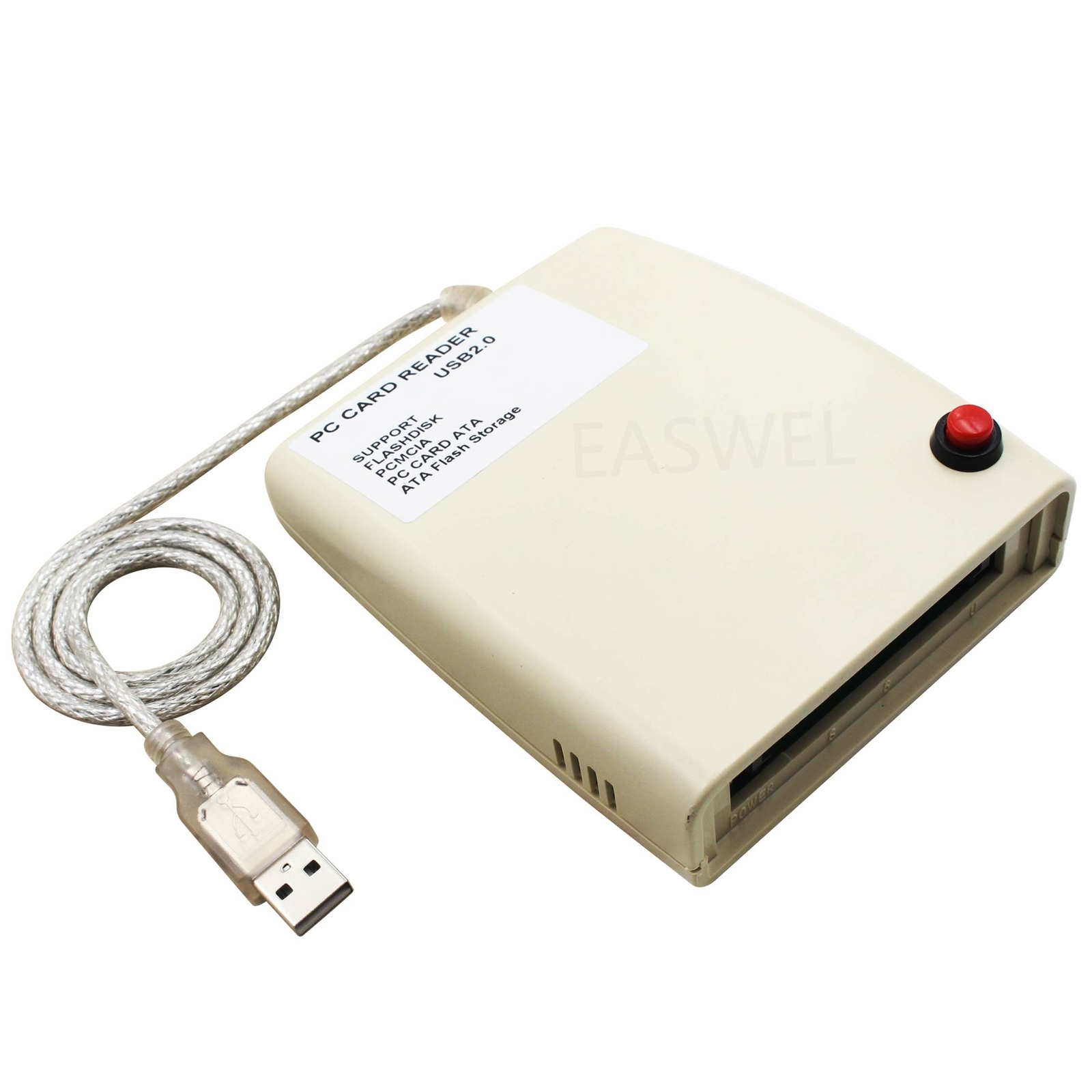
Found out a few things about this device. Seems the earliest this showed up on the interwebs was in 2021 at this site: https://www.alibaba.com/product-detail/PCMCIA-Memory-Card-Reader-USB-2_1600186135382.html?spm=a2700.galleryofferlist.normal_offer.d_image.44d413a0CB5TB7&priceId=baebdd1d68c54832865fb867e579f06f
One website, Electroshop, gives the most information about this device which some are calling "SZBJ PCMCIA CARD READER" https://electroeshop.com/products/szbj-pcmcia-card-reader-usb2-0-plastic-version-interface-pcmcia-card-reader-read-flashdisk-pcmcia-pc-card-ata-mass-storage-ata-flash-pc-card
There is a FAQ on that site which says this was designed for Windows specifically. No Mac support.
PC Card support always requires a driver matching the bridge chip in the laptop, which is part of the platform code shipped as part of the operating system. There is no standard device class in the USB protocol for bus translators like this one.
I appreciate the feed back robespierre. I've looked over what you said quite a few times. Let's see if I have this.
"PC Card support always requires a driver matching the bridge chip in the laptop,"
> Not processor but the bridge chip. The chips that handle the high and low speed communication devices.
"which is part of the platform code shipped as part of the operating system. "
>Ah, built in to the OS.
"There is no standard device class in the USB protocol for bus translators like this one."
> Translators being this PCMCIA to USB adaptor.
So no standard bridge chip protocol.
Interesting.
Hey all, in the 68K forums someone recommended using compact flash (with a PCMCIA adaptor) as that would be much more available.
And that works fine.
Next thing I'm looking for: I am able to use the Mac Disk Utility to make a .dmg of the ATA card in the Newton Messagepad format. That image works fine in the Newton emulator.
What I'm looking for next is a program that will write the .dmg image of the Newton image BACK to a ATA card.
Interestingly Disk Utility will make an image, but when try to restore the image to a ATA card I get "Restore Failure: An error (-119930868) occured while copying. (Operation not supported)."
Just need an application that will copy a .dmg file to a destination without care of the file structure. If there was a cloning software, what would be nice. I am looking into 7-Zip (https://www.7-zip.org/download.html) and I welcome other recommendations.
Thanks to the recommendations from the 68Kmla folk, we had two ideas:
1) use compact flash ATA cards with a PCMCIA adaptor. Much cheaper.
2) Use the sudo dd command in Terminal. Details on how to do this can be found here:
https://68kmla.org/bb/threads/playing-with-pcmcia-to-usb-adaptors-mac-driver-needed.53303/#post-604915
Like to thank all for your help in finding this solution.