
| Attachment | Size |
|---|---|
 A2FILECMD-6502-BOOT.dsk A2FILECMD-6502-BOOT.dsk | 140 KB |
| A2FILECMD-6502-EXTRA.dsk | 140 KB |
| A2FILECMD-65C02-XL.2mg | 32 MB |
Hi everyone,
I’ve been working on A2FileCmd, a keyboard-driven, two-panel file manager for the Apple II. The idea is to bring everyday file management, disk utilities and file viewers together in one program, with additional tools loaded as plugins.
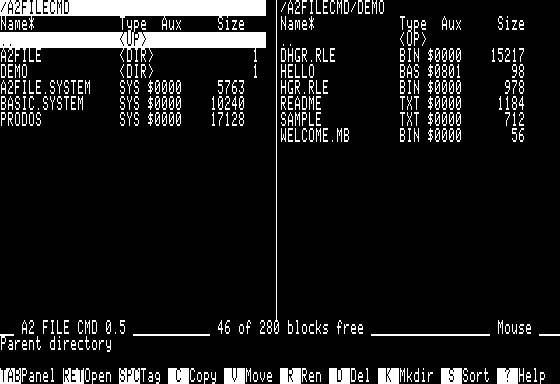
Think of the two-panel workflow of Norton Commander, with the ambition of gradually bringing together some of the capabilities of Copy II Plus, Locksmith and ProSel.
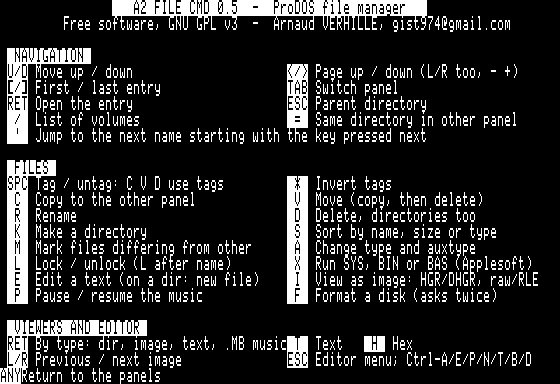
What it can do today
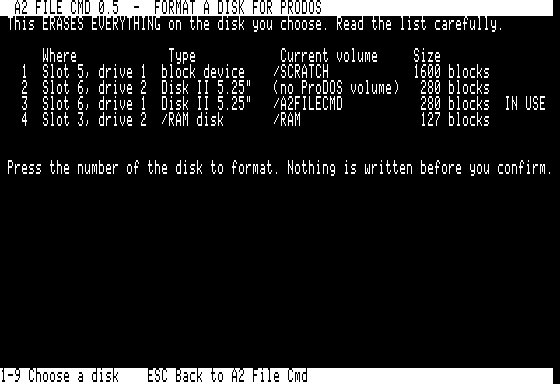
- Copy, move, rename and delete files and directory trees. - Tag files for batch operations, sort directory listings and change ProDOS attributes. - Browse ProDOS and DOS 3.3 disk images as folders and extract their files. - Read physical DOS 3.3 disks. - Create disk images from floppies, write images back to disk and format ProDOS volumes. - View text, hexadecimal data, Applesoft listings and AppleWorks word-processing documents. - Edit text, compare files and search for names or content. - Extract ShrinkIt and Binary II archives. - Display HGR and DHGR pictures, and play Mockingboard music.

The plugin menu also includes tools for CRC-32 checksums, file identification, conversions, batch renaming and volume management.
A recent addition is VOLINFO, a read-only ProDOS allocation checker. It displays free space, fragmentation and a block map, and detects shared blocks, lost blocks and referenced blocks incorrectly marked as free.
Two CPU versions, three disk options
There are separate 6502 and 65C02 builds. Each has:
- BOOT: a bootable 140 KB floppy with the main program and essential tools. - EXTRA: a companion floppy containing additional plugins for that CPU. - XL: a bootable 32 MB .2mg containing the complete collection on one disk.
Single-drive floppy exchanges explicitly identify the disk and drive to use. The program requires 128 KB and an 80-column display; the original, non-enhanced IIe is supported by the 6502 build.
Next in development are deleted-file recovery, disk comparison, empty-image creation, damaged-media recovery, directory synchronization and a directory-tree viewer.
Source, build instructions and documentation: https://github.com/habib256/a2filecmd
I’d particularly welcome feedback from people using real hardware: original IIe machines, enhanced IIe and // c systems, Disk II drives and different storage interfaces. Which disk utility would you most like to have available without leaving your file manager?
The six tools mentioned above as “next in development” — UNDELETE, DISKCMP, MKIMAGE, RESCUE, SYNC and TREE — are now included. Please use the canonical GitHub Release for the complete, versioned 6502 and 65C02 BOOT, EXTRA and XL images, checksums and PDF manual: https://github.com/habib256/a2filecmd/releases I’m particularly looking for tests on real hardware and storage interfaces.
Thanks, FlyingZebra! A 40-column file manager for the II+ sounds interesting — I’d love to see what you’re working on.
A2FileCmd currently requires 128 KB and 80 columns, so your project would serve machines mine doesn’t support. Fitting a useful file-management interface into 40 columns is a challenge in its own right!
Are you going for a two-panel layout too, or a different approach? Always happy to compare notes.
Is there a chance for a version running on a II+ with Videx 80 column?
**The ProDOS edition** (the two-panel manager with the overlays) needs an Apple IIe or newer with **128 KB**. The launcher checks the machine before anything else and hands control back to ProDOS otherwise. That's not a licensing choice: the program writes the 80-column text screen directly at `$400–$7FF` with the even columns in the **auxiliary bank**, and it uses auxiliary memory throughout — panel tables, `/RAM`, double hi-res pictures, the block claims FIXIT keeps on large volumes. A II+ has no auxiliary bank at all, so no 80-column card can make that edition run there.
**The Videx Videoterm** is also a very different target from the IIe's 80-column card: its character RAM lives on the card and is reached through a `$CC00` window with bank switching, driven by its own slot-3 firmware, rather than being part of main/aux RAM. Every screen write in the program would have to go through a new driver.
**What does run on a II+ today is A2FC Mini** (DOS 3.3, 48 KB, 40 columns) — a separate, all-assembly program shipped as `A2FC-MINI-DOS33-*.dsk` in the releases. Its screen code is isolated in one file, so a Videx mode is *conceivable* in principle, but it would mean a new screen driver plus a re-laid-out 80-column panel design , and my test host has no Videx card. So it isn't on the roadmap. If you have the hardware and want to experiment, the Mini's sources are the place to start, and I'm happy to answer questions.
Why is the 65C02 build necessary at all?
Hi Arnaud,
thanks for your reply and detailed explanations.
Regards
Eberhard
There is a 65C02 in enhanced Apple IIe & Apple //c.
Enhanced have the mousechar.
So it is not the CPU that is needed, but rather the character generator. I recommend you to name your executables by character generator they use. It is not uncommon to see a 6502 installed in enhanced apple 2e's and vice versa (The ROM of enhanced is not relying on 65C02, and works fine with 6502). On the other hand a 65C02 may be present in accelarators, etc., on non-enhanced and plus-es, and your users may run 65C02 thinking the software needs 65C02 instead of the enhanced charset. I recommend you to add some computer recognition to know what computer the program runs on, and to adapt itself, instead of having so many executables.
You're right that the naming is misleading:
the 65C02 edition needs both a real 65C02 (it's compiled with 65C02 opcodes) and the enhanced ROM (MouseText, mouse). Its launcher only checked the ROM, so a 6502 in an enhanced IIe slipped through — that's being fixed with a real CPU test.
Note that since 0.8 all floppies are 6502 code and run everywhere; only the XL image still comes in two flavours, and a single XL that picks its edition at boot is on the list.
And what exactly is gained by using the 65C02 additional instructions?