
Hi all, first post for me here.
I've slowly worked on building my A1 for a while, but finally to the point of bringing it up for the first time. I've gotten as far as the terminal side appearing to work and all the power nice, but that's where it goes off the rails.
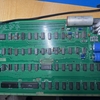
I built up the terminal only first and dealt with some odd problems but now it's working. Powers up, shows the gunk in ram, shorting pin 12 to 5v on the keyboard connector clears the screen but shorting pin 1 to ground to reset the cpu does not appear to work quite right and I never get into programming mode. Attempting a reset does put a backslash on the screen but it does not advance to next line and start the interface. For the moment I don't have a working keyboard so i'm trying to do without. Jumpers are all set to the basics (can be seen in the second photo).
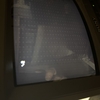
The only real notable 'off' thing aside from not being able to enter the monitor is that things blink about twice the speed i'm expecting by watching others videos. First pic is what happens if I try to reset the cpu.
Thanks all!
/brian
... which happened so often in the last years that I could write a book about it !
Q: What is a 'Maverick' Apple-1 builder ?
A: Somebody who procures his own components from here, there and everywhere, some of which are 40-50 years old, and then hopes that after the Apple-1 is put together that it will magically work.
It won't. Some do show signs of life, like yours, but it almost never happens that the build works as it should, except if you did use my famous 100% tested and burned-in IC kits, which, alas, are sold out. There is a huuuuuge difference in the odds for success between a known good IC set which once did work fine in an Apple-1 for several weeks and an untested IC set - the odds that some dead or limping IC is causing trouble is > 65% (or worse). So-called hobby grade "IC Testers" you can buy are not worth the money IMHO as while they can detect totally dead or excessively weak ICs, they fail to properly test timing parameters and driver strenghts and logic levels / thresholds. And the Apple-1 is pushing many ICs on it to their specified limits. A few signals are so weak, even with "good" ICs, that if you put an oscilloscope probe on them, the Apple-1 stops working, and this with a 1:10 probe which only adds a very low load !
DIAGNOSIS BASED ON SYMPTOMS
Your symptoms point to a bad or nonexistent RAM. Go see that all the jumpers and solder options are properly set. Then check the 480ns delay on the 74123 oneshot. If it still does not work, despite all these things are right, put six 390 Ohm resistors on the multiplexed address lines ... this is the absolute minimum piece of my famous 'reliability mods' which were published here on Applefritter many years ago.
And then, if it still doesn't work, deeper diagnosis needs more tools and instruments being thrown into the battle.
Tell us how it goes. Don't worry about the cursor blinking frequency, these 22uF electrolytics had huge tolerances, and age does not help them to get better, and the aged carbon composition resistor also contributes. This can be fixed easily.
- Uncle Bernie
For some unknown reason, I see only stamp sized preview pictures and can not enlarge them.
What tools do you have availible?Oscilloskope? Logic Analyzer, Raspberry Pi Pico RP2350 A4?
It would be also nice to see a picture or short video when you start your A1.
Most critical thing of the computer half is as already mentioned the DRAM Timing. especially around the oneshot.
It's because the OP selected "Preview" instead of "Teaser". Here they are:
https://www.applefritter.com/files/styles/95-percent/public/2026/01/05/IMG_8286.jpeg
and:
https://www.applefritter.com/files/styles/95-percent/public/2026/01/05/IMG_8280.jpeg
IMG_8292.mov
Figured this is probably important somehow, when I turn it on initially it's a full screen of flashing @s and _ but half of the screen vanishes. I have bank 2 removed / unjumpered for testing.
There are many variables in your setup. One way to debug would be to replace the whole terminal section with an arduino nano.
Check this out: https://github.com/DutchMaker/Apple-1-Mini
The idea is not to build this replica it's to connect it's nano to your board and replace the whole terminal section with it.
Can you verify you have a valid 1 MHz clock at the 6502?
If not it would be a good idea to feed the clock signal with an oscillator like shown in the Apple-1-Mini schematics.
Here is a very long thread about debugging some Apple I boards: https://www.forum64.de/index.php?thread/112461-nachbau-eines-apple-1 (German so if needed use translate function of browser)
In this thread several replacements get developed for PROM, 2519 and 2513, DRAM->SRAM, how to direct power with DC (requires removal of parts if you don't use higher voltages).
Here is the start about connecting that Arduino nano to the MC6821 Socket https://www.forum64.de/index.php?thread/112461-nachbau-eines-apple-1/&postID=1662989#post1662989
ralf02 and turbomicha got it working, I don't have an apple I myself. They used it not only for debugging but also as an easy way to upload software.
IMGP0027.JPG
IMGP6299.JPG
... there are a lot of "LS" TTL chips on this board...
You are right- the TI vintage sockets most likely will prove to be a mistake on top of other problems to get your A1 working. I have built 5 A1's including the A1 prototype. All work!! Without having Uncle Bernie's proven IC's, his Build documentation and his personal help, my first A1 would be a cool non working wall hanger. My last build I used NOS TI connectors. I inserted the IC's using the chip squeezeer and 3m insertion tool. This is key to hopefully get the best connection. If you didn't "roll" your chip and seated by hand you will definitely have non contact issues with these sockets. Furthermore, I have found some IC' connections pushing the IC out of sockets just sitting for a few months.
Test your connections using a good fast continuity tester, board supported, IC's installed and test between Pins and bottom solder weld. My TI socket build had 6 pins total not making contact in two sockets.
Good luck with your build.
Also, none of my builds worked correctly or at all without Uncle Bernie's 6 resistor fix. When added all work great! Without you will probably get strange problems. The added capacitors may also help, but positively the resistors are key.
It’s all in the timing/rising edge and a quiter BUS.
Where can I find this reference?
This Forum uses unfortunately not the best Forum Software availible, especially the search function could be better.
https://www.applefritter.com/content/part-path-towards-rock-solid-apple-1-builds
https://www.applefritter.com/content/how-fix-nonstandard-apple-1-video
If an admin reads that, I think it would be a good idea to make the linked threads above sticky.
Here is another interesting thread:https://www.applefritter.com/content/even-easier-uncle-bernie-reliability-mod
If you get the Apple 1 working you can continue with fixing the Apple Tape Interface (ACI):https://www.applefritter.com/content/uncle-bernies-improved-apple-1-cassette-interface
I don't want to complain, as the content makes a great forum not the software it runs on, I more want to show some ways around the problems:
For now I recommend to use google to search for specific thing with applefritter.com added as keyword or even better use Grok AI, forget about ChatGPT, Gimini or Copilot and others they are not able to actually crawl the web and find something in deep.
At least I gould not get any other than Grok to do so, I used Grok to digge out als the above links and it took less than 2 minutes including writing these words.
Natas666 thanks. I'll go searching a bit later after I check out the links
For those who don't know, you can search a specific site by adding site:<site name>, or to not search a site -site:<site name>. Ex:
Uncle Bernie's 6 resistor fix site:applefritter.com
or
"Uncle Bernie's 6 resistor fix" site:applefritter.com
Double quotes sometimes help to narrow down a broad search. I'm not sure if these methods work with other search engines. Duckduckgo doesn't get much with the quotes (Google doesn't either but does a search without them).
Instead of double quotes you can replace spaces with dashes that usually work when double quotes do not. Grok gives you the advantage that you can just use normal language and describe what you are looking for and it finds many things that google does not find. If you click on a source link indicator Grak lists you where it found the info with some short version of the relevant passage and a direct link to there, what is very helpful. from the time stamps you can see it was a real time crawl that happend to more less the exact time of the request. '(-1h indicates different time zone)
Here an example: https://x.com/i/grok/share/gCbNWapYXgXjlDBYSUnPmiTZl
Challenge show me an AI that gives better results
Screenshot 2026-01-11 110703.png
Just an update, my A1 is up and running. Now to build a case! It was just a dodgy cpu.