
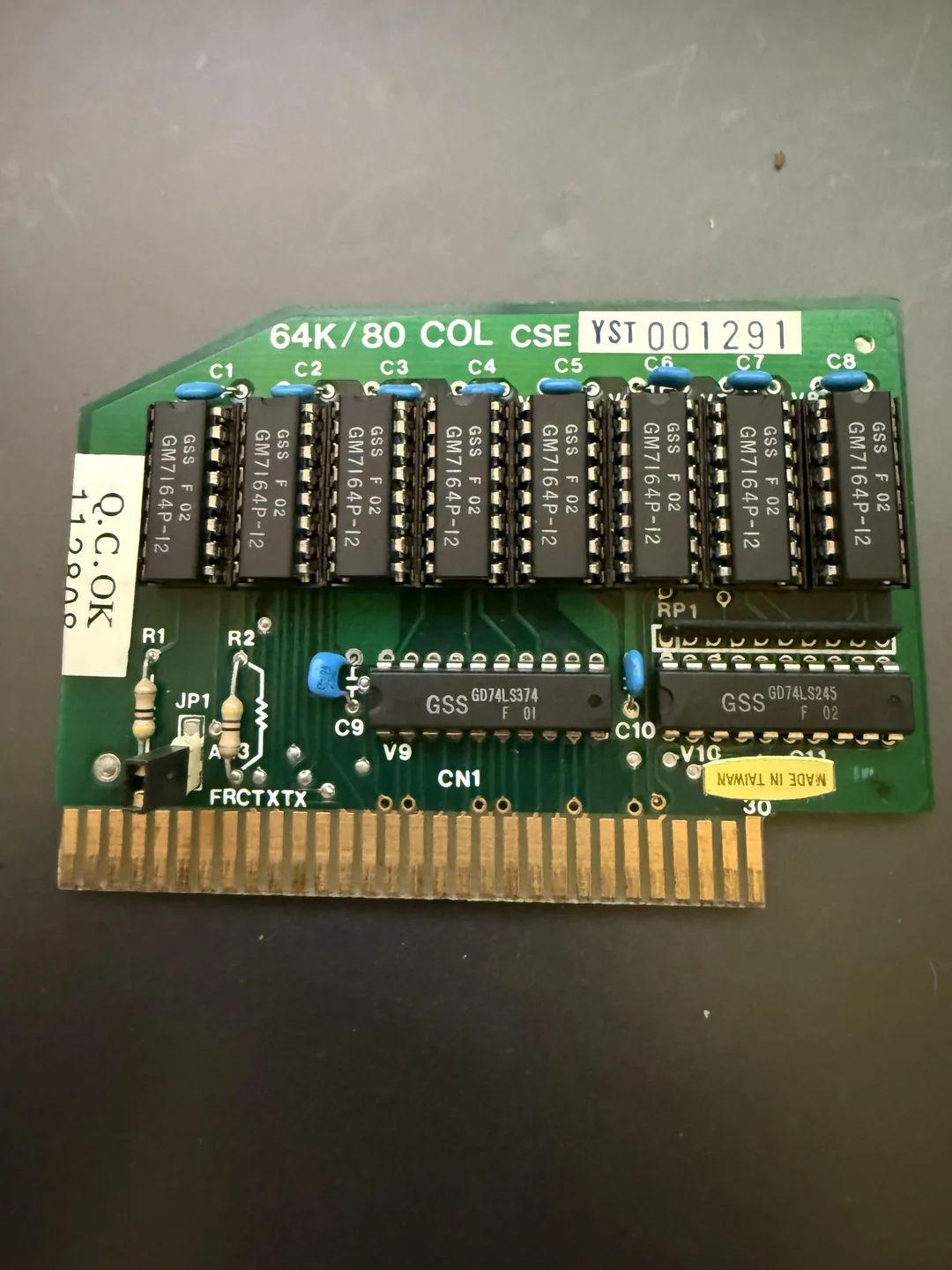
Can someone tell me the maker of this 80 column card? When I boot up my Apple IIE the screen is all jumbled and jumping around. I’m trying to figure out the intention of the card as which way it should face in the J0 slot. I tried changing it to different orientations since the slot is not keyed but it comes up to the Apple ][E prompt right away so I think think it’s facing in the right direction. Tia fir the help
Anonymous
User login
Please support the defense of Ukraine.
Direct or via Unclutter App
Active forum topics
- Microsoft SoftCard II - Claude created working emulation
- APPLE 50 – 50 years of Apple as an ASCII-art slideshow for the Apple-1 (inspired by David Schmenk's Apple30)
- Apple-1 display not working well: Is it because of my counterfeit AM1404s? Or something else?
- Transfer Problems with ADTpro (Host timeout)
- Apple II DISK Emulator using STM32
Recent content
Navigation
No Ads.
No Trackers.
No Social Media.
All Content Locally Hosted.
Built on Free Software.
We have complied with zero government requests for information.
The Q.C.OK label has to point towards the keyboard. Also beneath the MADE IN TAIWAN label you see the number 30, which most likely will be the pin number of the AUX-Slot.
I don't know the manufactures name, but it looks like a TAIWAN clone of the original card.
Regards
Eberhard
Are the chips side pointing away from the power supply or towards it?
W hen the QC sticker is ponited towards the keyboard then the chips are pointing away from the power supply. It doesn't boot as it gave me fuzzy red lines on my TV and doesn't beep. I think I just got a bad card.
There are 8 ram chips and 2 74LS chips. Do you have any chiptester?
I would guess that one or more of them are faulty.
And perhaps clean the pins that go in the slot, although it's probably not the reason for the malfunctioning.
Unfortunetaley I do not have a chip tester. Is there a way in BASIC to see if the 80 column card is woiking? I just ordered a floppy controller along with the floppy drive as it doesn't come with one so I cannot boot to any programs to terst the card. I tried PPEK commands but BASIC doesn't recognize it. When I do the system test it says KERNEL OK but I assume it doesn't test the addin cards.
If it has ever been plugged in backwards even once (with the angled part not faced towards the keyboard), either the 74LS374 or the 74LS245 have probably blown out. Also never "hot swap" cards in an Apple //e. The machine should be powered off (and not a bad idea to unplug for safety) before cards are removed or inserted. And always make sure cards are fully and properly seated before power on. If a machine is moved make sure all the cards are properly installed before operating, since they can come loose due to the Apple II family not having card hold down screws like PC clones.
I think I might of blown something then. Right now the card is sitting in the orientation with the QC sticker towards the keyboard and the chip side facing away from the power supply it boots up quickly and goes to the Apple ][E BASIC Prompt.
Going to the BASIC prompt is normal. What happens if you type PR#3 and then press return?
If the 80 column card is working it should go into 80 column mode.
That's not the question: Any Apple IIe with an 80 column card in the Aux slot responds to PR#0 and PR#3 (go to 40- or 80-column mode respectively). The firmware that responds to these commands is built-in to the IIe motherboard ROM. It works that way because slot #3 was the standard location for 80-column cards on the Apple II+, and the IIe integrates this function on the motherboard ASICs.
The 80-col card that goes in the Aux slot isn't really a peripheral on the Apple II bus; it's just part of the Apple IIe motherboard that wouldn't fit anywhere else. (The Language Card that goes in Slot #0 of an Apple II+ is also not a full peripheral because it has no "I/O Select" pin). You can upgrade the computer by changing the Aux card to a memory expansion or even RGB color, but these aren't considered peripherals because they don't have I/O space.
The AUX slot 80 column cards are kind of a weird special case as far as slots and ROM spaces and IO addresses go. While it is sort of built in, the reason it responds to PR#3 is the //e 80 column firmware occupies the address space assigned to slot 3. And that has side effects like weird things will usually happen if you try to use a card in slot 3 that has its own ROM. Because of that most people either just leave slot 3 empty or only use it with cards that don't need ROM space. Back in the day I used to run a Titan Accellerator //e, a Transwarp or an MCT SpeedDemon in slot 3 on //e units. European //e complicate things further because the AUX slot is inline with slot 3, making it so that few AUX 80 column cards and other cards will work in slot 3 due to space. I've never had to deal with that personally because Euro //e are extremely rare in the US and I've rarely ever even seen one in person. As noted the //e doesn't have a "slot 0" like a ][+ because the "language card" functionality is built in to the motherboard. Slot 0 in a ][, ][+ and a lot of clones also as noted lacks I/O select and doesn't have reserved space for ROM like the other slots.
It does go into 80 colum mode when I do PR#3 so it's still working. Thanks for your help!