
| Attachment | Size |
|---|---|
 POM1-Windows-v1.9.2.zip POM1-Windows-v1.9.2.zip | 17.39 MB |
 POM1-1.9.2-x86_64.AppImage POM1-1.9.2-x86_64.AppImage | 34.3 MB |
| POM1-macOS-v1.9.2.dmg | 26.57 MB |
POM1 v1.9.2 — DEV SDK Edition
The Apple-1 emulator just became an Apple-1 development kit.
POM1 has always let you run Apple-1 software. As of v1.9.2, it lets you write it — from first line of code to a binary (or a ROM) you can flash onto real hardware.
Why this release matters
At the heart of v1.9.2 is the integrated DevBench:
- Write in 6502 assembly, C, or BASIC (Integer and Applesoft).
- Hit Run — the bundled cc65 toolchain (ca65 / ld65 / cl65) compiles your code and boots it straight into the emulated machine.
- Nothing to install. The exact same toolchain runs natively on Linux, macOS, and Windows, and — byte-for-byte identical — in your web browser via WebAssembly.
- The output is real: the binaries and ROM images POM1 produces are the same ones you flash onto a physical Apple-1 and its cards.
In other words: an Apple-1, every major expansion card, a compiler, an editor, and a library of working examples — all in one window, on any platform, online or off.
Two color graphics cards. Two designers. One SDK — as equals.
POM1 gives full, first-class development support to both of the Apple-1's color graphics cards, with a perfectly mirrored toolchain on each side:
TMS9918 — designed by Claudio Parmigiani (P-LAB)
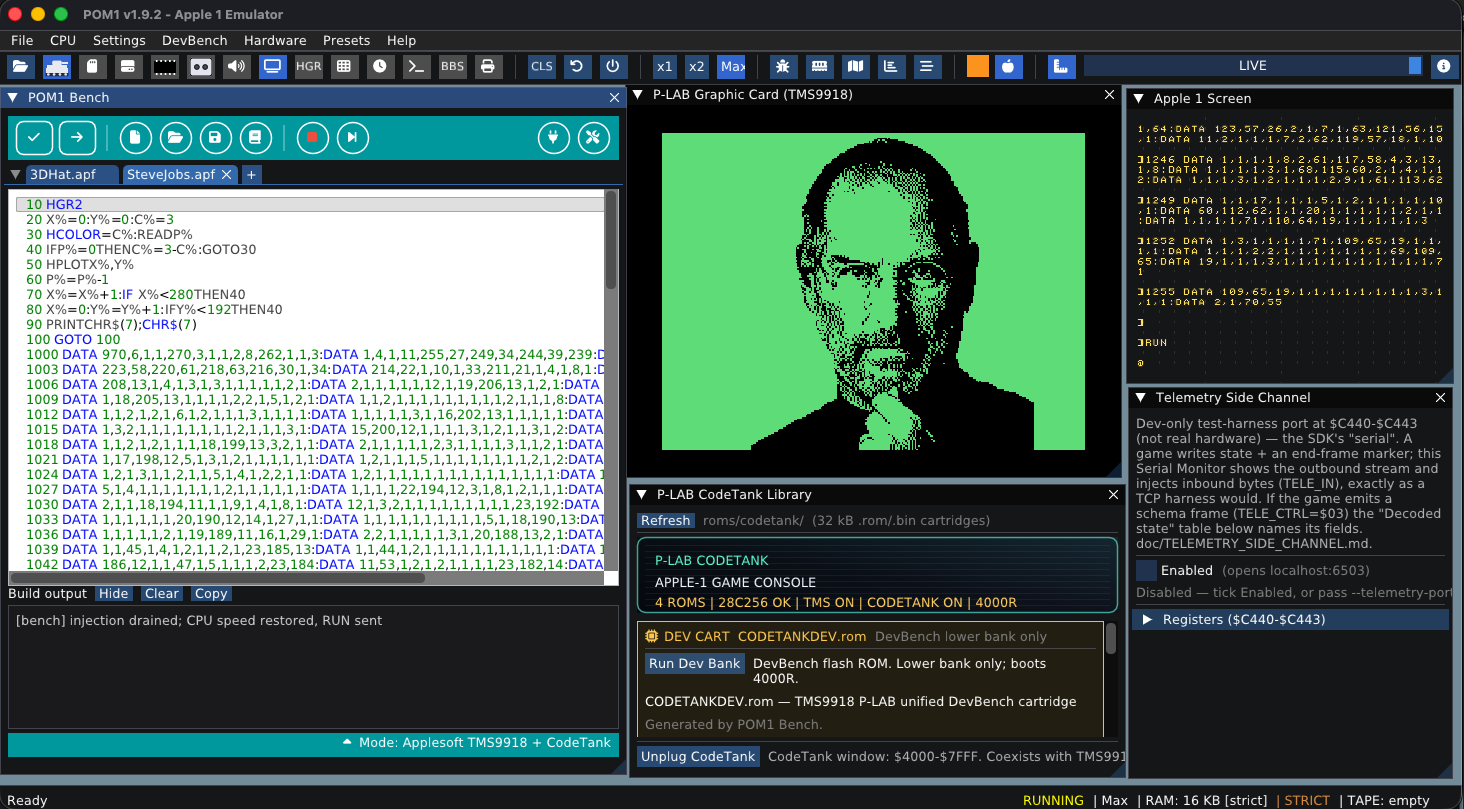
- C runtime library (tms9918c) + assembly library (tms9918)
- cc65 linker config that targets the CodeTank ROM directly
- Programming guides: Programming_TMS9918.md, Programming_TMS9918C.md, plus the sprite playbooks TMS9918-SPRITE_BEST_PRACTICES / _INIT
- Ready-to-run examples: Galaga, Rogue, Sokoban, Snake, Plasma, Mandelbrot, and more
- Bonus: a new Applesoft TMS — all the Apple II graphics commands, now driving the TMS9918
GEN2 HGR — designed by Uncle Bernie
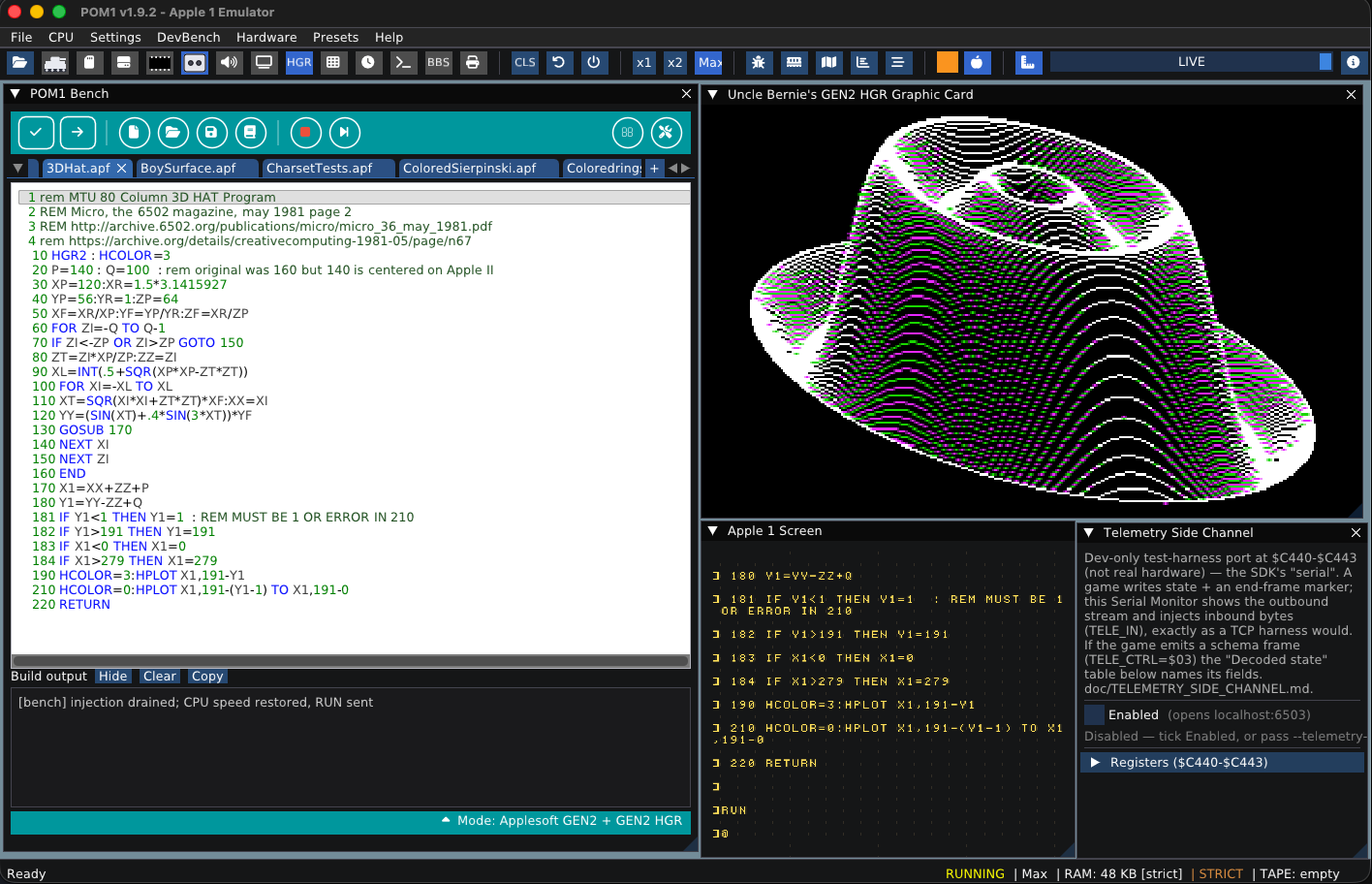
- C runtime library (gen2c) + assembly library (gen2)
- cc65 linker configs for both assembly and C HGR builds
- Programming guides: Programming_GEN2.md, Programming_GEN2C.md, plus the GEN2_RELEASE notes
- Ready-to-run examples: Sokoban, Snake, Mandelbrot, Life, Maze, Sierpinski, and more
- Bonus: a cycle-accurate beam-race renderer with authentic color soft-switches
Whichever card you own — or both — you get the same one-click path from source to silicon. No favorites: the goal is simply to make it as easy as possible to create new software for this machine.
Get started
Boot POM1 v1.9.2, open the DevBench, pick a language and a card, load an example, and press Run. Then change a line and watch it happen on the screen — desktop or browser, your choice.
Huge thanks to Claudio Parmigiani and Uncle Bernie, whose hardware makes all of this worth writing software for.
Go to github to see the latest releases (Win/Macosx/GnuLinux) : https://github.com/habib256/POM1/releases
Test it online now with WebAssembly : https://habib256.github.io/POM1/build-wasm/POM1.html
This is one way to Happy hacking,
Arnaud
Hi Arnaud -
thanks for the great work, it sure will be helpful for Apple-1 software developers, but only if they can make it run.
I tried the Appimage on Linux Mint (19.X and 22.3) and it does not work, as it wants GLIBC_2.34 which is only available in newer versions of Linux. There seems to be a concensus on the internet that you can't add GLIBC_2.34 to the older versions of Linux I run without breaking them so badly they can't even boot anymore, so I did not try that.
And until today I had no time to install all the development packages needed to compile it from the sources. The 'make' is still running since a few hours. Let's see what comes out and if it works. None of my own tools I ever built for the Apple-1 needs more than a few seconds to compile. And the sources are just a few 10 kBytes. Not 250+ MBytes. I wonder who wrote all that, must be gazillions of lines of code, more complex perhaps than the Windows XP source code ;-)
More on this later. I'll report back when I have results.
Wanted to use this new POM1 to further develop the demo software for my color graphics card, which should be available together with the release of the card's builder's tarball, planned later this year.
- Uncle Bernie
Hi Uncle Bernie,
What's happening: an AppImage bundles almost everything (GLFW, X11, OpenGL, the cc65 toolchain, all the ROMs and data) — but it deliberately does not bundle glibc, because glibc is the one library that has to match your kernel. So an AppImage silently inherits the glibc version of whatever machine built it. My release CI builds on a current Ubuntu, which stamps a GLIBC_2.34 requirement into the binary. Your Mint 19.x ships glibc 2.27, the loader sees a symbol it doesn't have, and refuses the binary before a single line of POM1 runs. You're completely right that you can't (and shouldn't) force 2.34 onto that system — that way lies an unbootable machine
The good news — you're already on the path that works. Building from source links POM1 against your glibc 2.27, so the binary you're compiling right now will run natively on your Mint 19. It's a one-time thing; after that a rebuild is just the files you touched. A couple of notes to take the sting out of it:
- The 250+ MB is almost entirely data — ROM images, .po/.d64 disk images, the software library, fonts, and the bundled cc65 toolchain. The actual C++ that gets compiled is a few dozen source files; it's a normal-sized program hiding inside a big data folder, not the Windows XP source tree. - Make sure you're parallelizing the build: cd build && cmake .. && make -j$(nproc). Most of the wall-clock goes into Dear ImGui and the vendored third-party code, which only compile once. - You don't need the WASM/browser bits at all for a native build.
- The Ctests slow down the process but it's my protection against futures regressions in the code.
The real fix is on my side: I'll rebuild the release AppImage on an old-glibc base (Ubuntu 18.04 (mint19)/ glibc 2.27) so the next download runs out of the box on Mint 19 and everything newer — no compiling required. Nothing changes in the app itself, only the machine it's built on. Let me some time to work on it.
Really glad you want to use this for your color-graphics-card demos — that's exactly the kind of thing it's for, and I'd rather it run on your bench than anywhere else. Sorry for the hoop; the next build won't ask you to jump through it.
— Arnaud
In post #4, 'arnaud.verhille' wrote:
" I'll rebuild the release AppImage on an old-glibc base (Ubuntu 18.04 (mint19)/ glibc 2.27) so the next download runs out of the box on Mint 19 and everything newer — no compiling required. "
Uncle Bernie comments:
That would be great ! I have a lot of older machines with older versions of Linux which I don't want to upgrade to a newer version as they get slower and slower and demand more and more memory and CPU speed. My oldest machine, a 80486 100 MHz clock, runs kernel 1.3.8 from the mid 1990s.
In the meanwhile, the build completed without a hitch, on my Linux Mint 22.3 'Zena' which allegedly is based in Ubuntu 24.04. The only package which I had to add specifically for POM1 was 'git'. No foul. But before that, I had already installed lots of development packages that just were not there in the basic 22.3 installation.
I don't think I will ever upgrade from Linux Mint 22.3, too, as the notebook is from Y2012 and the RAM can only be upgraded to 8 GBytes. I'm not going to ever buy a new notebook again - to many spyware / surveillance features like unfathomable backdoors built right into the hardware, so they can't be removed. I'll also never buy one of these new cars from model year 2027 up which have the mandated driver facing camera and are upload everything they see, listen to, and where they are GPS coordinate wise to the 'cloud'. So for me, no new computers of any kind. This makes it necessary to stay backwards compatible to older machines.
I've not tried actual work with this newly compiled POM1, but it seems to run fine.
This promises to be a great tool for Apple-1 software development because it covers all the known terrain.
- Uncle Bernie
Here is a version for glibc 2.27 POM1-1.9.3-x86_64.zip
pom 1.9.3 works under Debian :-)
Thanks
Yesterday I downloaded the new POM 1.9.7. release from github:
https://github.com/habib256/POM1/releases
... and compiled it from the sources and ran a few test /demo programs I'm currently developing for my Apple-1 color graphics card.
I must say, a lot of progress has been made over POM 1.9.2. which I have used previously to do my software development work.
I'm especially happy that my vertical screen split demo (vsplit.apl) now runs perfectly on POM1, which proves that Arnaud's implementation of the novel HST0 flag (which replaces the vaporlock programming technique known from the Apple II) is correct.
So you could already start to develop your own color graphic games for the Apple-1 equipped with my color graphics card, without having such a card yet. There ought to be some good Apple II HIRES graphics games out there in source code form, which only need keyboard inputs. "Bandits" comes in mind. Or "Loderunner" ? --- I just don't remember how it played with the keyboard. Scott Adams had graphics versions of his adventure games - porting these to the Apple-1 would be easy, and the text I/O could still happen on the native Apple-1 video output. Alas, I've found no source code for any of these interesting games anywhere.
BTW, having two monitors is very useful ... my driver software for the graphics card spits out error messages (for botched calls) on the Apple-1 text screen. So these error messages are visible regardless of the current graphics card mode.
So, both projects (POM1 and my color graphics card) have made good progress in the past few weeks.
Recommendation: get your version of POM1 as a software development platform for the Apple-1 and start coding !
- Uncle Bernie