
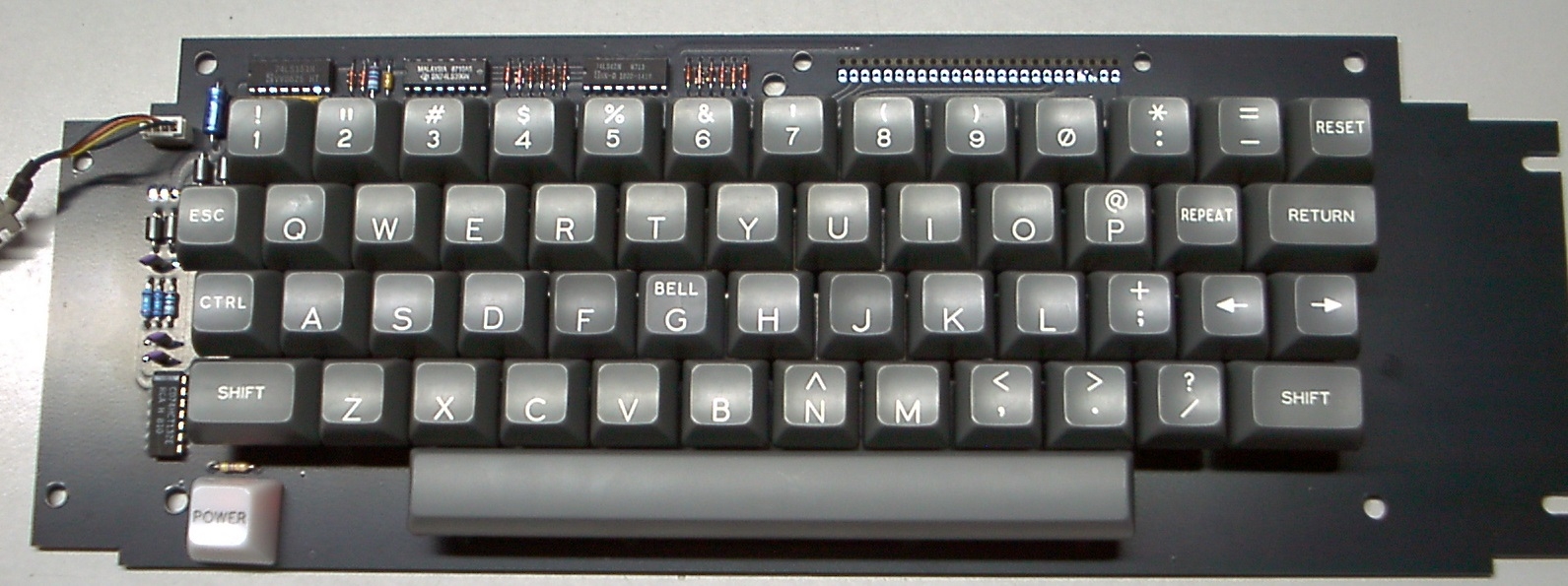
This is yet another Apple keyboard project, with the primary mission objective to be a good, affordable, nice looking keyboard for the Apple-1 which can be built by hobbyists. But there is a reason to put this into the Apple II forum, too:
A secondary - potential - application for it is replacement of decrepit keyboards in vintage Apple II computers. But although I made every mechanical design effort to - hopefully - make it fit into an Apple II shell, I could not verify whether this is true of not, as I long ago have sold the last empty Apple II shell / enclosure I had.
BETA TESTER(S) WANTED !
This is why I post this here in the Apple II forum. Maybe somebody who has both an Apple II and an Apple-1 wants to give YAAK a try. If it does not fit into the Apple II, you still can use it for the Apple-1 . . . and no money nor efforts wasted.
COMPATIBLE WITH THE ORIGINAL KEYBOARD ENCODER ? (NOT YET TESTED !)
Electrically, YAAK should be the same as the original Apple II and II+ keyboard with the separate keyboard encoder card with the 25 pin interconnect to the keyboard. Unless the on-board scanner components of YAAK are populated - then you lose that compatibility.
Theoretically, YAAK without its own scanner components being populated but the 25 connector being added should be able to accept an original Apple II keyboard encoder card and work. It has been my experience that even for the most rotten original Apple II keyboards, hopeless cases of all too many bad keyswitches, their encoder card still works fine more often than not, unless it was ruined by somebody who plugged in the 16 pin keyboard cable in the wrong way.
So there should be plenty of original encoders out there which can be re-used for YAAK. And then, there are replacement encoders based on common MCUs which I heard of, but don't own any of those, so I can't vouch for them.
TESTS STILL NECESSARY
I was not able to test this use case (with the original encoder card) as I did not order the Hirose connector yet, which - hopefully - would accept the pin row of the original encoder card.
UNAVOIDABLE MECHANICAL DIFFERENCES
The YAAK keyboard uses Cherry MX key switches and key caps custom made by Signature Plastics here in the USA. Using these components lead to some mechanical differences to the original keyboards. The biggest issue is with the position of the key caps:
The key caps I found on the first of the two original Apple II keyboard specimen I own are shaped such that they make a concave contour for the fingers - in other words, their tops are not in one plane. This was accomplished by shaping these original key caps in a peculiar way, each row being different, and by adding small plastic interposers between the key switch and the key cap. This contraptions do not fit on the Cherry MX key switches (I tried).
The second original Apple II keyboard I own has key caps which are all shaped alike, and hence would be in a plane, but again, small plastic interposers were added to tilt them a little bit. Presumably, this was done to compensate for the slanted shape of the Apple II shell, such that the key cap tops are parallel to the the desk surface despite of the wedge shaped shell. These plastic interposers also do not fit to the Cherry MX key switches.
So sorry, the original key caps of these Apple II keyboards can't be re-used for the YAAK project, and the newly made key caps will be in the same plane as the keyboard area of the original Apple II shell. Whether this looks acceptable and works for fast touch typists is the still open question.
The only remedy would be to make (3D print ?) small interposers which fit to the Cherry MX key switches, but this is not in my field of expertise, as I don't have a 3D printer. So I don't know if these can make such tiny parts with the required tolerances. Making a custom injection molding form would be prohibitively expensive.So we must accept the limitations of what hobbyists can do and what they can't do.
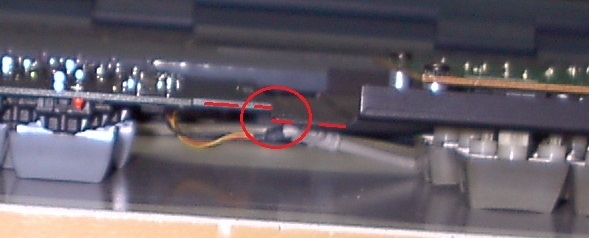
There is another small difference: the distance from the plane of the key cap tops to the plane of the mounting frame is slightly larger for YAAK, so to arrive at the same height of the key kap tops over the Apple II shell outer surface, added spacer discs may be needed. Having no empty Apple II shell anymore, I can't test this.
Here is a photo showing the different height above the keycap plane:
Also, the YAAK keyboard PCB is designed to be slightly wider in the Y direction than the original PCB, but the original encoder card specimen I have also stick out a bit over the PCB edge of the original, so I designed the YAAK PCB not to exceed that limit. This hopefully is no problem, but no guarantees until it's tried out.
If necessary, the PCB outline could be changed to reduce this dimension, but then the alternate mounting holes which are meant for Apple-1 applications of this PCB will be weakened and might get fatigue failures after a certain number of keystrokes. Still, if the alternate mounting holes are not required, these holes could be removed and the PCB dimension could be reduced accordingly. The idea, for the Apple-1 use case, was to bolt the keyboard to the top or bottom of some custom made enclosure with enough screws that no extra metal reinforcement frame is needed for the keyboard. The original Apple II keyboard only has four screws at the far ends but it does have an integral metal frame. Typical hobbyists can't make such a frame, so I designed in seven (!) extra mounting holes, for screws/bolts with up to 4.8mm outer thread diameter, three on the upper edge, and four on the lower edge of the PCB. Seven of such bolts, strategically placed as they are, should make the keyboard PCB as stiff against bending as if it had a heavy steel sheet metal frame.
All these small mechanical differences might conspire against the use of YAAK in an original Apple II. But this does not affect the primary mission objective, a keyboard for the Apple-1 which in this application looks (almost) the same as the Apple II keyboards which in the past were cannibalized from old Apple II computers. As these old Apple II are becoming sought after collector items on their own right, it's more and more considered a sin to cannibalize them by many members of the scene.
Other than that, at least from the bottom side, the overall size and the mounting holes seem to be a good enough match:
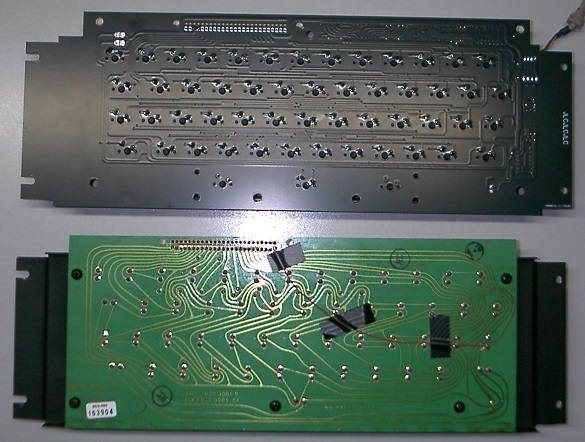
(Never mind the red wire seen on the original PCB, this was needed for tests of the scanner electronics WW lab rat).
WANT TO KNOW MORE ?
Here is the link to the YAAK thread in the Apple-1 forum:
https://www.applefritter.com/content/uncle-bernies-yaak-project-yet-another-apple-keyboard
If you want to help me with testing if YAAK can be used in an original Apple II, please send me a PM. This is the "send PM" button below my user name on the left side. But sorry, I won't send anything to the EU, Norway and Switzerland - their customs procedures and required paperwork got too tricky and time consuming, and even then there is no guarantee they let a parcel pass into the EU. Not worth the hassle and the risks. (And I think it will get worse, as in practice it's looking like a undeclared trade war).
Comments and questions invited - but please, put Apple-1 related comments in the Apple-1 forum thread, and Apple II related comments here in this Apple II forum thread, to avoid confusion of readers.
- Uncle Bernie
Hi fans,
some progress was made with the Apple II version of my YAAK ("Yet Another Apple Keyboard") project.
This morning (yes, a Sunday !) FEDEX delivered a large parcel with electronic components I had ordered from Digikey about mid week. Most are RF stuff for my atomic clock project, but there also was the all important 25 pin Hirose connector (Hirose part # MDF7-25S-2.54DSA(96) , Digikey part # MDF7-25S-2.54DSA(96) -ND).
I had some fears that I might have gotten the mechanical footprint wrong, not badly, and not out of ineptitude to read the Hirose datasheet, but because of the non-negiotiable tolerances on drill diameters at JLCPCB, who manufactured the first YAAK PCB production run. This is a trap any PCB designer must be aware of: once mechanical finished hole tolerance considerations come into play, all bets are off, when you can't walk into the workshop of the manufacturer.
Seems that I was lucky, and the Hirose connector did fit:
YAAK_HIROSE.jpg
And it also smoothly accepts the pins of the original Apple keyboard encoder:
YAAK_w_encoder.jpg
In other words, perfection !
"Perfection" at least for the things which were my greatest worries. There is the minor issue of how to properly fasten the "POWER" key cap to the keyboard (at the moment it's a friction fit of a 3mm LED: the 'cross' in the key cap which normally fastens the key cap to the key stem was drilled up on a drill press using a 7/64" drill bit, which is close to 2.8 mm diameter).
I am not super happy with this solution, but this is the key cap I got with the set of key caps from the manufacturer, and have to live with it, and note that a real illuminated Cherry MX key can't be used, as it would get too high compared to the flat top white plastic cap for the power light on the real Apple II keyboard.
Still, by running a yellow 3mm LED at low current, the outcome looks almost the same, in terms of color, as with the miniature incandescent light bulb that was used on the original APPLE II keyboard:
YAAK_POWER_LED.jpg
A quick functional test on an Apple II clone also showed all keys do work:
YAAK_Test.jpg
The BIIIIG remaining question is whether the whole YAAK keyboard fits mechanically into a real APPLE II shell (of course, I mean those versions of the Apple II which used this style of keyboard, and so the APPLE IIc and the APPLE IIe are excluded).
Any volunteers to try the mechanical fit on their Apple II shell ?
You can get an empty YAAK PCB from me for $6 plus postage, and, alternatively, you can get get this keyboard prototype (excluding the original Apple encoder):
YAAK_AppleII_topview.jpg
. . . for only $95 plus postage (no, you can't buy the components yourself for this money), and if this is too expensive for you, I can take the key caps off and sell you the populated PCB with the original Cherry MX Key switches but without any keycaps for $49 plus postage (only one available, the one I built for these photos, first come, first served !)
Any takers / beta testers / volunteers who want to try it ? If so, send PM to me for more info (sorry, this offer is only valid for people living in the lower 48 of the USA, to keep postage fees at bay).
Return policy:
If it does not fit mechanically into your Apple II shell you can send it back to me (undamaged and in the condition you got it), you pay the return postage, and I will refund you the whole amount you paid, which is the above quoted price, the postage to your home, and the return postage you paid - so you have zero cost if the experiment fails (meaning: it does not fit into the shell).
In this case I would like to know why it did not fit (photos you make), otherwise, no refund ! If the experiment succeeds, meaning: it does fit into the shell, I would like to hear which spacers or other measures you had to add to make it fit. And you should take a photo how it looks from the rear (inside the shell) and from the outside. Also note that you can"t get a refund if you mechanically modify the keyboard in any way (meaning: no cutting, drilling, sawing ...)
These are the rules, which I think are fair.
Sorry to bother you with that call for volunteers. I was stupid enough to sell the last empty Apple II shell I had to a member of Applefritter, many years ago. The reason why was that back then, years ago, I never had the foresight I might need it years later for testing if a keyboard of my own design would fit into it.
Same thing happened to me with some early BYTE magazines (including the issues about the "1977 Trinity", Apple II, PET 2001 and TRS-80) which I threw out after they were flying around in my home for more than 30 years without having been read even once in all these decades. The consequence of this stupid mistake was that I had to buy them again a few years ago, but at outrageous collector's prices. Lesson learned: never, ever, throw away any item that is "vintage computer" related. Never. Just don't do that. All these things are becoming collector's items. They document the start of a new era, the microcomputer era. Which now is about half a Century old (~50 years) and greatly changed our civilization. Imagine what if the microprocessor never had been invented . . .
- Uncle Bernie
That YAAK looks really great! I wish I had any $$$ right now but times are tough. I even have a Videx Enhancer II (replacement for the Apple keyboard encoder board with additional functionality). Maybe you could work with someone like Henry at ReActive Micro to put this into production? He might be willing to pay a small royalty per unit or something or perhaps maybe a one time payment up front. I don't know how he normally works, but he has done similar things for a number of other retrocomputing products like CFFA3k over the years.
Hi fans -
over the past nine months not much progress was made with the YAAK keyboard, because I had to push other projects forward, such as the 'IWMless'. But today I have good news for you:
YAAK now has its own keyboard encoder, aptly called 'YAAKEN' (No, I ain't of Swedish origins ;-)
It is the missing piece to employ the on-board keyboard scanner on the YAAK keyboard PCB, as seen in the photo in the first post of this thread. The completed wire-wrapped "lab rat" came alive today and worked perfectly on first power up:
YAAKEN_LIVES.jpg
Here is a closeup of the YAAKEN 'lab rat':
YAAKEN_Closeup.jpg
It is based on a lowly (and cheap) PIC10F202 microcontroller which is the second lowest member of the 8-bit MCU family made by Microchip Technology. The lowest member is the PIC10F200 which initially was targeted for YAAKEN but alas, slow but steady feature creep increased the firmware above its 256 words of instruction memory. No big deal, as I had unemployed PIC10F202 lazing around which are leftovers from the MCU based motor timer I developed during the 'IWMless' project but then did not use for the 'IWMless' beta test versions (I used cheaper RC based timers instead).
I intend to use the SOT23-6 version of the PIC10F202 for the "release" versions of YAAKEN, and there also are three NPN transistors and one 74xx164 8-bit shift register which expand the only four I/O pins of the PIC10F202 (I happen to have a few thousand PIC16C66 in stock, but these are mechanically too large for my intention to make a very small PCB).
SUMMARY OF FEATURES
- YAAKEN connects to the on-board scanner of the YAAK keyboard over only four wires in a PS/2 cable
- YAAKEN makes all ASCII characters from $OO to $7F, even those not available on a standard Apple II keyboard
- YAAKEN has a hexadecimal entry mode which can produce all codes from $OO to $FF (alas, Apple-1 and II lack the MSB)
- YAAKEN has "N-Key Rollover" allowing very fast typing
- YAAKEN has autorepeat
- YAAKEN can generate RESET and CLR SCREEN impulses (the latter is needed for Apple-1).
- YAAKEN Bill-of-Materials is ~$2 ... except for the PCB (costs t.b.d.) and the PS/2 cable (salvaged from old mouse)
Compare this ultra low cost approach to any other Apple-1 or Apple II capable keyboard encoder on the market. I wanted the absolutely cheapest solution possible without sacrificing any of the above features. The PIC10F202 is instrumental to do all this at this low cost. This is why I did not choose any other microcontroller for this project (Note: later versions won't have the heinously expensive LED displays made by Hewlett Packard, these where only added for debugging purposes ;-)
CONCLUSION
With the YAAKEN, a feature rich but ultra-low-cost keyboard encoder has been developed for the YAAK keyboard. It uses only four wires to connect the keyboard to the encoder. The planned encoder PCB will plug directly in the DIL-16 keyboard socket of the Apple-1 or Apple II and it will not be much larger than that socket outline plus the size of the PS/2 connector.
OPEN QUESTIONS TO MY DEAR READERS
Since the PIC software ran perfectly upon first power up (thanks to a very peculiar development method) there is not much to do to finalize the PIC software. The big open questions with the software are these:
1. Which delay until autorepeat is optimum for most users ?
2. What is the best autorepeat rate (I found 10 cps is too lame for me)
3. Is the interlock / safety feature for RESET and CLR SCREEN needed ? (it's the CTRL key which enables them)
4. How much time delay from RESET and/or CLR SCREEN keys being pressed to the actual action being triggered ?
At the moment I require CTRL to be pressed before the RESET and/or CLR SCREEN keys, as a sort of interlock safety feature. The downside is that if people forget this trick, then they will press RESET and/or CLR SCREEN and think the keys don't work.
At the moment I require 0.5 second of RESET and/or CLR SCREEN keys being down until the RESET and/or CLR SCREEN action occurs. Such a delay is necessary but it may be too large. I forgot about having increased it and wondered for a short while why the RESET key did not work with the PC-48 Apple clone I used for the initial tests - blind routine also may have contributed, because the original keyboards (the Apple originals and the one of this Taiwanese clone) react instantly to the RESET key being hit. Alas, if I reduce the delay time too much, to get a quicker response, then it may be impossibe for some users to hit both the RESET and the CLR SCREEN keys simultaneously within the shortened time window, and this might foil the desired action on the Apple-1 (clearing the screen and restarting the WOZmon at the same time). This feature is not needed on the Apple II, though, as it has no hardware CLR SCREEN function.
COMMENTS INVITED !
If you are interested, and want to know more, please comment ! I've more photos and could also write something about my peculiar development method which I tried for PICs the first time, and it worked like a charm !
Please also tell me your take about the yet open questions !
- Uncle Bernie
Looks good. I think I have a ][+ clone with a broken keyboard so something like this might be a nice thing to have.
I have to say I am a fan of the "look" of the physical keyboard's dark-ish keycaps and the decidely "retro" shape of the keys.
I'd buy one when it comes available, just because it looks really good.
Very nice work!
The default repeat delay for a PS2 Keyboard is 500ms it can be set in 250ms steps up to 1s.
The typematic rate (auto repeat rate) can be set between 2 cps and 30 cps, default is 20 cps.
I prefer 250ms (shortest possible delay) and 30 cps (max repeate rate)
For CLR I would think 250ms safety delay is a good delay.
For RESET I would think 500ms are better.
Hi Everyone,
I am happy to report I have successfully built and tested a YAAK keyboard from a kit provided by Uncle Bernie.
The kit included the PCB, cherry switches, keycaps, stabilizer, small electronics (connector and power led) and detailed construction instructions. This version of the kit does not include a keyboard encoder.
The instructions were easy to follow (although I wish they would include a schematic as well).
I am using a keyboard encoder I got from ReactiveMicro (developed by briel computers) and it pairs perfectly with the YAAK PCB (see photos).
The keyboard and encoder were tested on an Apple II rev 7 replica kit from ReactiveMicro.
I don't have an Apple II plus case so I used a laser cutter to make a case from plywood and hardboard. I can't comment on how to mount the keyboard in an original case but I was able to mount the keyboard with 4 screws with my case.
I'd like to try thank Uncle Bernie for making this kit available and confirm all works as it should and the keyboard feels and looks great. The quality of the PCB, switches and keycaps is fantastic. The switches are black and feel smooth (linear?).
I have not soldered the power LED yet...
IMG_4206.jpeg
IMG_4207.jpeg
IMG_4208.jpeg
IMG_4215.jpeg
Nice work!
Hi Fans -
this afternoon I designed the PCB layout for the YAAKEN ][ keyboard encoder:
YAAKEN-2.JPG
This is the version for the Apple II. Size is 18mm x 42mm ... it had to be a little bit narrower than the version for the Apple-1, because the Apple II PCB has a smaller distance between the ICs in the rows.
The YAAKEN ][ plugs directly in the DIL-16 keyboard connector of the Apple II and its PS/2 connector then sits between IC rows A and B. The PS/2 cable of the YAAK keyboard comes from the left (yellow arrow in the above photo). The mechanical fit is very tight ... the jury is still out if it really fits in all known Apple II motherboards. But it's not a risk ... if the YAAKEN ][ PCB would collide with the adjacent ICs on the motherboard, then adding just one machined pin DIL-16 socket as a spacer would lift it up enough to make it fit.
As with the YAAKEN-1 version, seen here:
https://www.applefritter.com/content/uncle-bernies-yaak-project-yet-another-apple-keyboard
... all the SMD components have been hidden on the bottom side of the PCB. But ... this was not done for the "1970s vintage looks" which are mandatory (I think) only for the Apple-1. It just turned out that I could not put any SMDs on the top side without increasing the PCB size.
The next step I plan is to make a small PCB frame with three break-off sub-PCBs and then see if I can find a PCB manufacturer here in the USA to make them. Because there is one odd thing ... the PS/2 connector has a sheet metal shield with "tabs" that go through the PCB to anchor it. The "slits" in the PCB (visible in the above picture) must be made correctly.
I have no doubt that JLCPCB would do it right, but since the tariff chaos using Chinese PCB manufacturers is off the table for me. I do not want that some parasitic carrier slaps $60-$200 "flat rate tariff / handling fee" on a parcel from China containing PCBs worth $10.
Let's see if US based PCB aggregators like OSPARK can do this in the right way and at which costs !
- Uncle Bernie
This looks like a fun project. Do you still need a tester? I have an Apple II plus and IIe cases to try it in.
I also need an Apple II keyboard for a standalone project so this would work out well.
In post #11, 'PeterKerr' wrote:
" This looks like a fun project. Do you still need a tester ? "
Uncle Bernie answers:
Yes, I need more beta testers for the YAAK, Apple II version. I especially appreciate your promise to test it in real Apple II shells. So far I had only one beta tester for that but nothing came out of it ... he ordered only a naked YAAK PCB to be cheap, and said he would get the cheaper Chinese knockoffs of the Cherry MX key switches and Chinese made key caps, and so far I got no feedback how this worked out. Maybe it didn't.
ABOUT COSTS FOR THE BOM
I checked this moring with OSHPARK, their webpage says that three PCBs of YAAKEN ][ will cost $5.85, that is $1.95 per YAAKEN PCB. Fair enough !
It also seems that their rendering tool understands the fine slits needed for the PS/2 connector. Whether they will come out like that is an open question before I have prototype PCBs at hand.
I have a few YAAK PCBs left which I did order from JLCPCB erlier this year, before the tariff chaos started, and can part with them at my own cost. I also have original Cherry MX key switches and key caps at pre-inflation prices. I bought about 800 key switches at Mouser in Y2022 (anticipating the YAAK project ;-) and paid $0.656 per switch. Now, three years of inflation later, one of these switches costs a tad over $1. Sigh. The key caps were made by Signature Plastics here in the USA and so these are not affected by tariffs. These are not cheap, however, IIRC a set is a tad above $50, but at the moment I can't find the invoice. The problem with these is that you need to order at least 50 complete sets from them, and then wait for YEARs until they make such a small production run. I participated in one of the compound orders organized by an Applefritter member to make it happen.
Building a whole YAAK keyboard with a YAAKEN encoder is quite expensive, the pre-tariff BOM will run a tad above $120, but certainly less than $150, but I still think it's the lowest cost Apple-1 and Apple II compatible, vintage-looking keyboard available, and the quality is second to none - no industrial keyboard available for sale gets anything near, as they all use the cheap rubber contact mat inside, or, worse, plastic foils with conductive ink printed on them as "contacts", these neither have the great "feel" as the Cherry MX key switches have, and certainly not the 50 million cycles Cherry specifies as the typical service life. You can get "cheap" Chinese knockoffs of those Cherry key switches, almost lookalikes, drop-in form and function, but their contacts are of very dubious construction, and lack the gold cross point contacts which made the Cherry keyboards famous. I posted a photo of the lousy inner guts of these knockoffs somewhere here on Applefritter. I think they are not worth the money. I would not use them even if I could get them for free. For me, it must be original Cherry MX.
I plan to order prototype PCBs at OSHPARK this week and if everything goes as planned, until end of October there will be building manuals, Bill-Of-Materials, and a few beta test kits available.
Stay tuned !
- Uncle Bernie
Please let me know when you get to the point of having a beta kit and I'll purchase it.
After sending the earlier post I realized that the IIE probably won't be useful with its different keybaord layout. I do have 2 differnt II plus machines though which have different model keyboards so we can get some variety in testing those.
PK
A keyboard like this won't work at all with a //e because the //e has the encoder on the motherboard and this keyboard has it as a board that hangs off the keyboard like the later ][+ units did. Early ][ and ][+ units had the encoder on the keyboard PCB.
Correct. The //e has more keys, plus it has an IDC 26 connector for the keyboard and the ][ and ][+ have a DIP 16 connector.
This afternoon the YAAKEN-A2 encoder prototype announced in post #10 was populated, and it works !
Here is a photo of how my experimental setup using a Taiwanese PC-48 Apple II clone looks:
YAAKEN_A2_top.jpg
(Oh, just in case Apple lawyers are seeing this, I do have a legit original Apple II motherboard, with the legit ROMs, I'm just using this Made-in-Taiwan clone because your Made-in-USA original Apple II motherboard has sh*tty IC sockets and does not work anymore ! --- I gave away its empty shell to another Applefritter member, just for the postage !)
The (almost) twin brother of YAAKEN-A2, called YAAKEN-A1, was presented around this noon, see post #22 in the companion thread of the Apple-1 forum:
https://www.applefritter.com/content/uncle-bernies-yaak-project-yet-another-apple-keyboard
... where you can find more information. The most obvious difference between YAAKEN-A1 and YAAKEN-A2 is the form factor, the latter had to be much more skinny to fit between the closer spaced ICs on the Apple II motherboard, and hence, is more difficult to solder - you need a long cone shaped soldering tip and can't have shaky hands to assemble YAAKEN-A2 successfully. YAAKEN-A1 is easier to solder.
Yet another difference between YAAKEN-A1 and YAAKEN-A2 is the positioning of the PS/2 plug, see the closeup photo here for the reason why:
YAAKEN_A2_closeup.jpg
The problem with the Apple II is that the keyboard connector sits in the first row of ICs on the motherboard, and the front wall of the enclosure is slanted upwards, to give the Apple II a "wedge looking" front.
I don't know why that design decision was made, as it is not needed for the functionality of the machine, so unless you prove otherwise, it's just a "industrial design gag" for me. Which thwarts any attempt to have the PS/2 plug for the YAAK keyboard coming out towards the front, as is the case with YAAKEN-A1.
The electronics are the same in both cases, except for the different pinout of the keyboard connector, and the value of one resistor, which is in the CLR SCREEN circuit. This is necessary to make the YAAKEN-A2 fit for use with the A2A1 adapter seen here:
https://www.applefritter.com/content/smallest-a2-a1-keyboard-adapter-pcb-world
YAAKEN-A2 still has the ability to generate a CLR SCREEN impulse, which is not needed for Apple II. But all you could save by omitting this feature is 12 cents worth of SMD components. So I recommend anyone building YAAKEN-A2 to put all the components in. This impulse could be used for other custom functions you could add to the Apple II. And it is required if the YAAKEN-A2 is used with the Apple-1.
THE REMAINING OPEN QUESTION
I still don't know whether YAAK fits into a standard Apple II or Apple II+ shell. I once had such an empty shell but I gave it away (as mentioned above). There could be problems, but they might be solvable by using some shims, possibly 3D printed. You see, Apple (the corporation) did change the Apple II keyboard configuration a lot over the product lifetime. Some original Apple II keyboards had little plastic interposers which changed the slant angle between the surface of the keyboard PCB and the top side of the key caps. I think that all these shenanigans could be reproduced, but I leave that to people who have 3D printers.
Comments invited !
- Uncle Bernie