

AppleII+ emulator, assembler & debugger - RetroAppleJS v1.3

11 posts / 0 new
Last post
FlyingZebra's picture
Online
Last seen: 1 hour 40 min ago
Joined: May 5 2026 - 16:09
Posts: 15
AppleII+ emulator, assembler & debugger - RetroAppleJS v1.3

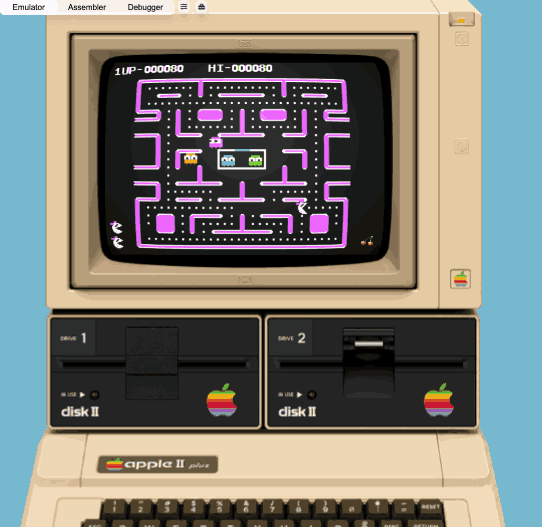
Here's another browser-only Apple II emulator, I probably started around the same time as Chris Torrence, about five years ago, but developed completely separately as a one-man project, with completely different features that make it rather interesting to compare.   It's an emulator, assembler and debugger all in one package:

  • The emulator core was mainly inspired from an early PoC from Thomas Skibo.   Before that time, I really thought client-side vanilla-JavaScript would never pull this off, but here it is!   I'm an enterprise architect in the daytime, so, I payed attention to it's modularity, configurability and usability design.  
  • The assembler has reached a high level of maturity, as it has a lexer that can compile syntax from most popular 6502 assemblers, like Merlin, S-C and ca65.  I packed a few listings one can load , assemble and paste directly into the emulator, or the step-debugger.   Another noteworthy feature is the listing produced by this assembler.  One column visually displays branch instructions using graphic characters, which comes in very handy for readability.
  • The step-debugger is a stand-alone debugger using a separate instance of the hardware object container of the emulator.  It allows to construct an entire memory map based on an emulator memory dump.   There's also a real-time debugger running inside the main emulator context, but this one requires more work.

The emulator really shines through its display modes, some nearing CRT rendering perfection.   In fact, I developed 4 Apple II display drivers based on different principles, and we can switch modes in real-time.   GPU based rendering (offloading emulator CPU operations), Wave based rendering (emulate a true inner working of a CRT monitor), ThreeJS based rendering (projecting a real-time emulator image on a curved monitor surface) and the rather classic pixel-wise HTML5 canvas painting mode.

Next steps would be to extend the emulators capability to run a virtual VIDEX card and a MOCKINGBOARD card.

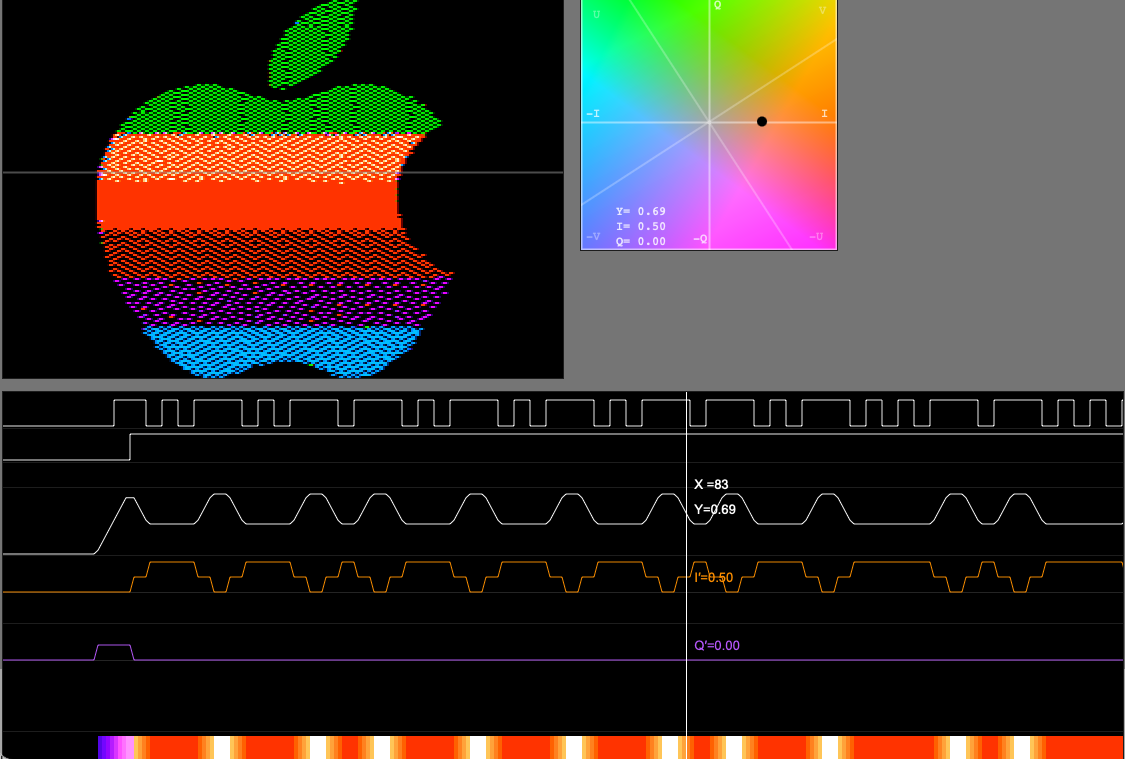
Last but not least, I did develop a few tools alongside that can be helpful to understand the Apple II+ even more.  Check out the LAB tools section for more experimental stuff, e.g. a tool showing how the Apple II video circuit generates color signals on a CRT.


  • Let me know what you think of this project in the comments, I'd very much appreciate your feedback.
Until then, cheers guys!
Offline
Last seen: 23 hours 44 sec ago
Joined: Apr 26 2016 - 08:36
Posts: 873
There seems to be an issue

There seems to be an issue with the character renderings using Safari.

FlyingZebra's picture
Online
Last seen: 1 hour 40 min ago
Joined: May 5 2026 - 16:09
Posts: 15
character rendering
  • This emulator was mainly built around Safari on a Mac, and I regularly get to test the emulator too on Chrome and Firefox.  Least I can say is that I never experienced this kind of output, which makes it difficult to reproduce.
  • I know the render engine gets the Apple II character ROM as argument;  I can definitely check error modes with that.
  • If you navigate through the slots by pushing the "6>" button until you have "H>" (this is the host I/O controller where you can change the settings of I/O devices)
  • By clicking the settings icon on the right side of the threejs label (screenshot below), you can change the threejs parameters.  Changing any of these could update the screen in a constructive way.  
  • Finally, you can also try to download the github project locally and run index.html or /dist/RetroAppleJS.html (=portable single file containing the entire project)https://github.com/RetroAppleJS/RetroAppleJS.github.io
Tnx for your feedback. 
Offline
Last seen: 3 hours 57 min ago
Joined: Jun 18 2010 - 13:54
Posts: 884
FWIW

FWIW - running on Mac OS 10.14.6 (yes, I know its old) and Safari 14.1.2, I get this:


and it doesn't boot. Sorta works in Firefox.


FlyingZebra's picture
Online
Last seen: 1 hour 40 min ago
Joined: May 5 2026 - 16:09
Posts: 15
running on Mac OS 10.14.6
  • As we speak, I'm ran  a perfect test on an early 2014 MacBook Air (Intel), running on Big Sur 11.7 and Safari 16.6.
  • So, it looks like Safari 14.1.2 is probably on the very edge of it's capabilities running a vanilla Javascript browser based emulator.
  • The CPU is probably not the biggest issue here, but the GPU i'm using to emulate the already challenging Wozniac display logic. 
 
 
  • The proposed link will still try to load GPU.js, which can still cause a showstopper, quite literally.   So, no panic if this link still does not work, I can try to sort out a method that prevents GPU.js from loading altogether, based on a browser version for example. 
Quite frankly, it was already quite a journey to squeeze so much processing power out of browser-based vanilla JavaScript, so, if anyone manages to run this emulator on a machine older than the year 2014, you'd be among the lucky ones.   
  • Anyways...guys, thank you for testing, really appreciated.
Cheers!


S.Elliott's picture
Online
Last seen: 46 min 43 sec ago
Joined: Jun 23 2022 - 16:26
Posts: 331
missing key code
 

Here's an easy bug fix: On an original Apple ][, SHIFT+CTRL+M generates ASCII code 29 ( CTRL+] ), but your emulator generates ASCII code 13 ( CTRL+M ) instead


Congratulations on getting SHIFT+CTRL+N ( CTRL+^ ) and SHIFT+CTRL+P ( CTRL+@ ) correct.  Those are rarely used, and thus easily overlooked.

FlyingZebra's picture
Online
Last seen: 1 hour 40 min ago
Joined: May 5 2026 - 16:09
Posts: 15
key code translation
  • Great finding! A no-brainer indeed, which I fixed right away.   Honestly, I did not check these keycodes after a keyboard refactoring exercise last year.  Hardwired keys in Apple II keyboards have always been tricky.  Some 5 years ago, my father trashed both my old Apple II+ machines, which initially triggered me to write this emulator.  But right now, it is still a curse not having a bare metal Apple II at hand to quickly check against a baseline.


  • On a completely different note, I really enjoyed your crazy idea of reviving the Vapor Lock hack, which is definitely not something that's self-evident to emulate. I mean, who on earth thinks about emulating data bus capacitance and electron beam position tracking?
  • Anyway, as you can see, I've gathered some useful information in the GitHub project under /disks/Experiments/Vaporlock in preparation for Vapor Lock emulation. I know my emulator doesn't currently have that capability, but I'm convinced it's definitely possible.
  • Once I'm completely happy with the overall device architecture, I'm sure I'll be able to confidently revamp it to handle some more 'sublime' aspects of the Apple II.
  • Thanks ! 
Offline
Last seen: 23 hours 44 sec ago
Joined: Apr 26 2016 - 08:36
Posts: 873
I've partially solved the

I've partially solved the display issue by opening up the settings sliders and clicking on the little "eyeball" icon for video mode, which seems to shift the video from mode to mode - I presume it's for scanlines/no scanlines?  CRT emulation/distortion?  Or perhaps it's RGB mode?  

Something else?  Anyway, after cycling through the button twice it displayed the text screen correctly.


I will also comment that running an uploaded disk image (in this case it was "bagman.po" found elswhere in this forum, is really really slow!  Like painfully slow.

FlyingZebra's picture
Online
Last seen: 1 hour 40 min ago
Joined: May 5 2026 - 16:09
Posts: 15
painfully slow
 

That's right! The eye icon is exactly the icon that allows you to switch from one screen driver to another.  These are not setting changes, but screen driver algorithms based on fundamentally different principles (I'm sorry, but that deserves a bit more context, but we'll get to the point why your display option runs slowly):

  1. GPU = algorithm based on GPU.js, the driver (located in res/EMU_DEVICE_video_GPU.js) gets a flash copy of a large RAM portion at every refresh frame.  (10 fps by default).  The GPU algorithm gets 3 arguments, raw RAM data, the Apple II character ROM, soft switches and an X/Y coordinate.  With this information, the GPU  kernel renders TEXT, LORES, HIRES and all mixed modes.  Here's a separate test tool you can play with.  GPU programming requires a true paradigm shift.  While on web pages, we can paint pixels, lines and text anywhere on an HTML canvas, the GPU kernel gets one X,Y coordinate as input and spits out the color of just one pixel, and the X,Y coordinates don't come in logical order.  As a matter of fact, the same kernel function, hence pixels are painted in parallel, approximately 53000 times per frame on an Apple II.   In other words, the GPU here renders the same output as the CPU would do, you won't see any difference (as long as your browser supports WebGL)
  2. Wave = also an algorithm based on GPU.js (located in res/EMU_DEVICE_video_wave.js), but instead of encoding colors in a deterministic way (e.g. when we have 2 adjacent high bits: color = white), we encode color signals like wave functions, which a real Apple II video circuit color would do.   Here's a separate test tool I wrote to develop this specific behaviour, you can play with it and see by yourself what it does.  On the HGR screen, 7 visible bits are defining a luminance and chrominance (color) slope, and the high bit defines if we want to run over the X-axis of the chrominance wheel or the Y-axis.   This way, when we have two visible bits high next to each other, the luminance slope runs into saturation, which is white, all other states run the 'color cursor' across the color wheel, which magically corresponds to the colors we used to see on a color CRT.  Visually, the image appears a bit blurry, but that's exactly what happens on a real CRT screen in HGR mode.
  3. ThreeJS = algorithm based on GPU.js and the ThreeJS library (located in res/EMU_DEVICE_video_THREE.js).  Admittedly, this is likely the most GPU and CPU resource intensive display driver.  The image is encoded like the GPU algorithm does, but then, it maps the calculated image as a luminecense texture over a real 3D mesh of a CRT tube.  The result is a somewhat warped image (warping is configurable), and the barely noticable green  background texture this is the color of the fosfor used at the time.  The 3D mesh is also illuminated by a point light, which we can actually move around.  In other words, you are watching at a real-time 3D image of an emulated screen. Here's another separate test tool I used to write my display driver.
  4. Canvas = a very simple algorithm that is painting the entire Apple II screen pixel by pixel on an HTML canvas, more than 53.000 pixels across the entire screen (driver located in res/EMU_DEVICE_video_canvas.js).  But while it looks simple, this algorithm is seriously taxing the CPU.  It's the only option left if your browser does not support WebGL, let alone a modern GPU.   Painting every pixel at 10 frames per second is tedious.  I optimised the algorithm to strictly update pixels that need to change, but a game like bagman.po unfortunately generates an enormous amount of pixel updates at every frame, while the same CPU still has to keep up with emulating approximately 300.000 6502 instructions per second... in Javascript. 
  • Conclustion: It was a great pleasure to hear about your experiences with the emulator, less video intensive games or applications may still work as intended, but this retro-compatible video mode is truly smoke testing your 'youngtimer' host computer I'm afraid :-D.  As I said, we are quickly running out of options when the host machine was built before 2014.There's only one more trick you can apply when the disk is loading too slow to your taste.  In the SYSTEM toolbar, you can temporaily glitch the slider to 400% emulator speed, which usually chips down quite some waiting time.


Offline
Last seen: 7 hours 27 min ago
Joined: May 16 2021 - 08:07
Posts: 60
Thanks for that

Thanks I was able to play breakout very enjoyably.

The CRT emulation tool is interesting to play with. Is that Feynman in the test pattern? The CRT emulation is pretty good. If there is a way to make boundaries around a scanline segment (or pixel) not so perfectly rectangular it would be even better.

As for the disk access, I kept running into an issue where after inserting a disk the emulator would fail to recognize that anything had happened, i.e. cold starting would simply reboot the previous disk that was inserted (whether DO, PO, or WOZ).  For WOZ I never got anything to work.  If it is not supported a simple improvement would be to popup an error message when one is inserted.

I have a minor request, can you make the nameplate on the case more like the usual one, according to what I am aware of and remember it was in the center and looked a little different.

FlyingZebra's picture
Online
Last seen: 1 hour 40 min ago
Joined: May 5 2026 - 16:09
Posts: 15
Perfect imperfection
  • Yes, prof. Feynman is my test pattern ;-)
  • Pls clarify what you mean with "make boundaries around a scanline segment (or pixel) not so perfectly rectangular".  
  • In any regard, we have to remain aware screen resolution puts a serious (exponential) strain on performance.  So far, I made rastering resolution' just good enough' to create effects I wanted to achieve.  Conceptually, I though I'd hit a sweet spot with a raster measuring double the size of a standard HGR resolution (560 x 384), just enough to allow some experimentation with sub-pixel transitions in HGR, support DHGR in the future and last but not least support 80-column mode (note that my test tool already staged a PoC displaying 80 columns purely on GPU).  
  • That said, I'm not against ramping up raster resolution for more fancy effects, but GPU.js - basically the product of a 24-hour hackathon in 2016 - has its limitations. Under the hood GPU.js factually abuses the GPU to emulate CPU arithmetic.   In all honestly, I did not yet try doubling to 1120 x 768 for more detailed 'imperfections'; it may work.. it may not.  The good news is that I recently managed to architect hot swapable screen devices, which will allow any time soon to slide in a few more risky screen drivers, so anyone can test on their own the processing limits of their host computer.  Briefly, we have still options, and I'd be glad to discover them.
  • About WOZ formatted disks, I admit, I have no loader for this yet.  Since I have not seen a lot of WOZ formatted disk images around, I did not feel much pressure to write a image file format detector and loader any time soon. The disk peripheral internally works with a NIBble formatted datastructure.  So, .DO, .DSK and .PO disks are all converted to NIB, and the emulator saves only disks in .DSK format.   I have a test tool allowing me to prepare future developments on this subject, but it got a bit on the back burner.  Remember this a one-man hobby project, and I have many other projects like this running on GitHub, but I can still prioritise displaying an error when disk loading fails.
  • ​About the name plate on the case, that's a correct observation, I must have been halucinating :-) but fixed it immediately, a no-brainer indeed.   Now I remember only the Apple IIe had it's name plate aligned on the left.  Until now, I only focused on making this background image of the Apple II+ as compact as possible; this PNG image weighs less than 28Kbyte.   Same is through for all the other imagery.  Note that this project loads no images, all images are encoded inline, which truly allows you to run this emulator offline, copy that one file in dist/RetroAppleJS.html and you have all you need (except ThreeJS.  It refuses to load locally, which is a recent phenomenon that slipped into the latest versions of ThreeJS).  Thanks for your findings!


Log in or register to post comments