
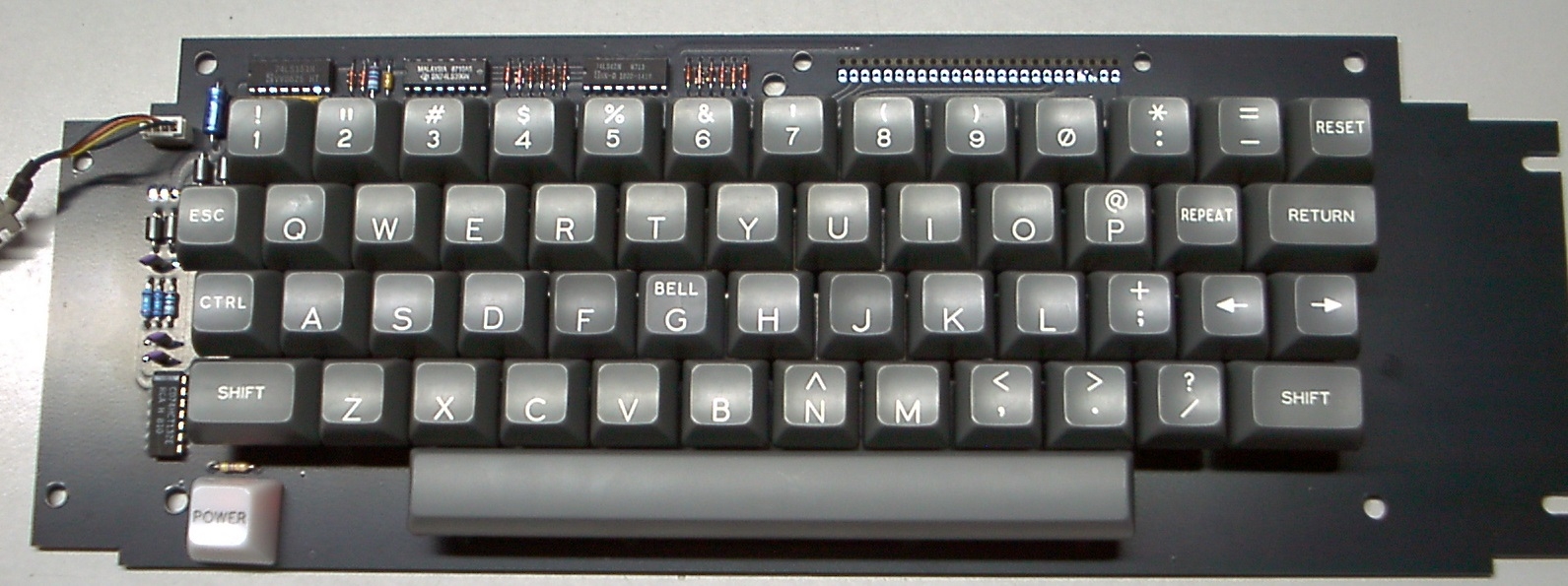
This is yet another Apple keyboard project, with the primary mission objective to be a good, affordable, nice looking keyboard for the Apple-1 which can be built by hobbyists. If we are lucky, it might also fit into the Apple II shell, but this feature was not tested yet, and so I placed a companion thread into the Apple II forum:
https://www.applefritter.com/content/uncle-bernies-yaak-yet-another-apple-keyboard
But for Apple-1 owners, many of which are building custom enclosures anyways, the mechanical differences to the original Apple II keyboard are irrelevant, so don't worry about the dimensions.
MOTIVATION
Yes, I know, there are plenty of keyboard alternatives for the Apple-1 out there (this is why it's "Yet Another" one).
To understand my motivation, let's investigate what is already there in terms of Apple-1 keyboard solutions and discuss their merits and drawbacks:
ALTERNATIVE SOLUTIONS WHICH ALREADY EXIST
There are replicas of the "Datanetics" keyboard which back in the mid 1976 were sold cheaply as surplus (I have some early BYTE magazines with that ad, but can't find it right now). The Datanetics replica is open source, see here:
https://github.com/schlae/replica-datanetics
There also are replicas of the Apple II keyboard, see this link:
https://www.applefritter.com/content/new-apple-2-keyboard-replacement
... among various other open source and closed source / commercial keyboard projects.
Finally, there is the (objectionable) way to cannibalize an original Apple II for its keyboard and slighly modify it to work with the Apple-1.
Various keyboard emulators also do exist, like this one:
https://www.applefritter.com/content/keyboard-serial-terminal
... and this one:
https://www.applefritter.com/content/apple-1-keyboard-emulator-cable-plans
So why did "Uncle Bernie" venture into designing YAAK ? What is the motivation ?
Well, being a reasonably fast typist, I hate the Datanetics keyboard layout which slows me down. Add I also dislike the mess'o wires it needs to connect to the Apple-1 motherboard.
Cannibalizing an Apple II being a collector's item on its own right is out of the question for me. "Adopting" Apple II keyboards off Ebay (the sellers did the butchering of innocent Apple II so these sellers are guilty) turned out to be a futile and often frustrating exercise: over the years I bought a few of those, and not only did I spend up to $200 on these wrecks, I also spent many hours of work to replace the key switches which had failed, and to retrobright the key caps, with various degrees of success.
Even if I would pay myself minimum wage (~$20/hour. For posterity, at the time of this writing, this buys you a small high quality grass fed beef filet mignon which is delicious to eat, if properly BBQ'd). No way that I would spend six to eight filet mignons worth of my time on restoring decrepit original Apple II keyboards anymore.I was stupid enough to do that several times. And then I discovered that the MOLEX connector (which is unobtainium in qty 1) also can fail, see this thread:
https://www.applefritter.com/content/does-anyone-know-source-25-pin-apple-ii-keyboard-connector
As for the various keyboard emulators, they are useful, and I like them to speed up my own development work on the Apple-1, which is thanks to their "download" functions being fed from my Linux based toolchain, but frankly, for a demo of an Apple-1 clone in a vintage computer setting (like VCF, or in a computer museum) having a modern notebook computer sitting next to the Apple-1 and using the keyboard of the modern notebook computer to exercise the Apple-1 is misplaced for that setting and may leave a bad aftertaste with the onlookers - - - the notebook could emulate the whole Apple-1, so what's the point to also show an Apple-1 once the notebook comes on the scene.
So, a better solution had to be found: YAAK.
The early steps of its development can be seen in posts #10 and #11 of the above thread about the 25 pin connector.
KEY FEATURES
YAAK will be an open source project for a keyboard for Apple-1 computers which is based on the famous Cherry MX key switches (at the moment it is NOT open source yet, as I do not want to publish imperfect and untested work, not worth the trouble it may cause).
YAAK can accept the original Apple II keyboard encoder card found on the split PCB Apple II keyboards. These have a 25 pin row which mates with a 25 pin connector on the actual keyboard PCB. I think that lots of these encoders float around as the keyboards with the key switches get defunct more often than the encoders. Also, I was told, or seem to dimly remember, that there are replicas of said encoder cards, although I never had one of those replicas.
But wait, it gets better:
YAAK also has the (optional) on board key matrix scanner which ends up in a PS/2 keyboard or mouse plug. This allows for detached keyboards with longer cables.
Although it is NOT truly PS/2 compatible protocol wise, my vision is to have a MCU based keyboard encoder card with a PS/2 jack. You could plug either the YAAK with populated key matrix scanner components into that jack, or, alternatively, a true PS/2 keyboard. Depending on how "vintage" you want the "looks". The MCU would find out automatically which type of keyboard it is dealing with.
This proposed solution based on a PS/2 keyboard cable is partially driven by my own desires, but also by the needs of people who want to take their Apple-1 clones to VCF's or similar venues, or computer museums who want to give their patrons the opportunity to actually program their Apple-1 being on display.
In both cases, the Apple-1 itself can be protected by an enclosure, i.e. plexiglass, but the keyboard must be exposed and cannot be protected from rough handling, spilled beverages, or dirty kid's fingers (is that brown smear left on the keyboard by that kid really chocolate or is it something more gross ?)
So for these demo purposes, the keyboard must be cheap and disposable. Since PS/2 keyboards are essentially zero cost (now being electronic junk, having been replaced by USB keyboards long ago), this the the cheapest and best solution for a disposable keyboard.
The more valuable and cherished YAAK, of course, would plug into the same PS/2 jack of the encoder for use in safer environments, such as for demos to adults at home.
So far my vision of a modular, DIY keyboard, with a separate encoder that could be tailored for any target system.
CURRENT STATE OF THE WORK
This Friday evening, I got the first batch of PCBs and believe me, I could not find any sleep before I had tested out the functions of these PCBs. Because the electronics and the PCB layout was designed in a great hurry and with no time for prototypes (the reason for the hurry is the upcoming tariffs / customs duties announced by President-elect Donald Trump - I disagree with his plan, and I'm refusing, as a matter of principles, to pay customs duties on any components I buy overseas because I can't source them domestically, so why having tariffs on those components at all ? In this case these tariffs are not protecting any domestic manufacturers, but instead, these tariffs are of parasitic nature any Randian like me must refuse to pay, as a matter of principles. So these are probably the last PCBs I ever have ordered from JLCPCB in China.)
REMARKS ON THE CAD TOOL CHALLENGE
To make my risks with this layout worse, the DIPTRACE PCB layout suite I bought a while ago is still too alien to me, and so far I could not find the time to learn how to enter schematics ... so I had to do all the layout without LVS, all the layout was done just from scribbled schematics on paper. In prior decades I had used EAGLE, and drew schematics first, to get rat lines and LVS, but when EAGLE was sold to some greedy corporation which changed the license from perpetual to yearly, that was the end of my use of EAGLE (I would have needed a fresh installation after my 20+ year old tower PC became too wonky, but the new owners of EAGLE refused to accept the perpetual license I had bought, and that was the end of my dealings with them, greedy bastards who will never see a dime of my money).
OLD TIME TRICKS TO THE RESCUE !
Using old time tricks and techniques from 40+ years ago, I still succeeded in making an electrically flawless PCB layout, which worked on the first try. One of these tricks is to make a photocopy of the hand drawn schematic, and then, during layout, mark every connection done in the CAD tool with a yellow highlighter on the paper.This helps greatly to avoid bugs in the connections.
REMARKS ON THE DRILL TOLERANCE CHALLENGE
I even got the friction fit of the Cherry MX key switches right-on-spot. They can be pressed into the PCB with no undue force, but they still stay put, and won't fall out or get dislocated when the PCB is turned upside down. This is a very important feature for saving time and hassle when populating the PCB. These drill tolerances were my greatest fear - those guaranteed by JLCPCB for non plated through holes are a bit loose. And their plated through holes which have tighter tolerances don't have the friction "bite". This is one example for the risks you have to take with overseas PCB manufacturers. This risk alone would have justified making only one prototype PCB first to test the Gerbers - but there was no time for that, thanks to Mr. Trump.
SOME MINOR MECHANICAL FLAWS
The only two mechanical flaws found so far are related to the solder mask and the silkscreen, but this can be fixed in the Gerbers easily.
For instance, JLCPCB did not replace the "JLCJLCJLC" text I have placed on the bottom side of the PCB with their manufacturing lot number, as they usually do, but they did add that number in some corner nearby. The first time this happened to me. It is not too disturbing. Don't know whose fault this is and why this happened.
What is worse is that the solder mask on the pads for the key switches got somewhat too tight. I did intentionally choose a minimal (design rule) mask ring to get all small vias covered with solder mask, but this somehow also led to the keyswitch solder pads having almost no exposed HASL ring around the hole. For the top side this bug could be called a welcome feature, as it helps to prevent shorts caused by accumulation of potentially conductive debris, which is inevitable unless it's a membrane keyboard (a different animal), but on the bottom side, the solder side, I wish the exposed ring was a little bit wider, to make larger solder joints.
Electrically and mechanically, there is no problem though - the plated through section of the hole solders fine and actually is the part of the solder joint which takes the mechanical stresses and conveys them to the PCB base material. The copper ring of the pad as such is only glued to the base material and hence, is mechanically much weaker. This is why it's always these copper rings of the pads which come off the PCB when being overheated with a soldering iron. So the "bug" with the solder mask being too tight actually may be a benefit for the durability of the keyboard, who knows.
ON THE EXPECTED USEFUL LIFE SPAN OF THE KEYBOARD
The Cherry MX key switches as such are rated for 50 Million cycles. I don't think a typical Apple-1 user could ever reach that life limit of such a switch. How long the keyboard PCB solder joints and traces last before they develop cracks is another open question.
MANAGEMENT OF MECHANICAL STRESSES
I did my best to design the layout such that mechanical stresses are minimized (i.e. using rounded corners of traces). I also have provided seven (!) large mounting holes strategically placed around the key switch area which can be used to bolt the keyboard PCB to the top or bottom of a rigid enclosure (bolt OD max. 4.8mm, which is not exactly weak !). This brutal measure should allow operation of the keyboard with no undue flexing under any condition, despite it has no integral metal frame.
MECHANICAL RIGIDITY REQUIRED !
The importance of mechanical rigidity of keyboard PCBs cannot be over emphasized. Once we use individual key switches soldered into a PCB, it must be rigid and must not flex too much under the keystrokes. The only alternative are plastic contact membrane based, disposable keyboards, the kind which nowadays is ubiquitous in notebook computers. These are not really bad (I'm amazed how long they last, given how cheaply made they are), but they are simply not period correct for Apple-1 use.
So it is unavoidable to bolt this keyboard to some rigid structure. Hence, the seven strong mounting holes.
ISSUES WITH NAKED YAAKs - TO BE SOLVED HOW ?
But for casual use, the finished keyboard PCB can also be laid flat on the desk or table. The only issue with this mode of use is how to keep the leads of the various components from scratching the desk surface. Adding rubber feet may be a solution, but it has been my experience that the self-adhesive variety tends to fall off after a while. The kind of automotive rubber feet I found for my Apple-1 motherboards which can be fastened by a screw turned out to leave persistent black rings if left sitting on a light surface for prolonged periods of time. Nylon feet turned out to be too slippery for keyboard use. So you can see, lots and lots of subtle little details need to be considered when making a keyboard. I'm open for your comments / suggestions on how to solve these issues with naked keyboards.
LESSONS LEARNED !
All the minor bugs encountered and mentioned above could have been avoided by ordering a single prototype PCB first, and not the whole lot. But then, with the inevitiable delays incurred by this, the whole lot might already have been struck with Mr. Trump's tariffs, and according to what was said on the web, this could have doubled the costs per PCB, which is inacceptable for me, considering that I may end up with some unused empty PCBs which find no use and hence will go to a landfill. I hate to throw my money into the trash bin. So it makes a difference if a keyboard PCB costs me $6 or $12 ($6 plus $6 tariffs).
TESTS COMPLETED SO FAR
I have built one lab rat to test the key functions and the on-board scanner electronics, and it works and looks fine:
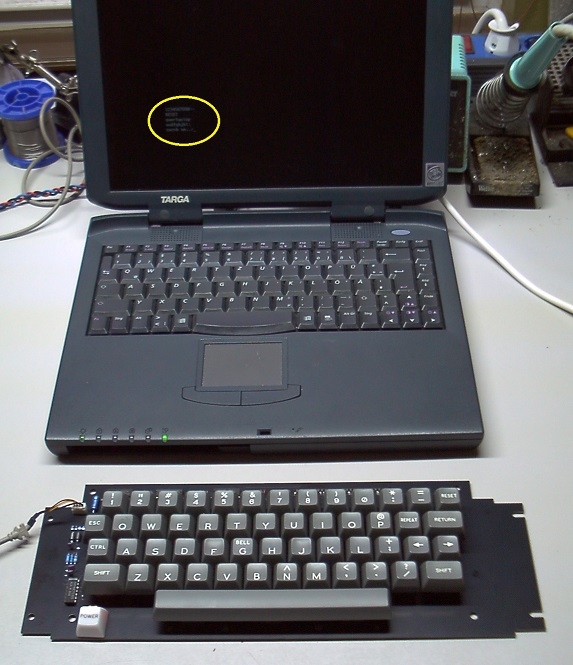
At the moment, the two signal wires from the PS/2 jack are going to the parallel port of a notebook computer running DOS, on which the scanner driver written in "C" runs, which scans the keyboard, does the key debouncing, the autorepeat, and the key encoding, and displays the results on the screen (in the yellow oval of the above picture). Very helpful for testing !
WORK STILL TO DO
Once I have made sufficient progress with some other projects of mine, and I have a BOM for them large enough to justify an order to Mouser or Digikey, I will also order the Hirose connector which is supposed to fit into the YAAK PCB, such that an original keyboard encoder made by Apple (the corporation) could be plugged in.
When this test succeeds, and the solder mask has been revised a little bit, then the Gerbers are ready to be released as "Open Source" - I promise ! (The open question is who will test these revised Gerbers . . . I won't as I now have enough empty PCBs for all the keyboards I intend to ever make for my fifteen Apple-1 clones).
I do not have a schedule yet to design the actual keyboard encoder with the PS/2 jack, which supports the on-board scanner electronics of YAAK. I'm just too busy with other projects right now (such as atomic clocks) and so I have no bandwidth left over (at this opportunity, is anyone out there in the USA privately owning a fully functional Cesium atomic frequency standard ? - if you do, please send PM to me !)
VOLUNTEERS WANTED !
I you like the YAAK project, and if you live in North America, I could provide you with a PCB, a set of key switches, and a set of key caps, and - if you want - the other electronic components at cost ("no profit" for me).
Sorry, I have no mice anymore to salvage the PS/2 cable and its connector - you do this to one of your own old mice. Armed with this, you could build a YAAK with on-board scanner as seen in the above photo, and then you could proceed to develop code for a MCU of your choice to do the keyboard scan and key encoding, and to drive a 16 pin Apple-1 keyboard cable. If you then make this encoder open source, YAAK would be complete. I can provide you with the "C" code I have written for keyboard work. The trick is to turn that into assembly code small enough for a cheap MCU (yeah I know, ST32, cheap and fast enough to emulate a dozen Apple-1 running simultaneously, but this is not the spirit, not the right way, I think it should be be done with a 1980s era MCU, such like the ST6 or the PIC, just to stay somewhat period correct).
If no such volunteer is found, the Apple-1 user community must wait until I have found the time to code this for some period correct MCU (i.e. PIC16 family) myself, which at the current sorry state of my other projects, may take 1-2 years from now, until I can start the actual coding work (I wish I had the "Star Trek" transporter and could hack it to produce exact duplicates of me, just to make them work on all these uncompleted projects of mine ;-).
Alas, time for projects is always a scarce ressource. So many projects, so little time.
COMMENTS INVITED !
Do you like this project ?
Do you see an application for you ?
Do you have any technical questions ?
Do you have suggestions for improvements / extra features ?
Do you want to volunteer to develop the MCU based encoder mentioned above ?
I do have a small number of PCBs and key switch / key cap sets left over which are available to volunteers at cost (I guess below $100 but above $60, sorry, did not calculate the per unit costs yet, just designed it to be as cheap as possible . . . there are still unknowns, like the costs for the mechanical support of the space bar, for which I have planned several alternate solutions, but not sure yet which are most viable for hobbyists. The "professional" solution used in factory made keyboards involves bending spring steel wire to exacting dimensions, and the last time I did that I wasted spring steel wire worth more than $15 with my failed attempts . . . this is just one example how to ruin a low cost concept . . . on the other hand, the hardware for building a bending jig, available at Home Depot, costs even more ! --- you see that building a keyboard is not a trivial exercise, as there are mechanical contraptions involved, which always were the bane of us electronics hobbyists).
- Uncle Bernie
Unlike the main board, an authentic keyboard is not a "must-have" for Apple-1 enthusiasts. Sure, there are purists who want a 100 percent replica on their desk. They might want to turn on a BeeGees record or sip a joint to get the full '70s vibe, but most guys are looking for the simplest and most inexpensive solution. I reread your post twice and found neither simplicity, nor cheapness, nor something fundamentally different from existing solutions.
My buddy from Moscow did a simpler one. He took the encoder out of a PS/2 keyboard, then designed a board for readily available Cherry MX mechanisms. And added to it a flashed controller from Novichok adapter. And that was it! I got a PS/2 keyboard with the minimum required number of keys for the Apple-1 and a DIP-16 connector. It can be called a simple and inexpensive solution.
IMG_20250113_153516_167.jpg
IMG_20250113_164329_201.jpg
You have several unfinished projects with a vague future in the last 3 years: a Disk ][ drive connection card, an external memory card, a video card, a book about the Apple-1, a replica Apple //e and something else, I think. Perhaps it would be more appropriate to finish a couple of these and then start something new? Otherwise it all looks like projects for the sake of a post on Applefritter rather than for the sake of a finished product. I'm afraid you'll soon stop being taken seriously. There's a Russian proverb, "Chase two hare and you'll never catch one." And you've already got half a dozen of them hares.
I apologize, I respect you very much and appreciate your contribution, but I am a straightforward person and could not help saying so. Personally, I'd rather hear the bitter truth than sweet lies.
In post #2, 'Macintosh_nik' wrote:
" You have several unfinished projects with a vague future in the last 3 years " . . . " There's a Russian proverb, "Chase two hare and you'll never catch one." And you've already got half a dozen of them hares."
Uncle Bernie comments:
The "vague future" of my projects is not really vague, it only depends on whether I wake up every morning instead of being dead. This is age related, and no, I did not take the depopulation "vaccine". At my age, one can die in sleep any night.
Readers of your criticism should note that all my projects are hobby projects with no intent to make any money with them. So none of these projects are driven by forces of economics or "time to market". Actually, there is no "market", there are only a bunch of hobbyists who occasionally look at Applefritter for what is new, and then they may or may not post a comment.
I publish my ongoing projects in Applefritter just to tell fellow hobbyists that these projects exist, and to see what the responses are, and whether there is any interest in them by others at all. So far the interest shown by Applefritter members for my projects was quite underwhelming, not to say worse.
All my projects you mentioned, such as my Apple-1 disk drive controller, my 48k DRAM card, my color graphics card, and the "Replica 2e" work, the wire wrapped prototypes sit on my living room table, and they work fine, but sorry, I'm not inclined to design a printed circuit board layout for them if only 2 ... 3 people in the world have shown interest in them.
There also were only about 3 people who contacted me about my Apple-1 book. Which currently has about 300 completed pages of text, and maybe 200 more to be written. The big problem is to draw the schematics etc. in a way that can be handled by book-on-demand printing houses. I can't use scans of hand drawn stuff, because this would become illegible. How many books could be sold ? 10 ? 20 ? - - - you see, again, no money can be made off such a book project, so I can't pay for professional draftsmen who would redraw my hand drawn schematics using a professional publishing tool.
Keep in mind that anything Apple-1 related is a very very small niche in the computer hobby so this lack of demand for my projects is fully understandable and I don't complain about it. For me, it's just a hobby to kill time. I would design and build these gadgets anyways, for my own use, and if enough people out there want to build another one, fine, I will spend a few days to make a PCB layout. But as I said, I can't do this for just 2...3 people who have shown interest. Note that showing interest via email or a PM does not mean they would actually buy a PCB (or other components) from me. Without a signed purchase order, all is just pretending.
As for the YAAK keyboard, I now have 20 empty PCBs, and 15 of them I need myself. So 5 are left. I also have 5 sets of key caps left. Which are the most expensive set of components, I paid $60.91 per set for 20 sets. Oh, and I added up some numbers and found out that the components, if bought by individuals for one keyboard each, just end up a tad above $100. But since I have bought more than 1000 Cherry key switches, I could make complete parts sets for well below $100. These costs could be greatly reduced by using Chinese made copycat key switches, but I did a tear down of some of those and what I found was poor quality contacts and springs. I made a post here on Applefritter about this, including a microphotograph of the lousy switch contact they use. So for half the money, you get key switches which are lousy, but would work for a while. The Chinese also make cheaper keycaps based on transfer printing and not on double injection molding. So these cheaper key caps will have their symbols worn out soon. But again, they cost much less than the ones "Made in the USA" by Signature Plastics, which are double injection molded.
I have everything for these keyboards in stock, they exist, and are real, but I lack the time to code a MCU based keyboard encoder in some assembly language. I do have "C" code which does all the work, including encoding a real PS/2 keyboard, but it will take more than 80 hours of work to reimplement this in a 8-bit MCU assembly language. This is why I presented this project here and did ask for volunteers who would like to do develop this missing piece. So far, no volunteers.
- Uncle Bernie
Barely any MCU applications are done in assembly language anymore. The Kiel, IAR, XC, and GCC compilers support all of the major MCU architectures, including 8-bit MCUs. The number of timers and counters built into today's MCUs make it basically unnecessary to count instruction cycles by hand.
In post #4, 'robespierre' wrote:
" Barely any MCU applications are done in assembly language anymore. The Kiel, IAR, XC, and GCC compilers support all of the major MCU architectures, including 8-bit MCUs. The number of timers and counters built into today's MCUs make it basically unnecessary to count instruction cycles by hand. "
Uncle Bernie comments:
I agree that with the advent of very powerful, modern MCUs which may be faster than a Cray-1 of the 1970s, use of "C" compilers, even if they produce inefficient code, can solve most problems quickly and for low software development costs. And still run many time faster than needed. A whole Apple-1 system could be emulated on a ST32 including the video generation in software.
But for legacy 8-bit MCUs the story is a bit different. About 20 years ago I developed some code for the 8-bit PIC family and the "C" compiler they had for free produced code that was so inefficient that it was useless for my application. It simply was not in the league of the Keil "C" compilers for the 8-bit MCU with Intel architectures. The paging scheme for the RAM of the PIC may have contributed to the inefficiency. We need to keep in mind that the original 8-bit PIC architecture is very old and never was meant to do "real computing stuff". It even predates the Apple-1 !
The first PIC was meant to implement peripherals for the ill fated CP1600 CPU made by General Instrument, which had some architectural flaws thwarting easy implementation of real time capable peripherals if running their drivers on this early 16-bit CPU. So out of this pressing problem, General Instrument developed the PIC, which is a good and efficient architecture for implementation of quick-and-dirty peripherals not needing much buffer RAM within them. Hence, the "register based" concept of the PIC which initially had no RAM in the classic sense, but only a "register file" which could be used as a RAM.
From this historical background it can be understood why the 8-bit PICs do not lead to efficient "C" compilers unless the "C" source you write is essentially the same thing as native PIC assembly code . . . throw in a few arrays and nested functions and the whole attempt falls apart, and the developer must go back to hand crafted assembly code.
However, in 20+ years, "C" compilers could have made some progress towards code efficiency. You have alerted me that there is a new "XC" compiler from Microchip, so I just downloaded the Linux version, and will give it a try.
As for the YAAK keyboard project, no timed loops are required, so no cycle counting necessary. PS/2 keyboards are a different animal, as they generate the clock internally, and the MCU in the keyboard encoder needs to be able to keep up - but there also is the trick to "stall" the keyboard and make it wait until the MCU is ready.
So I think, if the more modern "C" compiler will generate better code than the compiler of 20 years ago, it may be very straightforward to just compile my existing "C" driver and have a PIC as the keyboard encoder.
Of course, all this is driven by the fact that I do have several 1000's of PIC16C66 in my basement, which have been waiting to find a use for many decades. This is the way ! - I hate waste of precious silicon.
- Uncle Bernie
I suspect you know and have, but if not... the optimizations are only available in the "pro" (ie licensed) version of XC16. The free version dose no optimizaitons, so no it's not very efficient. =)
While modern compilers are better than they were, where they really excel over assembly programmers is when dealing iwth all the features found in modern RISC processor designs. I am smart enough to understand it would take me months to years to match the compiler's results with scheduling, look ahead and branch predections stuff so unless it's needed... I stick with C. That said, I write the asm, but more importantly always examine the compiler output to understand how the compiler handles things. I've found many examples which any self-respecting programmer would be embarassed to have in their code. For example, these Microchip parts have a lot of sample code which tries to keep things "pretty" with their "bit addressable" operations. But... if you look at the generated code you'd may never want to use bit addressable instructions, but their libraries do! I had inherited a dsPIC16 project and had no free space for code changes and bug fixes. I found the inditial devleopers just took the Microchip samples and ran with them. The problem was this was a read, modify, write architecture so you see this "cute" MC sample code initializing every bit in a register as a single bit-addressed line of C code. When compiled each line becomes 5-9 assembly instructions, and that happens for every single bit in the register! With all instructions being the same size, memory disappears quick! If they had realized this and refactored with the old-school way to configuring all the bits of the reginster in one shot that's one or two or three instruction but then all bits in that register are done! With only 12kB of flash for code every byte matters! Another thing these programmers did without realizing the potential problem was to create a incoming "message" handler using a switch statement where each case was a call to a message handler. Sound fine, but these message "ID"s covered a large range value and was sparsley populated.... XC did not do anything special here and just make a very large jump table with most entrires contianing a branch instruction to the next C line after the switch! Highest space optimization in the "pro" version and the compiler didn't take liberities to handle any of these space wasters. The compiler just did the minimum and the H1B developers never figured out why all their memory had disappered. But they also couldn't understand the compiler generated code, and missed all the clues in the linker output.
Long way of saying, if you do try to compile an encoder for the PIC, be sure to check the ouptut to verify things are as you're expecting!
My precious... that sounds like a nightmare someone should help you with. =)
In post #6, 'jeff d' wrote:
" I suspect you know and have, but if not... the optimizations are only available in the "pro" (ie licensed) version of XC16. The free version dose no optimizatins, so no it's not very efficient. "
Uncle Bernie comments:
Thanks for the warning, but I will still give it a try !
From the standpoint of a MCU manufacturer, it makes sense to offer a "free" C compiler which, by design, must only be able to produce inefficient code. This is why:
1. With assembly language programmers being expensive, without a "C" compiler offer, only few prospective customers would consider this particular MCU. So nowadays, offering a "C" compiler is mandatory.
2. The "free" C compiler lures them in, and the development team (if inexperienced with that type of scam) commits to their manager that the "C" code could be developed and be ready for release in X weeks.
3. The manager plans the project schedule according to these promises.
4. The development team quickly finds out that the "free" C compiler produces rotten and inefficient code, and that they will not be able fit the code into the MCU and fail to meet the schedule.
5. Now the project is in jeopardy and two ways to save it exist:
a) Change to a more powerful MCU from the same manufacturer (similar but more memory to hold the inefficient code).
b) Caugh up the money to buy a more expensive "C" compiler able to generate more efficient code, which then - hopefully - will fit into the originally chosen, smaller and cheaper MCU.
Rinse and repeat. The MCU manufacturer makes more money in any case.
But to avoid any false impression, I don't blame the writers of these "C" compilers to be incompetent. About 30 years ago I developed my own "C" compiler targeting 8 bit MCUs and it turned out that it's almost impossible to do the stack frames in an efficient way. I did not try it for the PIC, which has the further complication of "RAM" aka "register file" chunks not being continous and cluttered all over the address space, and for the larger PICs, distributed over several banks, which need bank select code. I think the only viable solution would be to build a function tree and then allocate register file bytes to the tree, so no stack frames are ever needed. I have a hunch that the famous "Keil C compiler" for the 8-bit Intel MCUs does that, but I never worked with it, as it did cost an arm and a leg. (See points 1.-5. above why they could do this). The downside of this approach is that no recursion / no reentrant functions are allowed. And it defeats the intent and purpose of high level languages to generate code this way.
- Uncle Bernie
Maybe you could find someone who has access to that pricey C compiler of your choice that could compile the code for you?
Especially being a hobby project you're simply trying to prove out. Just a thought.
Hi Uncle Bernie -
I live in the southwest of the US. Building an Apple-1 replica. Love your project. I do see an application for me. No tech questions yet. Improvements/Features - I'd really like to dig in to it before making any comments. Looking good already. Happy to volunteer to test/help. Also happy to pay for parts/materials to help offset your costs.
I have a lot of spare parts I've been sourcing (including keyboard parts) so I'm pretty sure I have the appropriate MCU (but although I sourced a lot of parts, I've been concentrating on the Apple-1 build thus far).
Let me know if you're still needing help.
Respectfully,
Sean
In post #9, 'SeanChalmers' wrote:
" Building an Apple-1 replica. Love your project. I do see an application for me. "
Uncle Bernie on the state of the project:
Progress of the YAAK project was a bit slower than expected because my 'IWMless' project for the Apple II took longer to reach beta test phase than expected. And "Beta Tests" on YAAK also were slow ...
So far, there are:
- Three YAAK keyboards deployed in Apple-1 clone builds, using Apple II encoder cards
- One YAAK in construction at a builder, I just sent the kit out earlier this month
- One YAAK with on-board scanner electronics sitting on my lab bench
- One YAAK PCB (no key switches) sent to a beta tester trying mechanical fit in Apple II shells
Alas, from the latter beta tester I did not hear much anymore over the last few months, he told me he would buy cheaper key switches and key caps from China, and who knows how that went ... with Mr. Trump's tariffs, the cheap Chinese knockoffs could cost as much (or more) than the genuine Cherry brand key switches . . .
So it is not proven yet if the YAAK fits and functions in Apple II shells. Could get tricky because of Apple having used different mounting methods, despite the keyboards had the same key layout. This topic needs futher investigations which can only be done by people having these older Apple II shells.
What is proven, however, is that a YAAK keyboard using an original Apple II keyboard encoder card works fine with an Apple-1, I have one of these in my "very special, keep it" Apple-1 build which has a very nice custom made wooden enclosure and lots and lots of white ceramic ICs and 1976 date codes. With the black YAAK PCB it just looks great - maybe I will post some photos if some readers nudge me to do so. It might inspire other Apple-1 builders to use nice wooden enclosures.
YAAK kit for Apple-1
So all you would need is a YAAK PCB, a set of key switches, a set of key caps, the space bar mechanics, the Hirose connector, a LED and a resistor, and an A2A1 keyboard cable adaptor and you can build a YAAK keyboard. But so far you also need an original Apple II keyboard encoder, as my companion project ("YAAKEN", the YAAK ENcoder card) has made only very very slow progress. I re-wrote the "C" code for it several times to compress the encoding tables and now I hope it's optimized far enough to start coding in PIC assembly language. I want it to fit into a PIC10F200 which only has 256 instruction space and only 16 useful bytes in the "register file". And I still want real 3-key rollover for fast typists like me. You might laugh at this self-imposed limitations but I just want to have a coding challenge that is believed to be "impossible". For me, all my work in the Apple-1 and Apple II field is just a mental exercise for an retired guy who wants to prevent brain rot. This explains why I seek to do these exploits using very limited hardware. I hope that I can finish the YAAKEN work this year, though.
If you are still interested (because you might have an original Apple II encoder card, or one of the numerous substitutes which other hobbyists have developed over the last decades), just send me a PM and I will tell you how to get the preliminary YAAK builder's manual - and then you can decide of you want to buy a kit from me. I sell these at cost (no profit) plus postage.
(Of course, as promised, I will make YAAK and YAAKEN "open source" when it is proven, fully tested, and has no residual quirks. So far the beta testers and me have found three minor quirks which need be addressed, but do not impair the usefulness of the current version, it's just lost flexibility due to these quirks, such as blocked screw holes which are not used in the Apple II anyways, and only a 4 pin connector while most mice from which PS/2 cables could be salvaged have 5 pin headers, this kind of quirks).
- Uncle Bernie
Hi Fans -
the 'YAAKEN' encoder I've announced in the previous post now is in the final testing phase (in 'rab rat' form) since yesterday, see here in the Apple II forum:
https://www.applefritter.com/content/uncle-bernies-yaak-yet-another-apple-keyboard
... and today I did the first tests with an Apple-1, and it (almost) worked:
YAAKEN_Apple1.jpg
The only bug I found was that the CLR SCREEN impulse was too short, despite its duration had been carefully calculated and verified on the lab bench by measurements with my Y1969 HP5325B "Universal Counter". This was a bad surprise because it means that I don't yet fully understand how the Apple-1 video logic works - I always thought that one scan field "covered" by a CLR SCREEN impulse would be enough to clear all of the 2504 shift registers. But surprisingly, this was a fallacy. The "fix" was easy, just increasing one constant in the PIC software. I still need more time to investigate how long the impulse really must be. For the "manual" clear screen action on all previous keyboards this was a non issue - because no human can press and release a key fast enough to cause a partial clear of the sceen (you can try this out yourself ... but don't break the key switch ;-)
PLANNED "RELEASE" VERSION
I intend to make two PCB layouts for the YAAKEN, one for the Apple-1 and one for the Apple II.
The difference will be that the Apple-1 version plugs directly into the Apple-1 keyboard connector while the Apple II version, when used for the Apple-1, still requires the A2A1 adapter, see here:
https://www.applefritter.com/content/smallest-a2-a1-keyboard-adapter-pcb-world
... and this enables the use of a "rainbow" flat band cable which looks "period correct" for the 1970s. One example of such a "rainbow" cable can be seen in the above photo.
So for Apple-1 owners, there will be two ways how to equip the YAAK with a YAAKEN.
Consequently, the PCB design I'm currently working on will be a little "frame" containing three sub-PCBs which can be broken off the frame:
- one YAAKEN PCB for the Apple II
- one YAAKEN PCB for the Apple-1
- one A2A1 adapter PCB
While this might look wasteful, I think this is the best way to give builders the cheapest and most convenient possible PCB solution. This is because most PCB providers have rules demanding a certain minimum size for the PCBs, and as I want to have the smallest possible area for the individual PCBs, they would refuse to make them. Furthermore, each PCB order incurs "socket costs" (aka NRE) so if you order, say, the Apple-1 version plus the A2A1 adapter, then it's two line items in the order incurring two times the socket costs.
I think it's better to end up with one or two excess PCBs which you might use later or even sell to another builder who wants the "other" solution available from that PCB set.
Alas, I can't unify the YAAKEN layout for the Apple II / Apple-1 into one PCB, as the Apple II version must mount the PS/2 connector turned 90 degrees from the long axis of the PCB, so as to be able to fit it into an Apple II shell. This would look very ugly in an Apple-1, I think.
COMMENTS INVITED !
Tell me what you think and if you have any wishes / preferences on how these PCBs should look and fit.
Please also give me a comment on the challenge: do you dare to solder a 74HC164 in a TSSOP14 package with 0.65mm pin pitch ? - I know I can solder these by hand, despite of my high age, but I got my fine motor skills honed by working on watch movements (as a hobby, when I was at half my current age, and it later was very helpful for using IC needle probe stations on the ICs I had designed). So my fine motor skills can't be used to make a call on the feasibility of using TSSOP packages by the typical electronics hobbyist - you tell me what you can do !
- Uncle Bernie
Hi Fans -
this afternoon I designed the PCB layout for the YAAKEN-1 keyboard encoder:
YAAKEN-1.JPG
The PS/2 connector "J1" is to the right. It's not much larger than my A2A1 adapter seen here:
https://www.applefritter.com/content/smallest-a2-a1-keyboard-adapter-pcb-world
The dimensions are 40mm x 20mm and this, I think, is another world record for the smallest Apple-1 keyboard encoder that currently exists !
--- I don't think it can be made any smaller because of the footprints of the DIL-16 keyboard connector and the PS/2 connector dictate the size.
Please disregard my "threat" in the post above about the TSSOP-14 . . . I did not need it as I found a way to position a DIL-14 74LS164 shift register IC such that I was able to route all the connections to the Apple-1 keyboard connector. The jury is still out if I can pull off a similar feat with the YAAKEN II (for the APPLE II) - this one might indeed need the '164 in TSSOP-14.
The beauty of YAAKEN-1 is that all the 21st Century SMD components are hidden on the bottom side of the PCB, which is the same trick I used for my improved Gen1 and Gen2 ACI. So it does not disturb the 1970's "looks". It plugs directly into the Apple-1 keyboard connector, and the PS/2 cable plugs in such that the cable crosses above the PIA.
Comments invited !
- Uncle Bernie
P.S.: I now became a great fan of these tiny SOT23-6 PIC10F202 microcontrollers. Without them, this miniaturization feat for a whole keyboard encoder could not have been accomplished. I think there is NO other semiconductor company which dared to make a six pin MCU with just 4 I/Os (3 I/O, 1 Input) --- tell me if there is a competitor. Oh, and I think the whole YAAKEN can be in-circuit programmed by plugging in a custom PS/2 cable ... connected to the actual programmer ! So the YAAKEN firmware can be upgraded in the field !
Absolutely brilliant!
I'm looking forward to trying it out...
Great job! Will the printed circuit board for Apple II fit into the original case? Will it be the right size?
In post #14, 'Macintosh_nik' asked:
" Will the printed circuit board for Apple II fit into the original case ? Will it be the right size ? "
Uncle Bernie answers:
I don't know yet, despite I had one beta tester who wanted to investigate the fit into an Apple II case / shell. He did not want to risk much money, so he only bought an empty YAAK PCB from me, and I gave him some free-of-charge key switches and keycaps which I could not use (the maybe half a dozen key switches I had bought on Ebay to test the source turned out to be Chinese knockoffs, and not the original Cherry MX).
But alas, nothing came out of this and this beta tester never contacted me again with final results of this fitting experiments.
So I can't say if the YAAK will fit into an Apple II shell, sorry. I don't have such a shell anymore, as I did sell one empty shell I had for 20 years but never found a use for to another Applefritter member (he only had to pay the postage).
But I have another prospective beta tester on the wait list who promised to test the YAAK with Apple II and Apple II+ shells. This is just on hold until the YAAKEN encoder PCB prototypes become available ... I ordered them a few days ago.
So be patient, the YAAK project is making progress, although it is slow. I also want to do some minor edits to the YAAK PCB itself, to fix a few minor mechanical issues unrelated to the PCB dimensions. For instance, some mounting holes I added turned out to be blocked by the spring steel wire of the space bar mechanics. Despite these mounting holes are not present in the original Apple II keyboard, they would be helpful for Apple-1 users who want to bolt their YAAK keyboard to the bottom side of a wooden enclosure. Which at the moment is impossible as the spring steel wire block the holes. I also want to add a fifth pad for the cable connector, as most mice I found fit as a cable donor turned out to have separate GND and SHIELD pins and hence have five pins, not four, as the first mouse I took apart had. I also want to move the resistor for the 'POWER' LED such that the white key cap can be glued onto a small holder which could be 3D printed.
None of these minor mechanical issues are a show stopper, but I can't do any edits/improvements to the YAAK layout before I know more about its fitness for the Apple II shell. Oh, and I also need some volunteer living outside the USA to order a few of these "final" YAAK PCB revison from JLCPCB in China to verify its fit, form and function before I can release the Gerbers. I can't do that anymore since Trump's tariffs on Chinese products and the shenaningans of greedy carriers slapping "handling fees/flat rate tariff payments" onto parcels coming from China - these "fees" were from $60 to $200 per parcel (!) even if the parcel holds only three PCBs worth only a few dollars each. I'm not willing to fall victim to these scammers and so I can't order any PCBs from China anymore. I use OSHPARK in Oregon/USA for my smaller PCB prototypes now but they charge $5 per square inch and while this is acceptable for small PCBs, it is out of the question for YAAK keyboards, which have quite a large PCB area. I think that most YAAK builders who live outside the USA will opt for the nice black solder mask YAAK PCBs made by JLCPCB in China - no risk to get scammed by the carriers with shenanigans like "flat rate tariff fee" the carrier just makes up.
WHAT WILL BE PUBLISHED:
I will put a design tarball together with all the Gerbers for YAAK and YAAKEN and even Gerbers for 'YAPP' which is 'Yet Another PIC Programmer' I've been developing in the last two days for the purpose of in-circuit programming of the PIC10F202 in the YAAKEN encoder.
It already works fine, and will be the cheapest PIC programmer ever. But the programming software (provided as source code) will only support YAAKEN and the PIC10F202, and, you will need an old PC or notebook which still has a DB-25 parallel port (for the printer) and run DOS or FreeDOS. I'm not willing to spend my time figuring out how to do a PIC programmer using USB and a preemptive multitasking OS - I've already spent too much time - two days - on the 'YAPP' programmer design and development, and I'm not willing to spend more than one other day to finish the PCB layout for it and write the instructions.
This is efficiency ! And if you have a DB-25 connector around, so you don't need to buy one, I estimate the BOM of the YAPP will be below $5, including the PCB, and this will enable YAAKEN builders to do the in-circuit programming without buying an expensive PIC programmer ... I cheapest ones I saw was $30 and ooops, it's again coming from China, so it may cost U.S. buyers anywhere between $90 and $260, if the greedy carriers slap their "fees" on it. It's simply not a feasable solution anymore to buy hobby items from China for us ... hence, I designed my own programmer so I have a complete solution for builders of the YAAK/YAAKEN combination (if you already have a programmer for the PIC10F202, such as the 'PICkit 1' from Microchip Technology, you can of course use this one to do the in-circuit programming, and don't need to build a 'YAPP').
- Uncle Bernie
https://electronics-diy.com/electronic_schematic.php?id=60
This worked fine for the PIC12F508 as used on the PSX.
Maybe it works too for then PIC10F202?
In post #16, 'natas666' wrote:
" https://electronics-diy.com/electronic_schematic.php?id=60 "
" This worked fine for the PIC12F508 as used on the PSX. "
" Maybe it works too for then PIC10F202 ?"
Uncle Bernie comments:
Before I decided to design and develop my own PIC programmer (specifically for the YAAKEN in-circuit programming), I did a short survey of what is available on the internet, and it seemed that many a hobbyist and his dog have designed their own PIC programming contraption. Which may work or not (the one designed by the dog may actually be better /sarc).
What IMHO is a bad sign is the use of a serial port to provide the VPP and VCC voltages ... too unpredictable, most notebooks use a MAX232 (or similar) chargepump IC which barely meets the RS232 specs and the voltages it makes vary greatly with loading. Which is not much of an issue when programming a bare PIC, but for in-circuit programming more power is needed, as the "other" electronics on the target system are an additional load which also must be driven by the programmer, and still guarantee proper logic levels.
Specifically, the 'JDM' programmer has issues they even admit at the website you mentioned. To cite from that website:
" However, an issue has arisen lately with some of the new PIC's, eg PIC12F675, 12F629, and some others with an internal oscillator. When these chips are programmed the first time, everything goes fine. However, if you later try to read or re-write to them, they read as blank and cannot be written to. The problem only occurs when the PIC has been programmed for INTOSC and MCLR_OFF, but even in this situation sometimes it will re-program OK - there seems to be some other dependence on the program which has been loaded as well. "
Alas, the PIC10F202 in the YAAKEN is used exactly in this configuration (INTOSC and MCLR_OFF) for which the 'JDM' programmer fails and may ruin a perfectly good PIC. I would not touch that programmer with a 10 ft pole, as they say.
So rather than wasting weeks with building and debugging dubious DIY PIC programmer schemes cooked up by third parties of unknown skill level and unknown competence in electronics, I designed and developed my own programmer in just 3 days:
Day #1
At breakfast, reading the official programming spec from Microchip Technology, making a sketch of the required circuit, and building a 'lab rat', testing the 'lab rat' to make the proper voltages for VPP and VCC and that they can be turned on and off in the specified time (not trivial, 1 us ramps or faster required, at 100nF bypass capacitors - this requires BJT based drivers).
Day #2
Coding the programming software in "C", based on the flowcharts in the official programming spec. Compile. Attach scope. Verify timing is right. Put in "sacrificial" PIC, one of the two DIL-8 PIC10F202 I have in the house. Initiate programming the PIC. PIC found to be dead afterwards - not "blown up", no magic smoke escaped. Hours of measurements and head scratching later, root cause is found and fixed - there is a "hole" in the official programming spec for the case where the configuration of the PIC is INTOSC and MCLR_OFF. (Seems the 'JDM' programmer fell into the same trap, among its other shortcomings).
Day #3
Further tests confirm full functionality of the programmer and its software. The poor PIC which was believed to be dead was "risen from the dead" by initiating a full bulk erase and then a programming cycle using the contents of the other PIC which had been safely plugged into the YAAKEN lab rat. At this point I had two good PIC10F202 able to run in the YAAKEN.
In the afternoon the same day I entered the schematic into DIPTRACE and made the layout:
YAPP_layout.jpg
Day #4 (today):
Uploaded the Gerbers to OSHPARK which quoted $8 for a set of three of these PCBs ($2.67 per PCB). So the estimated BOM for the whole programmer of $5 can be reached, or at least is not exceeded by much.
Then visited Applefritter and spent one hour to write this comment.
Alas, I can't order prototype PCBs yet as I ran into a problem with the silkscreen legends on the top side, it is packed so dense with SMD components that there is no way to place the component id's such that they would appear on the finished PCBs.
(I know that some PCB manufacturers allow printing of silkscreen over solder mask, but in the general case, they use the solder mask layer - the soldermask "openings" - to crop the silk screen, so only ugly bits and pieces of the component id's, totally illegible, would remain. Here is a screen shot of the rendering by OSHPARK:
YAPP_Rendered.JPG
So I need to work out a solution for the builders of 'YAAP'. Do you think you are able to put 23 SMDs in without any component id's on the PCB - I would only provide a photo of a finished PCB with the component values written on the individual SMDs seen there.
Comments invited ! I need some feedback from the user community before I can proceed with these PCBs,since I do not want to waste my time on a project which can't be built by the typical hobbyist - it's bad enough that I'm forced to use tiny "bird feed" SMDs just to shrink the PCB area small enough to make the costs bearable.
- Uncle Bernie
P.S.: For just three days of design and development work from start to finish of the Gerbers of a PIC programmer is not bad, I think. But of course, I need to do some further work, cleaning up the silk screen issue, ordering the PCBs, building one prototype on such a PCB, and writing a builder's and user manual. I mention this because of the following irony: if the very same 'YAPP' had been designed and developed in the U.S. electronics industry, this effort would have cost so much money, that they would need to produce and sell thousands of them around a $30 end user price point to recover their costs (this is a realistic estimate based on insider knowledge about hourly company internal accounting rates of U.S. based designers and technicians, I alas can't disclose). So, here is the curious question: how can these Chinese guys make and sell PIC programmers for $30 ? Including vastly larger software which can program far more PIC types ? One has to wonder how they can do this and not go bankrupt for lack of profitability. Maybe you have some comment on this riddle, too !
I guess your programmer connects to the parallel port and on the left has a connector for 5V, 12V and GND?
The JDM or LudiPipo as it was called over here was very often used to Programm PIC16F84 based Smartcard Emulators. I used it successfully to Programm some PIC12C508.
I got you it's not compatible with the PIC you use.
Also build a Willlem Programmer V3.5 https://www.mcumall.com/support/DualPoweredWillemUserGuide.htm both worked and fit a hobbiest budget. Guess your programmer is more like the Willem. I think your PIC is also newer as that the old software supports it.
It's easy the Chinese either use the reference design or copy an existing design so they don't design anything of their own, maybe change it or make it cheaper.
I would think both following programmers would work, but they are far more complex and expensive. They also need another programmer to get the PIC programmed.
https://reviahh.wordpress.com/2016/01/31/making-a-pickit-3-clone/
https://usbpicprog.org/?page_id=5
in post #18, 'natas666' wrote:
" I guess your programmer connects to the parallel port and on the left has a connector for 5V, 12V and GND?
... Guess your programmer is more like the Willem. "
Uncle Bernie answers:
You are correct with your guess about the connections. I use DB-25 "solder cup" connectors with the "stamped" contacts, which are the cheapest ($0.95 at qty 1 at Anchor Electronics) and the PCB is slightly chamfered on the edge where the solder pads for this connector are, which then can be stuck on by gently tapping it on with a light tool. This mounting method also needs the least PCB area, which, when using U.S. based PCB manufacturers, is expensive and must be reduced as much as possible.
You are almost correct about the power connector, it's solder pads for a typical Molex style square pin connector with 4mm raster (same as used for the video connector on the Apple-1) and I have so many left over I use them for power cables in my lab. The 'YAPP' needs an unregulated 15V DC supply. It has two on board regulators (78L05 and 78L12 in TO-92) with some little tricks to lift their output voltages up. The jury is still out if the 78L12 can provide enough surge current to charge the bypass capacitor on VPP within the specified 1us. I did not try this regulator on the lab rat, as I don't have any 78L12 in stock. So it is an accepted risk. If the circuit can't meet the VPP rise time spec, then the 78L12 will be left out and jumpered, and the 'YAPP' will be supplied from a laboratory power supply, which sure can source enough surge current to meet the spec.
The 'Willem' is much more sophisticated than the 'YAPP'. It even has ICs in it !
MORE ABOUT THE HARDWARE TRADEOFFS
If you do the math, it's a bit stunning, charging up a 100nF bypass capacitor from zero to 13V in 1 us takes 1.3A (assuming a linear current source, which a PNP BJT only approximates). This is why I said it's not trivial to meet this spec, and I think a lot of these PIC programming contraptions designed by hobbyists did not take this into account. The problem with failing this rise time spec is that the PIC won't go into programming mode if the VPP rise time is too slow.
There are some other minor complications needed to protect the lpt port and to get the logic levels right, so I needed seven BJTs in that programmer. This are three BJTs more than the 'JDM' circuit. No ICs are needed.
Seems I dodged the chicken-and-egg problem seen with some other programmers - these need a MCU to do the programming and sometimes it's a PIC, so why would anyone want to build such a programmer needing a first PIC running on it to control the programmer which then programs a 2nd PIC. This implies that the builder already has a PIC programmer (or needs to buy a readily programmed PIC, with the postage alone possibly exceeding the whole budget).
I think with the 'YAPP', all these issues are dodged, and it can be built for around $5. But ... it needs an old notebook computer having a parallel port and running DOS (or FreeDOS). The notebook can be had for a song, or be rescued out of a dumpster, and FreeDOS is free, so no undue costs here either. Any serious vintage computer hobbyist should have a whole pile of such old notebooks. They are incredibly useful for timed bit-banging on their parallel port, and no "modern" operating system like Windows or Linux can do that software controlled timing. This is the reason why many IC programmers need their own MCU ... the timing of the bit-banging is done in that MCU, because modern computers lost the ability to do this (oh the irony).
Hope this pointed out why 'YAPP' is as it is. Lots of design decisions to keep it as cheap as possible and still feasable to be built without having another programmer in the lab.
- Uncle Bernie
@UncleBernie are you using the PS2 protocol?
If yes that would mean this keyboard could be connected to any PC that has a PS2 Keyboard connector.
Or is just a PS2 cable and a serial connection used to ease the cableling? That is what I think looking to the parts used on the keyboard.
I think it would be great if the keyboard does not only look like a PS2 keyboard but also works as one.
I think you would need to add one more PIC to the PCB to make that possible and I know the idea is to keep the cost as low as possible but I think many would like to spend this extra dollar for the PS2 functionality.
In post #20, 'natas666' wrote:
" I think it would be great if the keyboard does not only look like a PS2 keyboard but also works as one.
I think you would need to add one more PIC to the PCB to make that possible and I know the idea is to keep the cost as low as possible but I think many would like to spend this extra dollar for the PS2 functionality."
Uncle Bernie comments:
This is *not* what my mission objective is.
YAAK is meant as a keyboard for the Apple-1 and Apple II, and not for a PC - only a masochist would want to use the limited set of keys on such a vintage style keyboard for any work with a PC or notebook. You can buy complete PS/2 keyboards new for $10-$15 (low quality ones, though) and building a YAAK will cost more than $100 in components alone.
The reason why I did use a PS/2 cable is that these can be salvaged from old mice (or old keyboards), so they are essentially "free" (aka "cost nothing") and the connector for them is only a small cube which does not look too offensive or out-of-place for a vintage computer.
I also wanted the option to make more sophisticated encoders for the YAAK which would also allow to plug in a regular PS/2 keyboard instead of the YAAK. As a matter of fact, I do have "C" code for that which is fully debugged and functional. But it does not fit into a PIC10F202. I guess if I wanted to have both the YAAK and the PS/2 keyboard functionality I'd need at least a PIC16F family member, and these are not physically small enough to fit on a YAAKEN PCB (which has to fit between the IC rows of an Apple-1 or Apple II, this is the reason why I needed two versions).
YAAK itself does not support the PS/2 protocol but it can be plugged into a regular PS/2 style keyboard port that allows "bit banging" on its two signals and so the encoder software I wrote for YAAKEN could be run there and do its job (there is a "C" version, too). As many MCU or FPGA evaluation boards do have PS/2 ports directly wired to an I/O, YAAK can be used with them, without any hardware modifications. The scanner electronics on the YAAK PCB are very simple and cheap.
I do not want to put an encoder on the YAAK PCB itself, because this would only cause uglyness, less flexibility, and toil and trouble for me. Oh, and it won't work with an Apple-1. Because of the CLR SCREEN signal being a "live" signal you can't have a long wire on it. On my A2A1 adapter PCB I added a transistor to isolate the keyboard cable from the cursor state machine on the Apple-1 motherboard. If you add a long wire to it without that transistor (or a diode), it won't work anymore. Another lovely quirk of the Apple-1 ;-)
- Uncle Bernie
Yesterday I found the YAAKEN PCBs ordered from OSHPARK in my mailbox. Seems I was lucky this time, no damage to the envelope, and only 10 days from ordering them to receipt. The 'YAPP' PCB was a different order a few days later and is still in the pipeline.
I quickly built a YAAKEN-A1 which is the version for directly plugging into the Apple-1. Here are some photos:
YAAKEN-A1_side.jpg
In the above photo you can see how the YAAKEN-A1 fits neatly between the ICs of ROW B of the Apple-1 motherboard (this particular motherboard is the professionally produced, lead-free wave-soldered, "Made in Germany" version sold by Armin's company in Munich). The position of the PS/2 plug was intentionally chosen such that the 6820 PIA supports it from below. This reduces the mechanical wonkyness of the whole setup. If the motherboard is mounted in one of Armin's Plexiglass enclosures, which are a tight fit, there is still enough room to bend the cable as needed to route it out of the enclosure.)
YAAKEN-A1_top.jpg
From this top view photo, you can see that other than the PS/2 connector cube and the 74LS164 in a socket, there are no other visible components.
This is intentional. It gives the casual onlooker the impression that this keyboard encoder 'belongs' to the Apple-1 of the mid 1970s, in other words, it gives no immediate visible clue about its own year of origin. This impression could be improved further by deleting the top level silk screen file from the Gerbers. Then the modern vector font text "YAAKEN-1" is gone, which for industry insiders is a giveaway that the PCB layout was not done by hand, as usual in the mid 1970s. Alas, I could not find a suitable font equivalent to the rub-on letters which were used back in the 1970s to put text on PCBs. These letters never were aligned perfectly on a PCB (even for a skilled layouter) and intentionally putting in such a slight imperfection would be important to make it look more 1970-ish. Oh, and the solder mask also should be green. But OSHPARK only has purple solder mask on these small prototype runs.
Another giveaway which would trigger industry insiders is the PS/2 (aka Mini-DIN) connector cube, but this is inevitable - there are no good alternatives. Mini-DIN appeared in the mid 1980s, about 10 years after the Apple-1. Fair enough, I think.
WORK TO DO (OUTLOOK)
More work needs to be done. I still have to build a YAAKEN-A2 prototype which is meant to plug directly into an Apple II motherboard, or, when using a flat band cable with DIL-16 headers on both sides, and my A2A1 Adapter PCB on one end, will also work with the Apple-1.
So YAAKEN-A2 is more universal, but if used for the Apple-1, needs one PCB, two press-fit DIL-16 headers, one NPN transistor, and one PCB more than the YAAKEN-A1. And, of course, the flat band cable, which for period correctness should be the "rainbow" variant with multicolor wires, which is much more expensive than the boring grey variant of today. This setup using the "rainbow" flat band cable would give the best "1970's" vibes. Which may be important for Apple-1 clones being shown on venues like the VCF. Or in computer museums.
The idea here is to "hide" the YAAKEN-A2 somewhere below the YAAK keyboard (assuming installation of the whole machine or at least the YAAK in an enclosure) so the rainbow cable is the only visible connection between the keyboard and the Apple-1 motherboard.
Of course, I could have put the encoder on the YAAK keyboard, too, but when I had to hurry to finish the layout, to get my stash of PCBs before the tariffs on Chinese made goods went into effect, I did not have the YAAKEN design yet, only a proof of concept.
TARIFF WOES
Alas, just yesterday, President Trump announced yet another increase of the tariff on Chinese goods, I think it's now 100% tariff or more, so this deprives me of an opportunity to do and test a "final revision" of the YAAK keyboard PCB layout itself. So unless I find some volunteer outside of the USA who would want to risk to order a small prototype run of YAAK PCBs from JLCPCB and then do a prototype build based on these, I can't release the project to the public. None of the accessories like the YAAKEN encoders or the YAPP PIC programmer are affected by the tariffs, because their PCBs are small enough to be ordered at OSHPARK in Oregon for $5 / sq inch for three of them. But the YAAK keyboard PCB is far too large to make this pricing policy acceptable in this case. (The same pricing issue applies to EU based PCB aggregators, too. Only JLCPCB in China can make the YAAK PCB with the desirable black solder mask at an acceptable price).
Comments invited ! (Tell us if you want to build one and what are your concerns)
- Uncle Bernie
I think this is one of the best looking keyboard options I have seen so far. I did not even know that those Cherry MX keys are still available?! Is this NOS or are they still produced?
In any case, you can put me down for a few of those to sell with my Apple-1 replicas. Terrific job, Uncle Bernie – keep it up!
Cherry MX key switches are still produced, HOWEVER, you have to be CAREFUL because there are a LOT of knock-offs. Many of them look almost exactly like the real thing but they aren't always as good quality. Although some of them are still at least OK. There are some that are pretty much junk though. The REAL ones are usually pretty expensive. If they seem like a really good deal? Probably clones.
In post #23, 'retroplace_1' wrote:
" I think this is one of the best looking keyboard options I have seen so far. I did not even know that those Cherry MX keys are still available?! Is this NOS or are they still produced ? "
Uncle Bernie comments:
Thanks for the praise ! When I designed the YAAK, I just wanted the best looking and most universal keyboard solution for both the Apple-1 and the Apple II --- this was largely driven by my disappointments with buying used Apple II keyboards off Ebay, the sellers typically want $200 or so, and then you have to invest 8+ hours of work to take them completely apart, remove the rust, repaint the metal frame, replace the bad key switches (there always are a few bad ones) and to retrobright the key caps. Even at U.S. minimum wage such a refurbished Apple II keyboard would cost somewhere around $360, it's simply insanely expensive.
So I designed my own version based on newly designed scanner / encoder electronics which don't use hard-to-get LSI keyboard encoders, with key switches and key caps still being manufactured and with the best possible quality. Which means "Cherry MX" key switches, these are the best key switches ever, and they are still being "Made in Germany", at least the last time I looked. They use the (once) patented gold cross point switch which made Cherry famous and they guarantee 50 Million (!) activation cycles lifetime.
As 'softwarejanitor' has mentioned in post #24, there are Chinese made knockoffs which look almost identical to the Cherry MX originals, and fraudulent sellers sell them on Ebay (and elsewhere) as the originals, but these have crappy, low-quality "guts" such as lousy wound springs and instead of the gold crosspoint switch they have just stamped dimples as the "contact" and this won't last. I took a few of these counterfeits apart and documented what I found here on Applefritter, but can't find the thread anymore despite I know it's there. Ironically, with Trump's 100% tariffs on Chinese made goods, these Chinese counterfeits / knockoffs are now more expensive than the Cherry originals, which also did increase in price: search for MX1A-11NW at your favorite distributor. For instance, as of today, Mouser rings up $1.21 per switch and if you take 500+, it goes down to $1.14 per switch. Which is not exactly a good volume discount. A few years ago I bought them for below $0.80 in the factory minimum qty box (800 pcs, IIRC).
The key caps are still available from Signature Plastics here in the USA, and they are double shot injection molded using the very same forms which the company used back in the day to make key cap sets for Apple. I paid $60.91 per set but the catch is that this is a custom production run with minimum order size of 50 complete keycap sets. So we did a group order which an Applefritter member had organized, to reach the 50 sets (Maybe he as a few left he would want to part with ;-)
The mounting hardware (mechanics) for the space bar also are still in production and available from Mouser.
The PCB, if produced by JLCPCB in China, did cost a tad below $6 each, at qty 25. But now with the 100% tariffs this is not viable anymore for makers living in the USA. I also handicaps me because I can't do a 2nd revision of the PCB layout which would iron out a few minor mechanical flaws. It's a matter of principles for me that I refuse to pay tariffs which were not there when I started the project. This is "changing the rules while the game is being played". Unfair. Not acceptable for me.
So there won't be a 2nd production run to test the improved layout.
But other than these obstacles which were thrown into my way (increasing prices and adding outrageous tariffs) the YAAK, if built outside of the USA (no tariffs) still is the best solution and it still can be manufactured because all components are still in production or can be ordered as a custom production run (the key caps).
- Uncle Bernie